
 資料結構
資料結構 網路
網路 關係資料庫管理系統 (RDBMS)
 作業系統
作業系統 Java
Java MS Excel
 iOS
iOS HTML
HTML CSS
CSS Android
 Python
 C語言程式設計
 C++
C++ C#
C# MongoDB
 MySQL
MySQL Javascript
 PHP
PHP 物理學
物理學 化學
化學 生物學
生物學 數學
數學 英語
英語 經濟學
經濟學 心理學
心理學 社會學
社會學 服裝設計
服裝設計 法律研究
法律研究如何在Tkinter中動態調整按鈕文字大小?
假設我們在Tkinter框架中建立了一個按鈕和一個標籤。任務是允許按鈕文字動態調整其主視窗大小。我們可以使用**按鈕部件**建立按鈕。但是,還有其他幾個函式用於動態建立按鈕標籤。
在這個例子中,我們將建立兩個帶有標籤的按鈕。透過使用**Grid方法**,例如**rowconfigure()**和**columnconfigure()**,我們將動態調整主視窗或根視窗的大小。
為了使按鈕文字動態化,我們將使用**bind(
首先,我們將根據寬度調整按鈕文字大小,然後根據高度調整。
示例
from tkinter import *

win= Tk()
win.geometry("700x300")

#Dynamically resize the window and its widget

Grid.rowconfigure(win, index=0, weight=1)
Grid.columnconfigure(win, index=0, weight=1)

#Define the function to change the size of the button text
def resize(e):
   #Get the width of the button
   w= e.width/10
   #Dynamically Resize the Button Text
   b.config(font=("Times New Roman",int(w)))
   #Resize the height
   if e.height <=300:
      b.config(font= ("Times New Roman",30))
   elif e.height<100:
      b.config(font= ("Time New Roman", 10))
#Let us Create buttons,

b=Button(win,text="Python")
b.grid(row= 0, column=0, sticky= "nsew")

win.bind('<Configure>', resize)
win.mainloop()
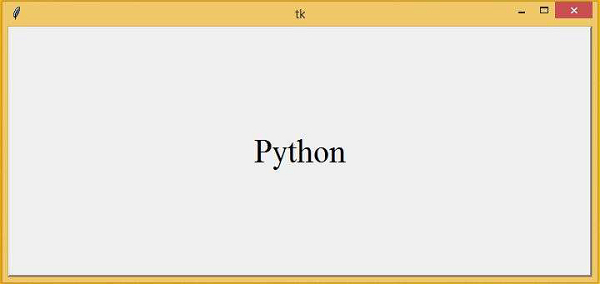
輸出
執行上述程式碼將建立一個文字為“Python”的按鈕,並且此按鈕可以動態調整大小。

更新於:2021年3月4日
914 次瀏覽

廣告