
 資料結構
資料結構 網路
網路 RDBMS
RDBMS 作業系統
作業系統 Java
Java MS Excel
 iOS
iOS HTML
HTML CSS
CSS Android
 Python
 C 程式設計
 C++
C++ C#
C# MongoDB
 MySQL
MySQL Javascript
 PHP
PHP 物理學
物理學 化學
化學 生物學
生物學 數學
數學 英語
英語 經濟學
經濟學 心理學
心理學 社會學
社會學 時尚學
時尚學 法律研究
法律研究如何動態生成 Tkinter 按鈕?
在本文中,我們將瞭解如何在 Tkinter 視窗中動態建立按鈕。動態建立按鈕意味著透過新增事件對按鈕進行自定義和功能性操作。
首先,我們在筆記本中匯入 Tkinter 庫,然後使用Button函式建立一個例項,該函式採用一些引數,如視窗父級或根級、textvariable(這是分配給每個按鈕的值)和命令。
語法
Button(parent, textvariable, command)
示例
from tkinter import *
import tkinter as tk

# create an instance of tkinter
win = tk.Tk()

#Define the size of the window
win.geometry("700x200")

#Name the title of the window
win.title("www.tutorialspoint.com")

# number of buttons
n=10

#Defining the row and column
i=3

#Iterating over the numbers till n and
#creating the button
for j in range(n):
   mybutton= Button(win, text=j)
   mybutton.grid(row=i, column=j)

# Keep the window open
win.mainloop()
輸出
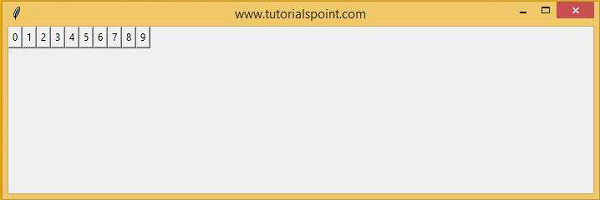
在 Tkinter 筆記本中執行上述程式碼,將生成以下輸出。

更新日期:2021-03-04
2K+ 瀏覽量

廣告