
 資料結構
資料結構 網路
網路 RDBMS
RDBMS 作業系統
作業系統 Java
Java MS Excel
 iOS
iOS HTML
HTML CSS
CSS Android
 Python
 C 程式設計
 C++
C++ C#
C# MongoDB
 MySQL
MySQL Javascript
 PHP
PHP 物理
物理 化學
化學 生物
生物 數學
數學 英語
英語 經濟
經濟 心理學
心理學 社會研究
社會研究 時尚研究
時尚研究 法律研究
法律研究如何降低 Matplotlib 中的網格密度?
要降低 Matplotlib 中的網格密度,我們可以採取以下步驟 −
設定圖形大小並調整子圖之間和周圍的邊距。
製作一個自定義水平網格類來覆蓋密度。
附加水平網格類。
建立一個新圖形或啟用現有圖形。
將'ax1'作為子圖排列的一部分新增到圖形中。
製作資料點列表。
用x和y資料點製作一個條形圖,其中hatch='o', color='green'和edgecolor='red'。
使用show()方法來顯示圖形。
示例
from matplotlib import pyplot as plt, hatch

plt.rcParams["figure.figsize"] = [7.50, 3.50]
plt.rcParams["figure.autolayout"] = True

class MyHorizontalHatch(hatch.HorizontalHatch):
   def __init__(self, hatch, density):
      char_count = hatch.count('o')
      if char_count > 0:
         self.num_lines = int((1.0 / char_count) * density)
      else:
         self.num_lines = 0
      self.num_vertices = self.num_lines * 2
      super().__init__(hatch, density)

hatch._hatch_types.append(MyHorizontalHatch)

fig = plt.figure()

ax1 = fig.add_subplot(111)

x = [3, 6, 1]
y = [4, 6, 1]

ax1.bar(x, y, color='green', edgecolor='red', hatch="o", lw=1., zorder=0)

plt.show()
輸出
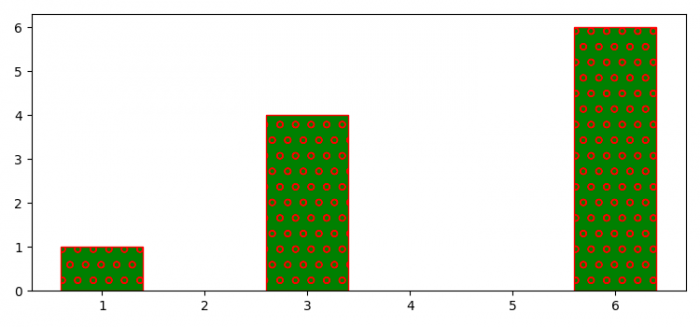

更新於:2021-09-23
623 次瀏覽

廣告