
 資料結構
資料結構 網路
網路 關係型資料庫管理系統
 作業系統
作業系統 Java
Java MS Excel
 iOS
iOS HTML
HTML CSS
CSS Android
 Python
 C 程式設計
 C++
C++ C#
C# MongoDB
 MySQL
MySQL Javascript
 PHP
PHP 物理學
物理學 化學
化學 生物學
生物學 數學
數學 英語
英語 經濟學
經濟學 心理學
心理學 社會學
社會學 時尚學
時尚學 法律學
法律學如何在 JavaFX 中建立檔案選擇器?
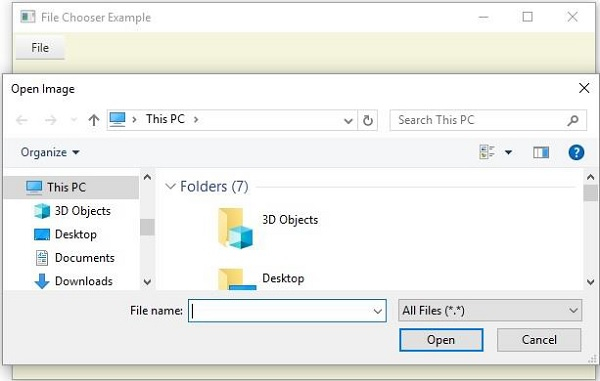
使用 JavaFX 檔案選擇器可以開啟檔案、瀏覽檔案並儲存檔案。類 javafx.stage.FileChooser 表示一個檔案選擇器,您可以使用它開啟檔案對話方塊、開啟單個檔案或多個檔案。
您可以透過例項化這個類來在應用程式中建立一個檔案選擇器。這個類有 4 個屬性 −
initialDirectory − 此屬性指定檔案選擇器的初始目錄。您可以使用 setInitialDirectory() 方法為其設定值。
selectedExtensionFilter − 此屬性指定對話方塊中顯示的副檔名過濾器。您可以使用 setSelectedExtensionFilter() 方法為其設定值。
Title − 此屬性指定對話方塊的標題。您可以使用 setTitle() 方法為其設定值。
透過為 FileChooser 類建立例項併為必備屬性設定值之後,您就可以在檔案選擇器中顯示一個對話方塊以開啟單個檔案、開啟多個檔案或儲存檔案,分別透過呼叫 showOpenDialog()、 showOpenMultipleDialog() 或 showSaveDialog() 方法實現。
示例
import javafx.application.Application;
import javafx.event.ActionEvent;
import javafx.event.EventHandler;
import javafx.scene.Group;
import javafx.scene.Scene;
import javafx.scene.control.Menu;
import javafx.scene.control.MenuBar;
import javafx.scene.control.MenuItem;
import javafx.scene.paint.Color;
import javafx.stage.FileChooser;
import javafx.stage.Stage;
import javafx.stage.FileChooser.ExtensionFilter;
public class FileChooserExample extends Application {
   public void start(Stage stage) {
      //Creating a menu
      Menu fileMenu = new Menu("File");
      //Creating menu Items
      MenuItem item = new MenuItem("Open Image");
      fileMenu.getItems().addAll(item);
      //Creating a File chooser
      FileChooser fileChooser = new FileChooser();
      fileChooser.setTitle("Open Image");
      fileChooser.getExtensionFilters().addAll(new ExtensionFilter("All Files", "*.*"));
      //Adding action on the menu item
      item.setOnAction(new EventHandler<ActionEvent>() {
         public void handle(ActionEvent event) {
            //Opening a dialog box
            fileChooser.showOpenDialog(stage);
      }});
      //Creating a menu bar and adding menu to it.
      MenuBar menuBar = new MenuBar(fileMenu);
      menuBar.setTranslateX(3);
      menuBar.setTranslateY(3);
      //Setting the stage
      Group root = new Group(menuBar);
      Scene scene = new Scene(root, 595, 355, Color.BEIGE);
      stage.setTitle("File Chooser Example");
      stage.setScene(scene);
      stage.show();
   }
   public static void main(String args[]){
      launch(args);
   }
}
輸出

更新於: 18-May-2020
1K+ 瀏覽量

廣告