
 資料結構
資料結構 網路
網路 關係資料庫管理系統
 作業系統
作業系統 Java
Java MS Excel
 iOS
iOS HTML
HTML CSS
CSS Android
 Python
 C 程式設計
 C++
C++ C#
C# MongoDB
 MySQL
MySQL Javascript
 PHP
PHP 物理
物理 化學
化學 生物
生物 數學
數學 英語
英語 經濟學
經濟學 心理學
心理學 社會學
社會學 時尚研究
時尚研究 法律研究
法律研究如何在 Java 中結合使用 FlowLayout 和 BoxLayout?\n
要組合兩種佈局,我們在此建立兩個面板 -
Frame f = new JFrame("Combining Layouts");
JPanel panel1 = new JPanel();
JPanel panel2 = new JPanel();
現在,相應地設定佈局 -
panel1.setLayout(new BoxLayout(panel1, BoxLayout.Y_AXIS));
panel2.setLayout(new FlowLayout());
然後在向兩個面板新增元件後,將它們新增到框架 -
f.add(panel1, BorderLayout.WEST);
f.add(panel2, BorderLayout.CENTER);
示例
package my;
import java.awt.BorderLayout;
import java.awt.Color;
import java.awt.FlowLayout;
import javax.swing.BoxLayout;
import javax.swing.JFrame;
import javax.swing.JLabel;
import javax.swing.JPanel;
import javax.swing.JTextArea;
public class SwingDemo {
   public static void main(String[] args) {
      JFrame f = new JFrame("Combining Layouts");
      JPanel panel1 = new JPanel();
      panel1.setLayout(new BoxLayout(panel1, BoxLayout.Y_AXIS));
      JPanel panel2 = new JPanel();
      panel2.setLayout(new FlowLayout());
      panel2.setBackground(Color.red);
      panel1.add(new JTextArea("TextArea1"));
      panel1.add(new JTextArea("TextArea2"));
      panel1.add(new JTextArea("TextArea3"));
      panel1.add(new JTextArea("TextArea4"));
      panel1.add(new JTextArea("TextArea5"));
      panel1.add(new JTextArea("TextArea6"));
      panel1.add(new JTextArea("TextArea7"));
      panel2.add(new JLabel("JLabel1"));
      panel2.add(new JLabel("JLabel2"));
      panel2.add(new JLabel("JLabel3"));
      panel2.add(new JLabel("JLabel4"));
      panel2.add(new JLabel("JLabel5"));
      panel2.add(new JLabel("JLabel6"));
      panel2.add(new JLabel("JLabel7"));
      f.add(panel1, BorderLayout.WEST);
      f.add(panel2, BorderLayout.CENTER);
      f.setVisible(true);
      f.setSize(550, 400);
      f.setDefaultCloseOperation(JFrame.EXIT_ON_CLOSE);
   }
}
輸出
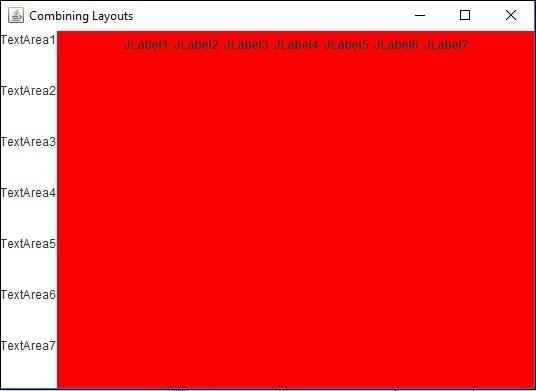

更新時間:2019 年 7 月 30 日
512 次瀏覽

廣告