
 資料結構
資料結構 網路
網路 RDBMS
RDBMS 作業系統
作業系統 Java
Java MS Excel
 iOS
iOS HTML
HTML CSS
CSS Android
 Python
 C 程式設計
 C++
C++ C#
C# MongoDB
 MySQL
MySQL JavaScript
 PHP
PHP 物理
物理 化學
化學 生物
生物 數學
數學 英語
英語 經濟學
經濟學 心理學
心理學 社會學
社會學 時尚學
時尚學 法學
法學如何使用 Selenium WebDriver 檢查 URL 中是否存在 404?
我們可以使用 Selenium WebDriver 檢查 URL 中是否存在 404。404 檢查實際上是要驗證頁面中是否存在損壞的連結。點選這樣的連結時,我們不會被導向正確的頁面。
損壞的連結可能由於以下原因而發生 −
目標頁面不再可用。
URL 的某些部分已被修改。
頁面上指定的 URL 不正確。
防火牆或地理位置限制。
URL 可能包含以下狀態程式碼 −
5XX − 表示伺服器出現問題。
4XX − 表示無法確定資源。
3XX − 表示重定向。
2XX − 表示條件正確。
因此,我們看到,只有使用 2XX 狀態程式碼,我們才能獲得正確的 URL。對於頁面上的所有連結,我們將傳送一個 HTTP 請求並分析它的響應程式碼。
示例
import org.openqa.selenium.By;
import org.openqa.selenium.WebDriver;
import org.openqa.selenium.WebElement;
import org.openqa.selenium.firefox.FirefoxDriver;
import java.util.concurrent.TimeUnit;
import java.net.HttpURLConnection;
import java.net.URL;
import java.net.URLConnection;
import java.util.List;
public class BrokenURL{
   public static void main(String[] args) throws
   InterruptedException{
      System.setProperty("webdriver.gecko.driver",
         "C:\Users\ghs6kor\Desktop\Java\geckodriver.exe");
      WebDriver driver = new FirefoxDriver();
      // wait of 5 seconds
      driver.manage().timeouts().implicitlyWait(5, TimeUnit.SECONDS);
      driver.get("https://www.google.com/");
      //get list of elements with anchor tag
      List<WebElement> l = driver.findElements(By.tagName("a"));
      //iterate links
      for(int j=0; j<l.size(); j++) {
         WebElement e = l.get(i);
         //get URL of links with getAttribute()
         String u = e.getAttribute("href");
         // to catch MalFormedURLException
         try{
            //object of URL class
            URL link = new URL(u);
            // establish connection URL object
            HttpURLConnection c = (HttpURLConnection)link.openConnection();
            //have timeout
            c.setConnectTimeout(1000);
            // connection began
            c.connect();
            //getResponseCode() to obtain response code
            if(c.getResponseCode()== 200) {
               System.out.println(u+" − "+ c.getResponseMessage());
            }
            if(c.getResponseCode()== 404) {
               System.out.println(u+" − "+c.getResponseMessage());
            }
         }
         catch (Exception ex) {
         }
      }
   }
}
輸出
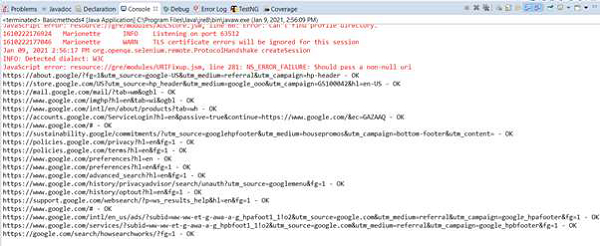

更新於: 30-Jan-2021
2000+ 瀏覽量

廣告