
 資料結構
資料結構 網路
網路 關係資料庫管理系統
 作業系統
作業系統 Java
Java MS Excel
 iOS
iOS HTML
HTML CSS
CSS Android
 Python
 C 程式設計
 C++
C++ C#
C# MongoDB
 MySQL
MySQL Javascript
 PHP
PHP 物理學
物理學 化學
化學 生物學
生物學 數學
數學 英語
英語 經濟學
經濟學 心理學
心理學 社會學
社會學 時尚研究
時尚研究 法律研究
法律研究如何在 Python 中向 Excel 檔案新增時間戳?
如果您正在使用 Python 處理資料,並且需要跟蹤更改或監控更新,那麼向 Excel 檔案新增時間戳可能是一個改變遊戲規則的功能。當我們處理大量資料時,可以使用 Excel 來分析特定修改或事件發生的時間。這可以透過在 Excel 檔案中包含時間戳來實現,該時間戳將顯示何時對某個單元格進行了特定修改。
向 Excel 檔案新增時間戳所需的模組將是 openpyxl 和 DateTime。在本文中,我們將詳細瞭解如何新增時間戳以及用於執行此操作的模組。
Datetime 模組
Datetime 模組可用於處理日期和時間,因為 Python 中沒有日期或時間資料型別。Python 已經內建了 DateTime 模組,因此我們不需要單獨安裝它。
Python DateTime 模組中提供了日期和時間操作類。日期、時間和時間段是這些框架中包含的方法的主要引數。因為日期和 DateTime 是 Python 中的物件而不是文字或時間戳,所以您對其進行的任何修改都將產生相同的效果。
Openpyxl
Openpyxl 是一個用於讀取和寫入 Excel 檔案的 Python 庫。資料科學家利用 Openpyxl 進行資料分析、資料複製、資料探勘、繪製圖表、格式化工作表和新增公式等任務。
Openpyxl 將用於
工作簿 - 在 openpyxl 中,電子表格被描述為工作簿。工作簿中包含一個或多個工作表。
工作表 - 工作表是由用於組織資料的單元格組成的單個文件。
單元格 - 行和列的交點稱為單元格。通常用 A1、B5 等表示。
行 - 行是由數字(1、2 等)指示的水平線。
列 - 列是由大寫字母(A、B 等)表示的垂直線。
可以使用 pip 命令安裝 Openpyxl,建議在虛擬環境中進行安裝。使用 pip 安裝 openpyxl 的語法如下所示:
pip install openpyxl
在 Python 中向 Excel 檔案新增時間戳的步驟
首先,必須在您的計算機上安裝 Python。如果您的計算機上尚未安裝 Python,您可以從官方網站下載並安裝它。安裝 Python 後,您必須安裝“openpyxl”Python 包。這可以透過開啟命令提示符並輸入以下命令來完成:
pip install openpyxl
現在我們已經安裝了 openpyxl 模組。下一步是匯入“openpyxl”包和“datetime”模組。
使用“load_workbook()”方法開啟您要向其中新增時間戳的 Excel 工作簿。
使用“datetime.now()”方法,我們獲取當前日期和時間,並使用“strftime()”方法格式化日期和時間,然後將其新增到 A1 單元格中。
最後,使用“save()”方法儲存您對工作簿所做的更改。例如,您可以根據需要更改以下程式碼,如果您想將時間戳新增到其他單元格或以不同的方式格式化日期和時間。
向單個單元格新增時間戳的程式
#Adding time stamp to a single cell
from datetime import datetime
from openpyxl import workbook
import time

#Open the desired workbook using openpyxl
wb = openpyxl.load_workbook('C:/Users/Tutorialspoint/Desktop/example1.xlsx')

#Select the workbook that is currently active
sheet = wb.active

# now we will get the current date and time
now = datetime.now()

# Add the date and time to a particular cell
sheet['A1'] = now.strftime("%Y-%m-%d %H:%M:%S")

# Save the changes to the workbook
wb.save('C:/Users/Tutorialspoint/Desktop/example1.xlsx')
輸出

向多個單元格新增時間戳的程式
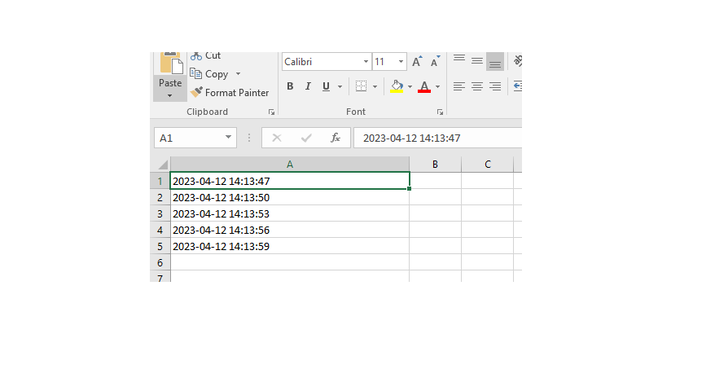
我們將使用 sleep 方法,以 3 秒的時間差向多個單元格新增時間戳。
import time
from openpyxl import Workbook
import datetime

# Open the workbook and select the sheet
wb = openpyxl.load_workbook('example.xlsx')

#Select the workbook that is currently active
sheet = wb.active
for i in range(10):
    #we will add timestamps to different cells after break of 3 seconds
    sheet.cell(row=1, column=1).value = datetime.datetime.now().strftime('%Y-%m-%d %H:%M:%S')
    time.sleep(3)
    sheet.cell(row=2, column=1).value = datetime.datetime.now().strftime('%Y-%m-%d %H:%M:%S')
    time.sleep(3)
    sheet.cell(row=3, column=1).value = datetime.datetime.now().strftime('%Y-%m-%d %H:%M:%S')
    time.sleep(3)
    sheet.cell(row=4, column=1).value = datetime.datetime.now().strftime('%Y-%m-%d %H:%M:%S')
    time.sleep(3)
    sheet.cell(row=5, column=1).value = datetime.datetime.now().strftime('%Y-%m-%d %H:%M:%S')
    time.sleep(3)

# Save the changes to the workbook
wb.save('C:/Users/Tutorialspoint/Desktop/example.xlsx')
輸出
結論
總之,使用 Python 向 Excel 檔案中的多個單元格新增時間戳對於跟蹤對大量資料的更改可能很有用。這可以透過向多行新增時間戳來實現。如果您想輕鬆地使用 Python 向 Excel 檔案中的多個單元格新增時間戳,您只需按照本文中詳細解釋的步驟操作即可。我們還詳細討論了程式中使用的模組。

3K+ 瀏覽量
