
- HBase 教程
- HBase - 首頁
- HBase - 概述
- HBase - 架構
- HBase - 安裝
- HBase - Shell
- HBase - 常用命令
- HBase - 管理員API
- HBase - 建立表
- HBase - 列出表
- HBase - 停用表
- HBase - 啟用表
- HBase - 描述和修改
- HBase - 判斷表是否存在
- HBase - 刪除表
- HBase - 關閉
- HBase - 客戶端API
- HBase - 建立資料
- HBase - 更新資料
- HBase - 讀取資料
- HBase - 刪除資料
- HBase - 掃描
- HBase - 計數和截斷
- HBase - 安全性
- HBase 資源
- HBase - 常見問題解答
- HBase - 快速指南
- HBase - 有用資源
HBase - 建立資料
使用HBase Shell插入資料
本章演示如何在HBase表中建立資料。要在HBase表中建立資料,可以使用以下命令和方法:
put 命令,
Put類的add()方法,以及
HTable類的put()方法。
例如,我們將在HBase中建立以下表。
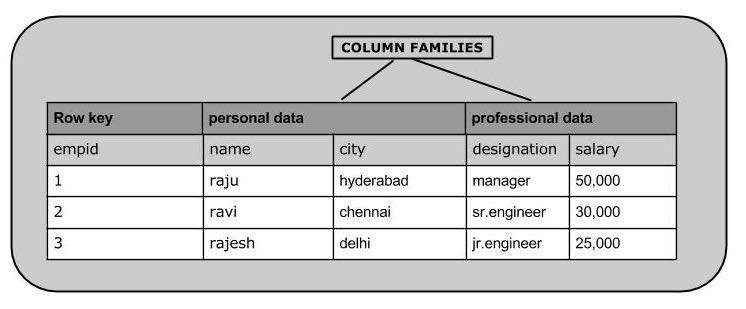
使用put命令,您可以將行插入到表中。其語法如下:
put ’<table name>’,’row1’,’<colfamily:colname>’,’<value>’
插入第一行
讓我們將第一行值插入到emp表中,如下所示。
hbase(main):005:0> put 'emp','1','personal data:name','raju'
0 row(s) in 0.6600 seconds
hbase(main):006:0> put 'emp','1','personal data:city','hyderabad'
0 row(s) in 0.0410 seconds
hbase(main):007:0> put 'emp','1','professional
data:designation','manager'
0 row(s) in 0.0240 seconds
hbase(main):007:0> put 'emp','1','professional data:salary','50000'
0 row(s) in 0.0240 seconds
以相同的方式使用put命令插入其餘行。如果您插入整個表,您將獲得以下輸出。
hbase(main):022:0> scan 'emp'

   ROW                        COLUMN+CELL
1 column=personal data:city, timestamp=1417524216501, value=hyderabad

1 column=personal data:name, timestamp=1417524185058, value=ramu

1 column=professional data:designation, timestamp=1417524232601,

 value=manager

1 column=professional data:salary, timestamp=1417524244109, value=50000

2 column=personal data:city, timestamp=1417524574905, value=chennai

2 column=personal data:name, timestamp=1417524556125, value=ravi

2 column=professional data:designation, timestamp=1417524592204,

 value=sr:engg

2 column=professional data:salary, timestamp=1417524604221, value=30000

3 column=personal data:city, timestamp=1417524681780, value=delhi

3 column=personal data:name, timestamp=1417524672067, value=rajesh

3 column=professional data:designation, timestamp=1417524693187,

value=jr:engg
3 column=professional data:salary, timestamp=1417524702514,

value=25000
使用Java API插入資料
您可以使用Put類的add()方法將資料插入Hbase。您可以使用HTable類的put()方法儲存它。這些類屬於org.apache.hadoop.hbase.client包。以下是建立HBase表資料的步驟。
步驟1:例項化Configuration類
Configuration類將HBase配置檔案新增到其物件中。您可以使用HbaseConfiguration類的create()方法建立配置物件,如下所示。
Configuration conf = HbaseConfiguration.create();
步驟2:例項化HTable類
您有一個名為HTable的類,它是HBase中Table的實現。此類用於與單個HBase表進行通訊。在例項化此類時,它接受配置物件和表名作為引數。您可以如下所示例項化HTable類。
HTable hTable = new HTable(conf, tableName);
步驟3:例項化Put類
要將資料插入HBase表,可以使用add()方法及其變體。此方法屬於Put,因此例項化put類。此類需要您要將資料插入其中的行名(字串格式)。您可以如下所示例項化Put類。
Put p = new Put(Bytes.toBytes("row1"));
步驟4:插入資料
Put類的add()方法用於插入資料。它需要3個位元組陣列分別表示列族、列限定符(列名)和要插入的值。使用add()方法將資料插入HBase表,如下所示。
p.add(Bytes.toBytes("coloumn family "), Bytes.toBytes("column
name"),Bytes.toBytes("value"));
步驟5:儲存表中的資料
插入所需行後,透過將put例項新增到HTable類的put()方法來儲存更改,如下所示。
hTable.put(p);
步驟6:關閉HTable例項
在HBase表中建立資料後,使用close()方法關閉HTable例項,如下所示。
hTable.close();
以下是建立HBase表資料的完整程式。
import java.io.IOException;

import org.apache.hadoop.conf.Configuration;

import org.apache.hadoop.hbase.HBaseConfiguration;
import org.apache.hadoop.hbase.client.HTable;
import org.apache.hadoop.hbase.client.Put;
import org.apache.hadoop.hbase.util.Bytes;

public class InsertData{

   public static void main(String[] args) throws IOException {

      // Instantiating Configuration class
      Configuration config = HBaseConfiguration.create();

      // Instantiating HTable class
      HTable hTable = new HTable(config, "emp");

      // Instantiating Put class
      // accepts a row name.
      Put p = new Put(Bytes.toBytes("row1"));

      // adding values using add() method
      // accepts column family name, qualifier/row name ,value
      p.add(Bytes.toBytes("personal"),
      Bytes.toBytes("name"),Bytes.toBytes("raju"));

      p.add(Bytes.toBytes("personal"),
      Bytes.toBytes("city"),Bytes.toBytes("hyderabad"));

      p.add(Bytes.toBytes("professional"),Bytes.toBytes("designation"),
      Bytes.toBytes("manager"));

      p.add(Bytes.toBytes("professional"),Bytes.toBytes("salary"),
      Bytes.toBytes("50000"));

      // Saving the put Instance to the HTable.
      hTable.put(p);
      System.out.println("data inserted");

      // closing HTable
      hTable.close();
   }
}
編譯並執行上述程式,如下所示。
$javac InsertData.java
$java InsertData
輸出應如下所示:
data inserted