
- GWT Highcharts 教程
- GWT Highcharts - 首頁
- GWT Highcharts - 概覽
- 環境設定
- 配置語法
- GWT Highcharts - 折線圖
- GWT Highcharts - 面積圖
- GWT Highcharts - 柱狀圖
- GWT Highcharts - 條形圖
- GWT Highcharts - 餅圖
- GWT Highcharts - 散點圖
- GWT Highcharts - 動態圖表
- GWT Highcharts - 組合圖
- GWT Highcharts - 3D 圖表
- GWT Highcharts - 地圖圖表
- GWT Highcharts 有用資源
- GWT Highcharts - 快速指南
- GWT Highcharts - 有用資源
- GWT Highcharts - 討論
GWT Highcharts - 基礎條形圖
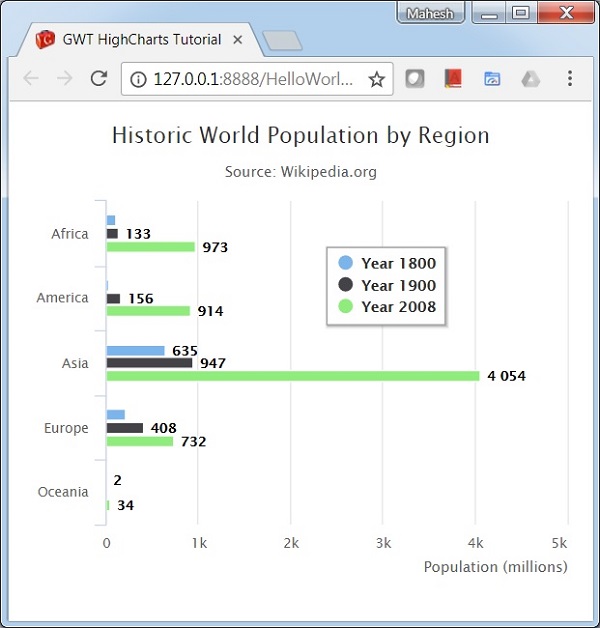
以下是條形圖的示例。
我們已經看到在 Highcharts 配置語法 一章中用於繪製圖表的配置。現在,讓我們來看一個基本條形圖的示例。我們還將瞭解其他配置。我們已更改了圖表中的 type 屬性。
圖表
配置圖表型別為“條形圖”。chart.type 決定圖表的資料序列型別。在此,預設值為“折線圖”。
chart.setType(Type.BAR);
示例
HelloWorld.java
package com.tutorialspoint.client;

import org.moxieapps.gwt.highcharts.client.AxisTitle;
import org.moxieapps.gwt.highcharts.client.Chart;
import org.moxieapps.gwt.highcharts.client.Credits;
import org.moxieapps.gwt.highcharts.client.Legend;
import org.moxieapps.gwt.highcharts.client.Series.Type;
import org.moxieapps.gwt.highcharts.client.ToolTip;
import org.moxieapps.gwt.highcharts.client.ToolTipData;
import org.moxieapps.gwt.highcharts.client.ToolTipFormatter;
import org.moxieapps.gwt.highcharts.client.labels.DataLabels;
import org.moxieapps.gwt.highcharts.client.plotOptions.BarPlotOptions;

import com.google.gwt.core.client.EntryPoint;
import com.google.gwt.user.client.ui.RootPanel;

public class HelloWorld implements EntryPoint {
   public void onModuleLoad() {
      Chart chart = new Chart()
         .setType(Type.BAR)
         .setChartTitleText("Historic World Population by Region")
         .setChartSubtitleText("Source: Wikipedia.org")
         .setBarPlotOptions(new BarPlotOptions()
            .setDataLabels(new DataLabels()
               .setEnabled(true)
            )
         )
         .setLegend(new Legend()
            .setLayout(Legend.Layout.VERTICAL)
            .setAlign(Legend.Align.RIGHT)
            .setVerticalAlign(Legend.VerticalAlign.TOP)
            .setX(-100)
            .setY(100)
            .setFloating(true)
            .setBorderWidth(1)
            .setBackgroundColor("#FFFFFF")
            .setShadow(true)
         )
         .setCredits(new Credits()
            .setEnabled(false)
         )
         .setToolTip(new ToolTip()
            .setFormatter(new ToolTipFormatter() {
               @Override
               public String format(ToolTipData toolTipData) {
                  return toolTipData.getSeriesName() + ": " + toolTipData.getYAsLong() +" million";
               }
         }));
         chart.getXAxis()
            .setCategories("Africa", "America", "Asia", "Europe", "Oceania");
         chart.getYAxis()
            .setAxisTitle(new AxisTitle()
               .setText("Population (millions)")
               .setAlign(AxisTitle.Align.HIGH)
            );
         chart.addSeries(chart.createSeries()
            .setName("Year 1800")
            .setPoints(new Number[] { 107, 31, 635, 203, 2 })
         );
         chart.addSeries(chart.createSeries()
            .setName("Year 1900")
            .setPoints(new Number[] { 133, 156, 947, 408, 6 })
         );
         chart.addSeries(chart.createSeries()
            .setName("Year 2008")
            .setPoints(new Number[] { 973, 914, 4054, 732, 34 })
         );
      RootPanel.get().add(chart);
   }
}
結果
驗證結果。
gwt_highcharts_bar_charts.htm
廣告