- FuelPHP 教程
- FuelPHP - 首頁
- FuelPHP - 簡介
- FuelPHP - 安裝
- FuelPHP - 架構概述
- FuelPHP - 簡單Web應用程式
- FuelPHP - 配置
- FuelPHP - 控制器
- FuelPHP - 路由
- FuelPHP - 請求與響應
- FuelPHP - 檢視
- FuelPHP - 展示器 (Presenters)
- FuelPHP - 模型與資料庫
- FuelPHP - 表單程式設計
- FuelPHP - 驗證
- 高階表單程式設計
- FuelPHP - 檔案上傳
- FuelPHP - Ajax
- FuelPHP - HMVC 請求
- FuelPHP - 主題
- FuelPHP - 模組
- FuelPHP - 包
- Cookie 與會話管理
- FuelPHP - 事件
- FuelPHP - 郵件管理
- FuelPHP - 效能分析器 (Profiler)
- 錯誤處理與除錯
- FuelPHP - 單元測試
- 完整的執行示例
- FuelPHP 有用資源
- FuelPHP - 快速指南
- FuelPHP - 有用資源
- FuelPHP - 討論
FuelPHP - 主題
主題用於為應用程式啟用多種外觀和感覺。它為使用者/開發者提供了更改應用程式外觀和感覺而不影響應用程式功能的選項。一個應用程式可以擁有一個或多個主題。每個主題都位於其自己的資料夾中。讓我們在本節中學習如何建立主題。
主題配置
FuelPHP 為主題提供了一個單獨的配置檔案,**fuel/app/config/themes.php**。所有與主題相關的設定都在此檔案中配置。一些主要的主題設定如下:
**active** - 活動主題的名稱
**fallback** - 如果找不到活動主題,則為回退主題的名稱
**paths** - 用於搜尋和查詢主題的路徑陣列
**assets_folder** - 通常,資產需要位於 DOCPATH 內,以便可以透過 Web 訪問。它指的是 DOCPATH 內主題的資產資料夾。
**view_ext** - 主題檢視檔案的副檔名
**info_file_name** - 包含有關主題的擴充套件資訊的的檔案
**require_info_file** - 是否需要主題資訊檔案,info_file_name
**use_modules** - 是否使用當前模組
主題檔案的簡單配置如下所示。
<?php
   return array (
      'active' => 'tpthemes',
      'fallback' => 'tpthemes',
      'paths' => array (
         APPPATH.'themes',
      ),
      'assets_folder' => 'assets',
      'view_ext' => '.html',
      'require_info_file' => false,
      'info_file_name' => 'themeinfo.php',
      'use_modules' => false,
   );
這裡我們設定了:
- 活動和回退主題的名稱為 tpthemes
- 主題資料夾的路徑為 fuel/app/themes/
- 資產資料夾的路徑為 /public/assets/tpthemes/
主題類
完成配置後,我們可以使用 FuelPHP 提供的 Theme 類來實現主題的功能。讓我們在本節中瞭解 Theme 類中可用的方法。
instance
instance 方法用於建立一個新的主題。它具有以下兩個引數:
**$name** - 主題名稱(可選)
**$config** - 主題配置陣列(與配置部分中看到的一致)
這兩個引數都是可選的。如果沒有指定引數,它將嘗試從配置檔案中獲取預設主題。如果指定了主題名稱,它將嘗試從配置檔案中獲取其他設定。如果也指定了配置,則它將使用使用者指定的設定而不是配置檔案中的設定。
$theme = \Theme::instance();
$theme = \Theme::instance('tpthemes');
$theme = \Theme::instance ('mytheme', array (
   'active' => 'mytheme', 'view_ext' => '.php'));
forge
forge 與 instance 類似,只是它只有一個配置陣列。
$theme = \Theme::forge (array(
   'active'   => 'tpthemes',
   'fallback' => 'tpthemes',
   'view_ext' => '.php',
));
view
view 方法在後臺使用 **View::forge()**。這兩個 API 類似,不同之處在於 view 方法在 themes 資料夾 fuel/app/themes/tpthemes/ 中搜索檢視檔案,而不是在 fuel/app/views/ 資料夾中。
$theme = \Theme::instance();
$view = $theme->view('template/index');
// *fuel/app/themes/tpthemes/template/index.php
presenter
presenter 方法在後臺使用 **Presenter::forge()**。這兩個 API 類似,不同之處在於 presenter 方法在 themes 資料夾 fuel/app/themes/tpthemes/ 中搜索檢視檔案,而不是在 fuel/app/views/ 資料夾中。
$theme = \Theme::instance();
$presenter = $theme->presenter('template/index');
asset_path
asset_path 方法返回相對於當前選定主題的請求資產的路徑。
$theme = \Theme::instance();

// public/assets/tpthemes/css/style.css
$style = \Html::css($theme->asset_path('css/style.css'));
add_path
add_path 方法允許在執行時新增主題路徑。
$theme = \Theme::instance();
$theme->add_path(DOCROOT.'newthemes');
add_paths
add_paths 方法允許在執行時新增多個主題路徑。
$theme = \Theme::instance();
$theme->add_path(DOCROOT.'newthemes');
active
active 方法允許設定活動主題。
$theme = \Theme::instance();
$active = $theme->active('newtheme');
fallback
fallback 方法允許設定回退主題。
$theme = \Theme::instance();
$fallback = $theme->fallback('custom');
get_template
get_template 方法將返回當前載入的主題模板的 View 例項。
$theme = \Theme::instance();
$theme->get_template()->set('body', 'Theme can change the look and feel of your app');
set_template
set_template 方法允許設定頁面的主題模板。
$theme = \Theme::instance();
$theme->set_template('layouts/index')->set('body', 'set theme template');
find
如果找到主題的路徑,find 返回 true,否則返回 false。
$theme = \Theme::instance();
$path = $theme->find('newtheme')
all
all 方法返回所有主題路徑中所有主題的陣列。
$theme = \Theme::instance();
$themes = $theme->all();
get_info
get_info 方法從主題資訊陣列中返回特定變數。如果沒有指定主題,則使用活動主題的資訊陣列。
$theme = \Theme::instance();
$var = $theme->get_info('color', 'green', 'newtheme');
這裡,方法獲取在“newtheme”中定義的顏色。如果未定義,則將使用“green”作為預設顏色。
set_info
set_info 方法在活動主題或回退主題中設定變數。
$theme->set_info('color', 'green', 'fallback');
set_partial
set_partial 方法允許為頁面模板的命名部分設定檢視區域性。通常,這是透過 HMVC 呼叫完成的。
$theme = \Theme::instance();
$theme->set_template('layouts/homepage');
$theme->set_partial('navbar', 'homepage/navbar');
get_partial
get_partial 方法允許獲取頁面模板命名部分中先前設定的區域性的檢視例項。
$theme = \Theme::instance();
$theme->set_partial('sidebar', 'partials/menu');
$theme->get_partial('sidebar', 'partials/menu')->set('class', 'menu green');
工作示例
讓我們在我們的員工應用程式中新增主題支援。
**步驟 1** - 新增新的主題配置檔案,fuel/app/config/theme.php,內容如下。
<?php
   return array (
      'active' => 'tpthemes',
      'fallback' => 'tpthemes',
      'paths' => array (APPPATH.'themes', ),
      'assets_folder' => 'assets',
      'view_ext' => '.html',
      'require_info_file' => false,
      'info_file_name' => 'themeinfo.php',
      'use_modules' => false,
   );
**步驟 2** - 為主題 tpthemes 新增新的資產資料夾,public/assets/tpthemes/css。
cd /go/to/app/root/path
mkdir -p public/assets/tpthemes/css
**步驟 3** - 下載最新的 bootstrap 並將 bootstrap.min.css 放置在 public/assets/tpthemes/css 下
**步驟 4** - 在 fuel/app/themes 資料夾下新增新資料夾 tpthemes。
cd /go/to/app/root/path
mkdir -p fuel/app/themes/tpthemes
**步驟 5** - 在 fuel/app/themes/tpthemes/layout/ 下新增新的佈局模板 bootstrap.html,並新增以下程式碼。
<!DOCTYPE html>
<html lang = "en">
   <head>
      <title>Theme example</title>
      <meta charset = "utf-8">
      <meta name = "viewport" content = "width = device-width, initial-scale = 1">
      <!-- Bootstrap core CSS -->
      <?php echo \Theme::instance()->asset->css('bootstrap.min.css'); ?>
   </head>

   <body>
      <?php echo $header; ?>
      <div class = "container">
         <div class = "row">
            <div class = "col-sm-12">
               <?php echo $content; ?>
            </div>
         </div>
      </div>
   </body>

</html>
在這裡,我們使用了 theme 例項和 asset 方法來獲取 bootstrap 檔案的路徑。我們定義了兩個變數,header 和 content。**header** 用於動態設定標題詳細資訊。**content** 用於動態設定頁面的實際內容。
**步驟 6** - 在 fuel/app/themes/tpthemes/partials 下新增新的標題模板 header.php,如下所示。
<div class = "jumbotron text-center">
   <h1>Theme support in fuelphp</h1>
   <p>bootstrap based template</p>
</div>
**步驟 7** - 在 fuel/app/classes/controller/themesample.php 中建立一個新的控制器 **ThemeSample**,並在 action_index 中新增如下所示的 **action**。
<?php
   class Controller_ThemeSample extends \Controller {
      public function before() {
         $this->theme = \Theme::instance();
         $this->theme->set_template('layouts/bootstrap');
         $header = $this->theme->view('partials/header');
         $this->theme->get_template()->set('header', $header);
      }
      public function action_index() {
         $content = $this->theme
         ->view('themesample/index')
         ->set('message', 'This data comes from action page');
         $this->theme
         ->get_template()
         ->set('content', $content);
      }
      public function after($response) {
         if (empty($response) or  ! $response instanceof Response) {
            $response = \Response::forge(\Theme::instance()->render());
         }
         return parent::after($response);
      }
   }
在這裡,我們使用了 **before** 和 **after** 方法來使用 **Theme** 類的方法初始化主題。使用的一些方法是 instance、get_template、set_template 和 view。
**步驟 8** - 最後,為 fuel/app/themes/tpthemes/themesample 下的 index 操作新增檢視 index.php,如下所示。
<p>The data comes from *fuel/app/themes/tpthemes/themesample/index.html* file.</p>
<p>
   <?php echo $message; ?>
</p>
在這裡,我們定義了一個變數 message,需要在控制器中動態設定。
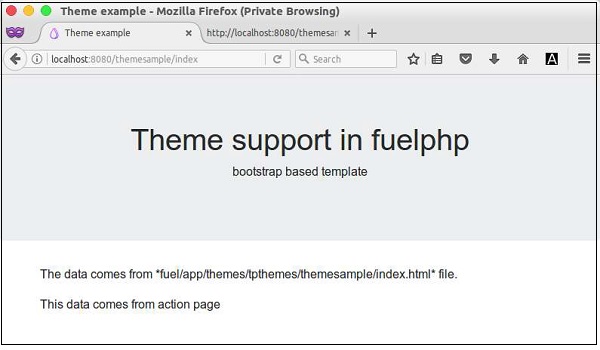
我們建立了一個新的主題 **tpthemes** 並將其用於 **ThemeSample** 控制器。現在讓我們透過請求 URL https://:8080/themesample/index 來檢查結果。結果如下。