- FuelPHP 教程
- FuelPHP - 首頁
- FuelPHP - 簡介
- FuelPHP - 安裝
- FuelPHP - 架構概述
- FuelPHP - 簡易 Web 應用
- FuelPHP - 配置
- FuelPHP - 控制器
- FuelPHP - 路由
- FuelPHP - 請求 & 響應
- FuelPHP - 檢視
- FuelPHP - 展示器
- FuelPHP - 模型 & 資料庫
- FuelPHP - 表單程式設計
- FuelPHP - 驗證
- 高階表單程式設計
- FuelPHP - 檔案上傳
- FuelPHP - Ajax
- FuelPHP - HMVC 請求
- FuelPHP - 主題
- FuelPHP - 模組
- FuelPHP - 包
- Cookie & Session 管理
- FuelPHP - 事件
- FuelPHP - 郵件管理
- FuelPHP - 分析器
- 錯誤處理 & 除錯
- FuelPHP - 單元測試
- 完整的執行示例
- FuelPHP 有用資源
- FuelPHP - 快速指南
- FuelPHP - 有用資源
- FuelPHP - 討論
FuelPHP - 表單程式設計
FuelPHP 提供三個類,Form、Fieldset 和 Input,用於執行表單程式設計。
Form 類提供建立所有 HTML 表單元素的選項。
Fieldset 類提供透過更高階的方法建立 html 元素的選項,整合了模型和驗證。
Input 類提供解析透過 html 表單提交的資料以及 http 引數、伺服器變數和使用者代理的選項。
在本章中,讓我們學習 FuelPHP 中的表單程式設計。
表單
如前所述,Form 類提供建立 html 表單元素的方法,重要方法如下:
open()
open() 用於建立一個新表單。它提供以下兩個引數:
$attributes - 表單標籤的屬性,可以是陣列或僅為 action URL 字串。
$hidden - 隱藏欄位名稱及其值的陣列。
echo Form::open('/employee/add');
echo Form::open(array('action' => '/employee/add', 'method' => 'post'));
close()
close() 簡單地關閉表單。
echo Form::close();
input()
input() 建立 html 輸入元素。它有以下三個引數:
$field - 輸入元素的名稱
$value - 輸入元素的值
$attributes - 輸入元素的屬性,以陣列形式
echo Form::input('name', 'jon', array('style' => 'border: 20px;'));
label 元素
label 建立 html label 元素。它有以下三個引數:
$label - 要顯示的標籤
$id - 關聯的表單元素 ID
$attributes - label 元素的屬性,以陣列形式
echo Form::label('Employee Name', 'employee_name');
hidden
hidden 與 input 方法類似,只是它將輸入元素的型別設定為隱藏。
password
password 與 input 方法類似,只是它將輸入元素的型別設定為密碼。
radio
radio 與 input 方法類似,只是它將輸入元素的型別設定為單選按鈕。它有以下四個引數:
$field - 輸入元素的名稱
$value - 輸入元素的值
$checked - 專案是否被選中 (true / false)
$attributes - 輸入元素的屬性,以陣列形式
echo Form::label('Male', 'gender');
echo Form::radio('gender', 'Male', true);
echo Form::label('Female', 'gender');
echo Form::radio('gender', 'Female');
checkbox
checkbox 與 input 方法類似,只是它將輸入元素的型別設定為複選框。它有以下四個引數:
$field - 輸入元素的名稱
$value - 輸入元素的值
$checked - 專案是否被選中 (true / false)
$attributes - 輸入元素的屬性,以陣列形式
echo Form::label('Male', 'gender');
echo Form::checkbox('gender', 'Male', true);
echo Form::label('Female', 'gender');
echo Form::checkbox('gender', 'Female');
file
file 與 input 方法類似,只是它將輸入元素的型別設定為檔案。
textarea
textarea 建立 html textarea 元素。它有以下三個引數:
$field - textarea 元素的名稱
$value - textarea 元素的值
$attributes - textarea 元素的屬性,以陣列形式
echo Form::textarea ('description', 'original data (value)', array ('rows' => 6,
      'cols' => 8));
select
select 建立一個 HTML select 元素。它有以下四個引數:
$field - select 元素的名稱
$values - 初始選擇值
$options - 選項陣列。選項可以使用巢狀陣列進行分組
$attributes - 輸入元素的屬性,以陣列形式
echo Form::select (
   'country',
   'none',
   array (
      'none'  => 'None',
      'asia'  => array (
         'in' > 'India',
         'cn' => 'China'
      ),

      'us' => 'United States'
   )
);
submit
submit 與 input 方法類似,只是它將輸入元素的型別設定為提交。
button
button 建立 html button 元素。它有以下三個引數:
$field - button 元素的名稱
$value - button 元素的值
$attributes - button 元素的屬性,以陣列形式
echo Form::button('emp_submit', 'Submit');
reset
reset 與 input 方法類似,只是它將輸入元素的型別設定為重置。
fieldset_open
fieldset_open 建立 html fieldset 和 legend 元素。它有以下兩個引數:
attributes - fieldset 元素的屬性,以陣列形式
legend - 要建立的圖例名稱
// returns <fieldset class = "example-class" id = "example-id">
<legend>
   Custom Legend
</legend>

echo Form::fieldset_open (array (
   'class'  => 'example-class',
   'id'     => 'exampleid',
   'legend' => 'Custom Legend'
));
fieldset_close
fieldset_close 建立 HTML fieldset 關閉標籤。
// returns </fieldset>
echo Form::fieldset_close();
Input 類
Input 類提供讀取所有請求資料以及表單詳細資訊的方法。一些重要方法如下:
uri
uri 返回請求的當前 URI
// request: https://:8080/employee/welcome
echo Input::uri(); // return /employee/welcome
method
method 返回請求中使用的 HTTP 方法
echo Input::method() // "POST"
get
get 可用於讀取 $_GET 變數。它有以下兩個引數:
$index - $_GET 陣列的索引
$default - 如果未找到索引,則為預設值。
echo Input::get('age', '20'); // returns $_GET['age']
post
post 可用於讀取 $_POST 變數。它有以下兩個引數:
$index - $_POST 陣列的索引
$default - 如果未找到索引,則為預設值
echo Input::get('age', '20'); // returns $_POST['age']
param
param 可用於從 $_GET、$_POST、$_PUT 或 $_DELETE 變數中獲取專案。它有以下兩個引數:
$index - 陣列的索引
$default - 如果未找到索引,則為預設值
如果沒有指定引數,它將返回所有專案。
echo Input::param('age', '20'); // returns $_POST['age']
file
file 可用於讀取 $_FILE 變數。它有以下兩個引數:
$index - $_POST 陣列的索引
$default - 如果未找到索引,則為預設值
echo Input::file();
is_ajax
is_ajax 如果請求是透過 AJAX 發出的,則返回 true。
echo Input::is_ajax() // return false
protocol
protocol 返回請求中使用的 HTTP 協議。
echo Input::protocol() // returns "HTTP"
ip
ip 返回發出請求的 IP 地址。
echo Input::ip() // returns "84.45.34.24" (Public IP Address)
real_ip
real_ip 嘗試返回發出請求的真實 IP 地址(如果客戶端位於代理之後)。
echo Input::real_ip() // returns "10.76.12.1" (local private IP Address)
server
server 可用於讀取 $_SERVER 變數。它有以下兩個引數:
$index - $_POST 陣列的索引
$default - 如果未找到索引,則為預設值。
echo Input::server('HTTP_HOST'); // returns localhost:8080
referrer
referrer 從 $_SERVER 變數返回推薦來源。這是獲取當前請求的 http 推薦來源的快捷方法。
user_agent
user_agent 從 $_SERVER 變數返回使用者代理。這是獲取當前請求的 http 使用者代理的快捷方法。
query_string
query_string 從 $_SERVER 變數返回查詢字串。這是獲取當前請求的查詢字串的快捷方法。
headers
headers 返回特定或所有標頭。它有以下兩個引數:
$index - HTTP 標頭的名稱
$default - 如果未找到索引,則為預設值。
echo Input::headers('Content-Type'); // returns "text/html"
extension
extension 返回當前請求的 URI 副檔名。
// Example URL: https:///test/
echo Input::extension();  // NULL

// Example URL: https:///test.html
echo Input::extension();  // 'html'
執行示例
讓我們建立一個簡單的表單,使用 Form 和 Input 類新增新員工。
建立表單
在 employee 控制器中建立一個新的 action,get_add,如下所示。
public function get_add() {
   return Response::forge(View::forge('employee/add'));
}
現在,為該 action 新增檢視,fuel/app/views/employee/add.php,如下所示。
<!DOCTYPE html>
<html lang = "en">
   <head>
      <title>Employee :: add page</title>
      <meta charset = "utf-8">
      <meta name = "viewport" content = "width = device-width, initial-scale = 1">
      <?php echo Asset::css('bootstrap.css'); ?>
   </head>

   <body>
      <div class = "container">
         <?php
            echo Form::open(array('action' => 'employee/add', 'method' => 'post'));
         ?>

         <div class = "form-group">
            <?php
               echo Form::label('Employee name:', 'name');
               echo Form::input('name', '', array('class' => 'form-control'));
            ?>
         </div>

         <div class = "form-group">
            <?php
               echo Form::label('Employee age:', 'age');
               echo Form::input('age', '', array('class' => 'form-control'));
            ?>
         </div>

         <?php echo Form::button('frmbutton', 'Submit', array(
            'class' => 'btn btn-default'));
         ?>

         <?php
            echo Form::close();
         ?>
      </div>
   </body>

</html>
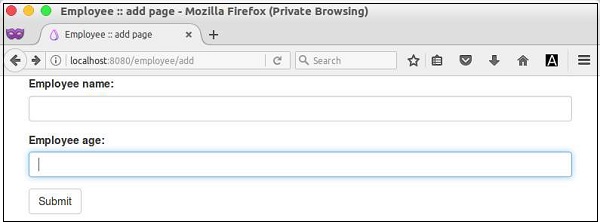
在這裡,我們使用了bootstrap來設計表單。FuelPHP 完全支援 bootstrap 元件。現在,請求頁面 https://:8080/employee/add 將顯示以下表單。
處理表單
建立一個新的 action,post_add,用於處理表單並將使用者輸入的員工資料新增到 employee 控制器中的資料庫中,如下所示。
public function post_add() {
   $name = Input::post('name');
   $age = Input::post('age');
   $model = new model_employee();
   $model->name = $name;
   $model->age = $age;
   $model->save();
   Response::redirect('employee/list');
}
在這裡,一旦使用者輸入的資料儲存到資料庫中,我們將重定向到員工列表頁面。接下來,我們將建立員工列表頁面。
員工列表
建立一個新的 action,action_list,用於列出資料庫中的員工,如下所示。
public function action_list() {
   $data = array();
   $data['emps'] = model_employee::find('all');
   return Response::forge(view::forge('employee/list', $data));
}
為上述 action 建立一個新的檢視,fuel/app/views/employee/list,如下所示。
<ul>
   <?php
      foreach($emps as $emp) {
   ?>
   <li><?php echo $emp['name']; ?></li>
   <?php
   }
   ?>
</ul>
檢查表單
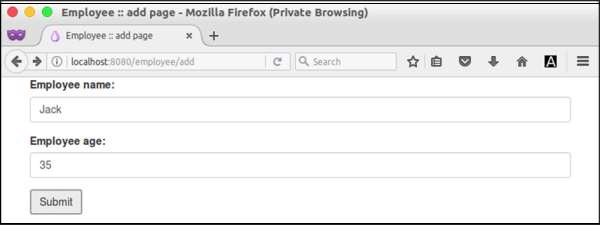
現在,請求 URL,https://:8080/employee/add,輸入一些員工資料(如下圖所示)並提交表單。
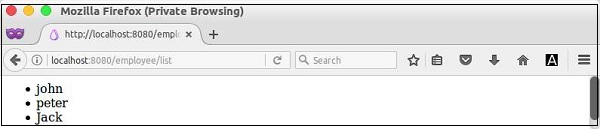
然後,它將顯示資料庫中所有可用的員工(包括新新增的員工),如下所示: