
- Firebase 教程
- Firebase - 首頁
- Firebase - 概覽
- Firebase - 環境設定
- Firebase - 資料
- Firebase - 陣列
- Firebase - 寫入資料
- Firebase - 寫入列表資料
- Firebase - 寫入事務性資料
- Firebase - 讀取資料
- Firebase - 事件型別
- Firebase - 分離回撥
- Firebase - 查詢
- Firebase - 過濾資料
- Firebase - 最佳實踐
- Firebase - 郵箱認證
- Firebase - Google 認證
- Firebase - Facebook 認證
- Firebase - Twitter 認證
- Firebase - Github 認證
- 匿名認證
- Firebase - 離線功能
- Firebase - 安全性
- Firebase - 部署
- Firebase 實用資源
- Firebase - 快速指南
- Firebase - 實用資源
- Firebase - 討論
Firebase - 郵箱認證
在本篇章中,我們將展示如何使用 Firebase 電郵/密碼認證。
建立使用者
要對使用者進行認證,我們可以使用 createUserWithEmailAndPassword(email, password) 方法。
示例
我們考慮以下示例。
var email = "myemail@email.com";
var password = "mypassword";

firebase.auth().createUserWithEmailAndPassword(email, password).catch(function(error) {
   console.log(error.code);
   console.log(error.message);
});
我們可以檢視 Firebase 儀表板並檢視是否建立使用者。
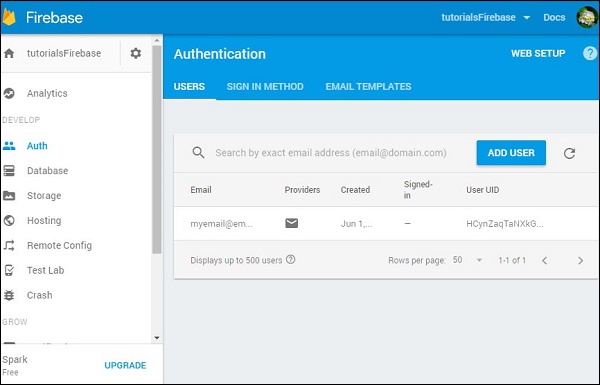
登入
登入過程與此類似。我們使用 signInWithEmailAndPassword(email, password) 登入使用者。
示例
我們考慮以下示例。
var email = "myemail@email.com";
var password = "mypassword";

firebase.auth().signInWithEmailAndPassword(email, password).catch(function(error) {
   console.log(error.code);
   console.log(error.message);
});
登出
最後我們可以使用 signOut() 方法登出使用者。
示例
我們考慮以下示例。
firebase.auth().signOut().then(function() {
   console.log("Logged out!")
}, function(error) {
   console.log(error.code);
   console.log(error.message);
});
廣告