
Elm - 基本語法
本章討論如何在 Elm 中編寫簡單的程式。
步驟 1 - 在 VSCode 中建立一個名為 HelloApp 的目錄
現在,在這個目錄中建立一個檔案 - **Hello.elm**。
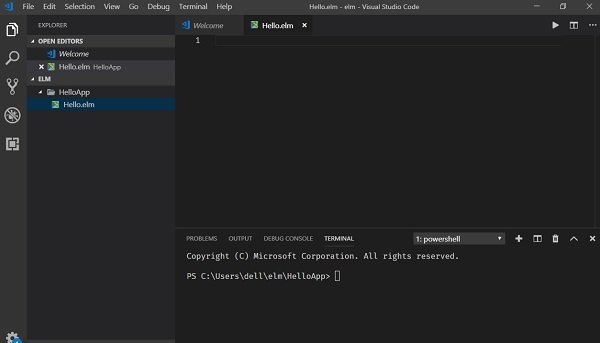
上圖顯示了在 VSCode 中開啟的專案資料夾 **HelloApp** 和終端。
步驟 2 - 安裝必要的 Elm 包
Elm 的包管理器是 *elm-package*。安裝 *elm-lang/html* 包。此包將幫助我們顯示 Elm 程式碼在瀏覽器中的輸出。
在 VSCode 中右鍵單擊“檔案”→“在命令提示符中開啟”,轉到 **HelloApp** 專案資料夾。
在終端視窗中執行以下命令:
C:\Users\dell\Elm\HelloApp> elm-package install elm-lang/html
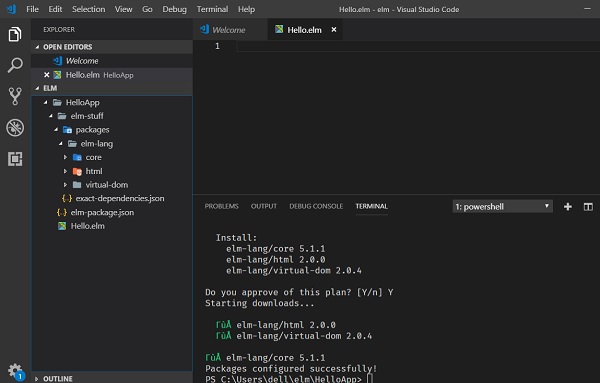
安裝包後,專案目錄中將新增以下檔案/資料夾。
- elm-package.json(檔案),儲存專案元資料
- elm-stuff(資料夾),儲存外部包
包成功安裝後,將顯示以下訊息。
步驟 3 - 將以下程式碼新增到 Hello.elm 檔案中
-- importing Html module and the function text
import Html exposing (text)

-- create main method
main =
-- invoke text function
text "Hello Elm from TutorialsPoint"
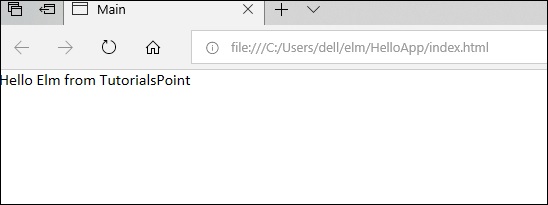
上面的程式將在瀏覽器中顯示字串訊息 **Hello Elm from TutorialsPoint**。
為此,我們需要在 **Html** 模組中匯入 **text** 函式。text 函式用於在瀏覽器中列印任何字串值。main 方法是程式的入口點。main 方法呼叫 text 函式並將字串值傳遞給它。
步驟 4 - 編譯專案
在 VSCode 終端視窗中執行以下命令。
elm make Hello.elm
上述命令的輸出如下所示:
//update path to the proj folder in the command elm make
C:\Users\dell\elm\HelloApp>elm make Hello.elm
Success! Compiled 38 modules.
Successfully generated index.html
上述命令將生成一個 **index.html** 檔案。Elm 編譯器將 .elm 檔案轉換為 JavaScript 並將其嵌入到 **index.html** 檔案中。
步驟 5 - 在瀏覽器中開啟 index.html
在任何瀏覽器中開啟 *index.html* 檔案。輸出將如下所示:
Elm 中的註釋
註釋是提高程式可讀性的一種方式。註釋可用於包含有關程式的其他資訊,例如程式碼作者、關於函式構造的提示等。編譯器會忽略註釋。
Elm 支援以下型別的註釋:
單行註釋 (--) - -- 和行尾之間的任何文字都被視為註釋。
多行註釋 ({- -}) - 這些註釋可以跨越多行。
示例
-- this is single line comment

{- This is a
   Multi-line comment
-}
行和縮排
Elm 沒有使用大括號來指示函式定義或流程控制的程式碼塊。程式碼塊由行縮排表示,並且嚴格執行。塊中的所有語句必須縮排相同的量。例如:
module ModuleIf exposing (..)
x = 0

function1 =
   if x > 5 then
      "x is greater"
   else
      "x is small"
但是,以下程式碼塊會產生錯誤:
-- Create file ModuleIf.elm
module ModuleIf exposing (..)
x = 0

function1 =
   if x > 5 then
      "x is greater"
         else --Error:else indentation not at same level of if statement
      "x is small"
因此,在 Elm 中,所有使用相同空格數連續縮排的行將構成一個程式碼塊。
C:\Users\admin>elm repl
---- elm-repl 0.18.0 -----------------------------------------------------------
   :help for help, :exit to exit, more at
   <https://github.com/elm-lang/elm-repl>
   ---------------------------------------
   -----------------------------------------

> import ModuleIf exposing(..) -- importing module from ModuleIf.elm file
>function1 -- executing function from module
-- SYNTAX PROBLEM ---------------------------------------------------

I need whitespace, but got stuck on what looks like a new declaration.
You are either missing some stuff in the declaration above or just need to add some spaces here:
7| else
   ^
I am looking for one of the following things:

   whitespace