
- CakePHP 教程
- CakePHP - 主頁
- CakePHP - 概述
- CakePHP - 安裝
- CakePHP - 資料夾結構
- CakePHP - 專案配置
- CakePHP - 路由
- CakePHP - 控制器
- CakePHP - 檢視
- CakePHP - 擴充套件檢視
- CakePHP - 檢視元素
- CakePHP - 檢視事件
- CakePHP - 資料庫操作
- CakePHP - 檢視記錄
- CakePHP - 更新記錄
- CakePHP - 刪除記錄
- CakePHP - 服務
- CakePHP - 錯誤與異常處理
- CakePHP - 記錄
- CakePHP - 窗體處理
- CakePHP - 國際化
- CakePHP - 會話管理
- CakePHP - Cookie 管理
- CakePHP - 安全
- CakePHP - 驗證
- CakePHP - 建立驗證器
- CakePHP - 分頁
- CakePHP - 日期和時間
- CakePHP - 檔案上傳
- CakePHP 實用資源
- CakePHP - 快速指南
- CakePHP - 實用資源
- CakePHP - 討論
CakePHP - 檔案上傳
為了處理檔案上傳,我們將使用窗體幫助器。以下是檔案上傳的一個示例。
示例
在 config/routes.php 檔案中進行更改,如下面的程式所示。
config/routes.php
<?php
use Cake\Http\Middleware\CsrfProtectionMiddleware;
use Cake\Routing\Route\DashedRoute;
use Cake\Routing\RouteBuilder;
$routes->setRouteClass(DashedRoute::class);
$routes->scope('/', function (RouteBuilder $builder) {
   $builder->registerMiddleware('csrf', new CsrfProtectionMiddleware([
      'httpOnly' => true,
   ]));
   $builder->applyMiddleware('csrf');
   //$builder->connect('/pages',['controller'=>'Pages','action'=>'display', 'home']);
   $builder->connect('fileupload',['controller'=>'Files','action'=>'index']);
   $builder->fallbacks();
});
在 src/Controller/FilesController.php 處建立一個 **FilesController.php** 檔案。將以下程式碼複製到控制器檔案中。如果已經建立,則忽略。
在 src/ 中建立 uploads/ 目錄。上傳的檔案將被儲存在 uploads/ 資料夾中。
src/Controller/FilesController.php
<?php
   namespace App\Controller;
   use App\Controller\AppController;
   use Cake\View\Helper\FormHelper;
   class FilesController extends AppController {
      public function index(){
         if ($this->request->is('post')) {
            $fileobject = $this->request->getData('submittedfile');
            $uploadPath = '../uploads/';
            $destination = $uploadPath.$fileobject->getClientFilename();
            // Existing files with the same name will be replaced.
            $fileobject->moveTo($destination);
         }
      }
   }
?>
在 src/Template 處建立一個 **Files** 目錄,在該目錄下建立一個名為 **index.php** 的 **檢視** 檔案。將以下程式碼複製到該檔案中。
src/Template/Files/index.php
<?php
   echo $this->Form->create(NULL, ['type' => 'file']);
   echo $this->l;Form->file('submittedfile');
   echo $this->Form->button('Submit');
   echo $this->Form->end();
   $uploadPath ='../uploads/';
   $files = scandir($uploadPath, 0);
   echo "Files uploaded in uploads/ are:<br/>";
   for($i = 2; $i < count($files); $i++)
      echo "File is - ".$files[$i]."<br>";
?>
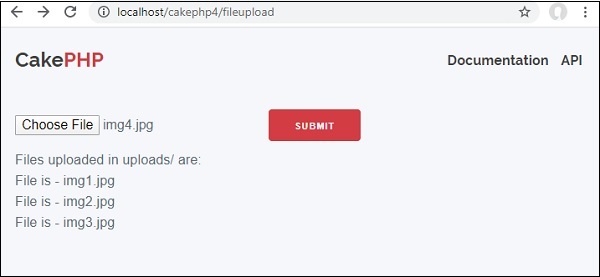
儲存在 uploads/ 資料夾中的檔案會列給使用者。透過訪問以下 URL 來執行上述示例 −
https:///cakephp4/fileupload −
輸出
執行上述程式碼時,你應該看到以下輸出 −
廣告