
- Apache POI PPT 教程
- Apache POI PPT - 主頁
- Apache POI PPT - 概述
- Apache POI PPT - Java API 風味
- Apache POI PPT - 安裝
- Apache POI PPT - 類和方法
- Apache POI PPT - 表示形式
- Apache POI PPT - 幻燈片佈局
- Apache POI PPT - 幻燈片管理
- Apache POI PPT - 影像
- Apache POI PPT - 建立超級連結
- Apache POI PPT - 讀取形狀
- Apache POI PPT - 文字格式化
- Apache POI PPT - 合併
- Apache POI PPT - PPT 轉影像
- Apache POI PPT 資源
- Apache POI PPT - 快速指南
- Apache POI PPT - 有用資源
- Apache POI PPT - 討論
Apache POI PPT - PPT 轉影像
你可以將表示形式轉換為影像檔案。以下程式顯示瞭如何執行此操作。
import java.awt.Color;
import java.awt.Dimension;
import java.awt.Graphics2D;
import java.awt.geom.Rectangle2D;
import java.awt.image.BufferedImage;
import java.io.File;
import java.io.FileInputStream;
import java.io.FileOutputStream;
import java.io.IOException;
import java.util.List;
import org.apache.poi.xslf.usermodel.XMLSlideShow;
import org.apache.poi.xslf.usermodel.XSLFSlide;

public class PptToImage {
   public static void main(String args[]) throws IOException {
      //creating an empty presentation
      File file=new File("pptToImage.pptx");
      XMLSlideShow ppt = new XMLSlideShow(new FileInputStream(file));

      //getting the dimensions and size of the slide
      Dimension pgsize = ppt.getPageSize();
      List<XSLFSlide> slide = ppt.getSlides();
      BufferedImage img = null;
      for (int i = 0; i < slide.size(); i++) {
         img = new BufferedImage(pgsize.width, pgsize.height,BufferedImage.TYPE_INT_RGB);
         Graphics2D graphics = img.createGraphics();

         //clear the drawing area
         graphics.setPaint(Color.white);
         graphics.fill(new Rectangle2D.Float(0, 0, pgsize.width, pgsize.height));

         //render
         slide.get(i).draw(graphics);
      }
      //creating an image file as output
      FileOutputStream out = new FileOutputStream("ppt_image.png");
      javax.imageio.ImageIO.write(img, "png", out);
      ppt.write(out);

      System.out.println("Image successfully created");
      out.close();
   }
}
將上述 Java 程式碼另存為 PpttoPNG.java,然後從命令提示符處按如下所示進行編譯和執行 −
$javac PpttoPNG.java
$java PpttoPNG
它將編譯並執行以生成以下輸出 −
Image created successfully
以下快照顯示了作為輸入提供的表示形式 −
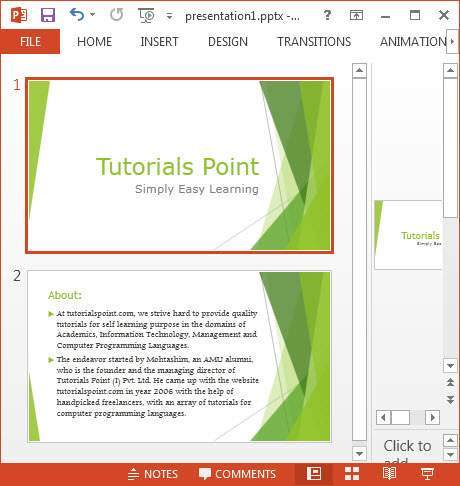
以下是給定位置建立的影像快照。

廣告