
- Apache POI 教程
- Apache POI – 主頁
- Apache POI – 概覽
- Apache POI – Java Excel API
- Apache POI – 環境
- Apache POI – 核心類
- Apache POI – 工作簿
- Apache POI – 電子表格
- Apache POI – 單元格
- Apache POI – 字型
- Apache POI – 公式
- Apache POI – 連結
- Apache POI – 列印範圍
- Apache POI – 資料庫
- Apache POI 資源
- Apache POI – 問答
- Apache POI – 快速指南
- Apache POI – 有用資源
- Apache POI – 討論
Apache POI – 資料庫
本章解釋了 POI 庫如何與資料庫進行互動。藉助 JDBC,你可以從資料庫中檢索資料,並使用 POI 庫將該資料插入電子表格。我們以 MySQL 資料庫作為 SQL 操作的範例。
將資料從資料庫寫入 Excel
讓我們假設要從 MySQL 資料庫**test**中檢索名為**emp_tbl**的以下員工資料表。
| 員工 ID | 員工姓名 | 學位 | 薪水 | 部門 |
|---|---|---|---|---|
| 1201 | Gopal | 技術經理 | 45000 | IT |
| 1202 | Manisha | 校對員 | 45000 | 測試 |
| 1203 | Masthanvali | 技術作家 | 45000 | IT |
| 1204 | Kiran | 人事管理員 | 40000 | 人力資源 |
| 1205 | Kranthi | 運營管理員 | 30000 | 管理 |
使用以下程式碼從資料庫中檢索資料並將其插入電子表格。
import java.io.File;
import java.io.FileOutputStream;

import java.sql.Connection;
import java.sql.DriverManager;
import java.sql.ResultSet;
import java.sql.Statement;

import org.apache.poi.xssf.usermodel.XSSFCell;
import org.apache.poi.xssf.usermodel.XSSFRow;
import org.apache.poi.xssf.usermodel.XSSFSheet;
import org.apache.poi.xssf.usermodel.XSSFWorkbook;

public class ExcelDatabase {
   public static void main(String[] args) throws Exception {
      Class.forName("com.mysql.jdbc.Driver");
      Connection connect = DriverManager.getConnection(
         "jdbc:mysql://:3306/test" ,
         "root" ,
         "root"
      );

      Statement statement = connect.createStatement();
      ResultSet resultSet = statement.executeQuery("select * from emp_tbl");
      XSSFWorkbook workbook = new XSSFWorkbook();
      XSSFSheet spreadsheet = workbook.createSheet("employe db");

      XSSFRow row = spreadsheet.createRow(1);
      XSSFCell cell;
      cell = row.createCell(1);
      cell.setCellValue("EMP ID");
      cell = row.createCell(2);
      cell.setCellValue("EMP NAME");
      cell = row.createCell(3);
      cell.setCellValue("DEG");
      cell = row.createCell(4);
      cell.setCellValue("SALARY");
      cell = row.createCell(5);
      cell.setCellValue("DEPT");
      int i = 2;

      while(resultSet.next()) {
         row = spreadsheet.createRow(i);
         cell = row.createCell(1);
         cell.setCellValue(resultSet.getInt("eid"));
         cell = row.createCell(2);
         cell.setCellValue(resultSet.getString("ename"));
         cell = row.createCell(3);
         cell.setCellValue(resultSet.getString("deg"));
         cell = row.createCell(4);
         cell.setCellValue(resultSet.getString("salary"));
         cell = row.createCell(5);
         cell.setCellValue(resultSet.getString("dept"));
         i++;
      }

      FileOutputStream out = new FileOutputStream(new File("exceldatabase.xlsx"));
      workbook.write(out);
      out.close();
      System.out.println("exceldatabase.xlsx written successfully");
   }
}
我們將上述程式碼另存為**ExcelDatabase.java**。從命令提示符處編譯並執行它,如下所示。
$javac ExcelDatabase.java
$java ExcelDatabase
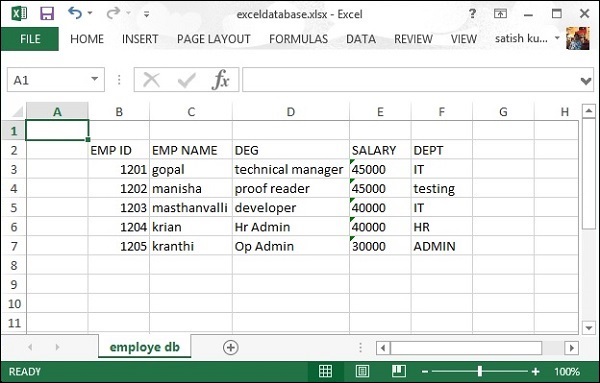
它將在你的當前目錄中生成一個名為**exceldatabase.xlsx**的 Excel 檔案,並在命令提示符處顯示以下輸出。
exceldatabase.xlsx written successfully
**exceldatabase.xlsx**檔案如下所示。
廣告