
- Apache Bench 教程
- Apache Bench - 首頁
- Apache Bench - 概述
- Apache Bench - 環境設定
- 測試我們的示例應用程式
- 併發測試多個URL
- 動態頁面測試準備
- 動態頁面的順序測試用例
- 輸出比較
- Apache Bench 有用資源
- Apache Bench - 快速指南
- Apache Bench - 有用資源
- Apache Bench - 討論
動態頁面測試準備
本章我們將瞭解測試動態頁面所需的準備工作。伺服器端動態網頁是指其構建由處理伺服器端指令碼的應用程式伺服器控制的網頁。Apache Bench 只能負載測試伺服器端動態網頁。
併發級別和請求總數
併發級別應低於請求總數。
$ ab -l -r -n 30 -c 80 -k -H "Accept-Encoding: gzip, deflate" http://127.0.0.1:8000/
輸出
ab: Cannot use concurrency level greater than total number of requests
Usage: ab [options] [http[s]://]hostname[:port]/path
標誌的使用
在本節中,我們將描述 ab 命令中一些重要標誌的使用。我們將交替使用術語“選項”和“標誌”。
詳細 -v
詳細選項可用於分析和除錯是否存在多個失敗的請求。負載測試失敗的一個常見跡象是測試非常快地完成,並且每秒請求值很好。但這將是一個錯誤的基準。為了確定成功或失敗,可以使用-v 2選項,它會將每個響應的主體和標頭轉儲到終端輸出。以下命令描述了一個用例:
$ ab -n 1 -v 2 http://www.generic-example-URL.com/
輸出
LOG: header received:
HTTP/1.0 200 OK
…
Content-Length: 2548687
當然,如果您正在測試可變響應或在發生任何錯誤時返回非 200 HTTP 程式碼,則應使用-l選項忽略長度檢查。在後續章節中,我們將啟動一個 web2py 應用程式時,我們將很快看到非 200 HTTP。
保持活動 -k
當客戶端傳送 HTTP 請求時,會與伺服器建立連線,伺服器傳送響應,並在傳送請求後關閉連線。此迴圈在每次請求時都會繼續。但是,使用保持活動設定(也稱為持久連線),客戶端會保持底層 TCP 連線開啟以促進多個請求和響應;這消除了否則存在的緩慢且代價高昂的連線初始化時間。
可變文件長度 -l
如果網頁長度可變,則應使用選項-l。如果響應的長度不恆定,Apache Bench 不會報告錯誤。這對於動態頁面很有用。
選項 -r 的使用
如何強制 ab 在收到錯誤時不退出?您應該使用選項-r。沒有此選項,您的測試可能會在任何請求遇到套接字錯誤時中斷。但是,使用此選項,錯誤將在“失敗錯誤”標題中報告,但測試將持續到結束。
選項 -H 的使用
此選項用於新增任意標頭行。引數通常採用有效標頭行的形式,包含一個冒號分隔的欄位-值對(即,“Accept-Encoding: zip/zop;8bit”)。
選項 -C 的使用
在下一節中,我們將詳細瞭解如何將上述選項與使用 cookie 值的選項結合使用,即-C選項。-C 選項通常採用name = value對的形式。此欄位可以重複。
使用 Apache Bench 的會話 Cookie
要了解如何在 Apache Bench 中使用 cookie,我們需要一個嘗試設定 cookie 的網頁。一個很好的例子是 web2py 應用程式,它是一個 Python Web 框架。
安裝 web2py
我們將快速安裝另一個 Python 應用程式 web2py。您可以在Web2py 框架概述中閱讀有關如何使用它的更多資訊。
Ubuntu 和 Debian 伺服器通常預設安裝 Python。因此,已經滿足了一個成功執行 web2py 的要求。
但是,我們需要安裝 unzip 包才能從我們將下載的 zip 檔案中提取 web2py 的原始檔:
$ sudo apt-get update
$ sudo apt-get install unzip
讓我們從專案的網站獲取 web2py 框架。我們將將其下載到我們的主資料夾:
$cd ~
$ wget http://www.web2py.com/examples/static/web2py_src.zip
現在,我們可以解壓剛剛下載的檔案並移入:
$ unzip web2py_src.zip
$ cd web2py
要執行 web2py,您無需安裝它。進入 web2py 目錄後,您可以透過鍵入以下命令來執行它:
$python web2py.py
如果一切順利,您將看到以下輸出,其中會要求您為管理 UI 選擇密碼:
web2py Web Framework
Created by Massimo Di Pierro, Copyright 2007-2017
Version 2.14.6-stable+timestamp.2016.05.10.00.21.47
Database drivers available: sqlite3, imaplib, pymysql, pg8000
WARNING:web2py:GUI not available because Tk library is not installed
choose a password:

please visit:
        http://127.0.0.1:8000/
use "kill -SIGTERM 23904" to shutdown the web2py server
但是,您需要注意的是,啟動的 Web 介面只能在本地機器上訪問。
從輸出中,您可以瞭解到要停止 Web 伺服器,您必須在即時終端中鍵入“CTRL-C”。另一方面,要在與同一 VPS 相關的另一個終端上停止 web2py 伺服器,您可以插入命令 kill -SIGTERM <PID>,其中<PID>是 web2py 伺服器的程序 ID,在本例中為 23904。
來自 web2py 的會話 Cookie
如果一個頁面只能由已登入的使用者訪問,而不能直接從登入頁面訪問,那麼您可以使用-C標誌。此標誌為 ab 命令定義一個 cookie。但是您必須從有效的會話中獲取會話識別符號 cookie 的值。如何獲取?各種線上教程將指導您使用 Chrome(或 Mozilla)瀏覽器開發者工具。但在我們的測試用例中,由於應用程式只能在命令列上使用,我們將使用 lynx 瀏覽器來獲取該值。
讓我們首先獲取會話的 cookie 值。開啟另一個終端並鍵入以下命令:
$ lynx http://127.0.0.1:8000/
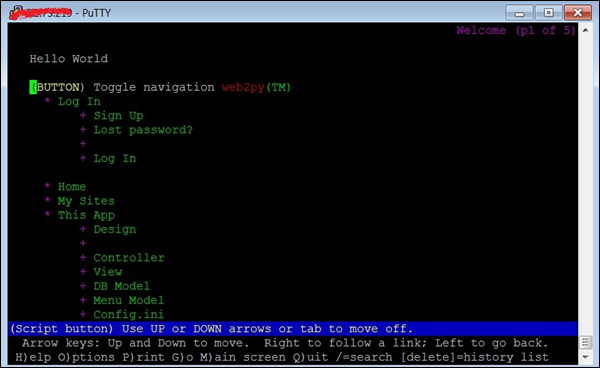
響應上述命令,lynx 將會詢問您是否允許接受來自 web2py 伺服器的 cookie,如下面的影像所示。

在鍵入y接受 cookie 之前,記下 cookie 值。現在終端將類似於下面的影像——終端上的網站!
獲得 cookie 值後,我們現在將執行 ab 測試。為此,我們將必須開啟第三個終端(參見下圖):
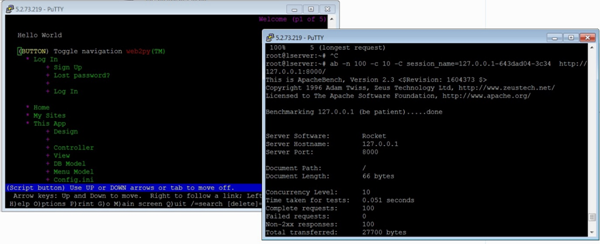
現在,讓我們在第三個終端中使用 -C 標誌:
$ ab -n 100 -c 10 -C session_name = 127.0.0.1-643dad04-3c34 http://127.0.0.1:8000/
輸出
This is ApacheBench, Version 2.3 <$Revision: 1604373 $>
Copyright 1996 Adam Twiss, Zeus Technology Ltd, http://www.zeustech.net/
Licensed to The Apache Software Foundation, http://www.apache.org/

Benchmarking 127.0.0.1 (be patient).....done


Server Software:        Rocket
Server Hostname:        127.0.0.1
Server Port:            8000

Document Path:          /
Document Length:        66 bytes

Concurrency Level:      10
Time taken for tests:   0.051 seconds
Complete requests:      100
Failed requests:        0
Non-2xx responses:      100
Total transferred:      27700 bytes
HTML transferred:       6600 bytes
Requests per second:    1968.12 [#/sec] (mean)
Time per request:       5.081 [ms] (mean)
Time per request:       0.508 [ms] (mean, across all concurrent requests)
Transfer rate:          532.39 [Kbytes/sec] received

Connection Times (ms)
              min  mean[+/-sd] median   max
Connect:        1    2   0.9      2       4
Processing:     0    3   0.9      3       5
Waiting:        0    2   1.1      2       4
Total:          4    5   0.7      5       7

Percentage of the requests served within a certain time (ms)
  50%      5
  66%      5
  75%      5
  80%      6
  90%      6
  95%      6
  98%      7
  99%      7
 100%      7 (longest request)
從上面的輸出中,我們注意到幾點。首先,web2py 使用Rocket Web 伺服器。我們還注意到,除了前面討論的輸出標題外,我們還獲得了“非 2xx 響應”。一般來說,Http 協議使用響應程式碼響應請求,200 範圍內的任何內容都表示“確定”,其餘內容則對應於某些問題。例如,400 是資源相關的錯誤,例如 404 檔案未找到。500 對應於伺服器錯誤。在我們目前的例子中,除了使用 -C 選項時之外,沒有任何錯誤。正如前面所述,它可以使用 -l 選項來抑制。
檢查管理頁面
在本節中,我們將瞭解如何檢查管理頁面。為了進行比較,讓我們測試 web2py 應用程式的另一個 URL:
$ ab -n 100 -c 10 session_name = 127.0.0.1-643dad04-3c34 http://127.0.0.1:8000/admin
輸出
This is ApacheBench, Version 2.3 <$Revision: 1604373 $>
Copyright 1996 Adam Twiss, Zeus Technology Ltd, http://www.zeustech.net/
Licensed to The Apache Software Foundation, http://www.apache.org/

Benchmarking 127.0.0.1 (be patient).....done


Server Software:        Rocket
Server Hostname:        127.0.0.1
Server Port:            8000

Document Path:          /admin
Document Length:        8840 bytes

Concurrency Level:      10
Time taken for tests:   2.077 seconds
Complete requests:      100
Failed requests:        0
Total transferred:      926700 bytes
HTML transferred:       884000 bytes
Requests per second:    48.14 [#/sec] (mean)
Time per request:       207.749 [ms] (mean)
Time per request:       20.775 [ms] (mean, across all concurrent requests)
Transfer rate:          435.61 [Kbytes/sec] received

Connection Times (ms)
          min  mean[+/-sd] median   max
Connect:        0    1   3.2      0      12
Processing:    62  204  52.2    199     400
Waiting:       61  203  52.0    199     400
Total:         62  205  54.3    199     411

Percentage of the requests served within a certain time (ms)
  50%    199
  66%    211
  75%    220
  80%    226
  90%    264
  95%    349
  98%    381
  99%    411
 100%    411 (longest request)
您應該特別注意http://127.0.0.1:8000/和http://127.0.0.1:8000/admin的“連線時間”和“已服務的請求百分比…”部分中的相應統計資料。差異巨大。
使用時間限制選項
通常,時間限制選項是一個棘手的問題。讓我們從ab 的手冊中瞭解這一點,這相當具有解釋性:
-t timelimit
Maximum number of seconds to spend for benchmarking. This implies a -n 50000 internally.
Use this to benchmark the server within a fixed total amount of time.
Per default there is no timelimit.
讓我們使用此選項執行測試。在瀏覽輸出後,我們將記下我們的觀察結果:
$ ab -n 100 -c 10 -t 60 http://127.0.0.1:8000/
輸出
This is ApacheBench, Version 2.3 <$Revision: 1604373 $>
Copyright 1996 Adam Twiss, Zeus Technology Ltd, http://www.zeustech.net/
Licensed to The Apache Software Foundation, http://www.apache.org/

Benchmarking 127.0.0.1 (be patient)
Completed 5000 requests
Completed 10000 requests
Completed 15000 requests
Completed 20000 requests
Completed 25000 requests
Completed 30000 requests
Completed 35000 requests
Completed 40000 requests
Completed 45000 requests
Completed 50000 requests
Finished 50000 requests


Server Software:        Rocket
Server Hostname:        127.0.0.1
Server Port:            8000

Document Path:          /
Document Length:        66 bytes

Concurrency Level:      10
Time taken for tests:   22.547 seconds
Complete requests:      50000
Failed requests:        0
Non-2xx responses:      50000
Total transferred:      13850000 bytes
HTML transferred:       3300000 bytes
Requests per second:    2217.61 [#/sec] (mean)
Time per request:       4.509 [ms] (mean)
Time per request:       0.451 [ms] (mean, across all concurrent requests)
Transfer rate:          599.88 [Kbytes/sec] received

Connection Times (ms)
              min  mean[+/-sd] median   max
Connect:        0    2   0.8      2       8
Processing:     0    2   3.2      2     218
Waiting:        0    2   3.2      2     218
Total:          2    4   3.1      4     220

Percentage of the requests served within a certain time (ms)
  50%      4
  66%      4
  75%      4
  80%      5
  90%      5
  95%      5
  98%      7
  99%      8
 100%    220 (longest request)
請注意,輸出顯示此選項會覆蓋由-n選項指定的請求數,並持續到 50K 個請求。但是,由於請求處理得非常快,ab 一旦達到 50k 標記(在本例中為 22 秒內(參見標題測試所用時間))就會終止。
您可以測試相同的命令,將http://127.0.0.1:8000/替換為http://127.0.0.1:8000/admin(假設它是我們的 web2py 應用程式)或像 https://www.apache.org/ 這樣的第三方網站,注意統計資料的差異。
執行負載測試前的清單
有一些檢查將幫助您成功執行測試並準確測量效能。在執行負載測試之前,請考慮以下條件:
確保沒有載入額外的 Python 模組。
為了避免 TCP/IP 埠耗盡,您通常應該在進行另一個 ab 測試之前等待 2-3 分鐘。
確保併發連線數低於 Apache 工作執行緒數。
如果 Apache 或 Python 崩潰,您應該在執行另一個測試之前重新啟動伺服器。