
具有多層級瀑布圖
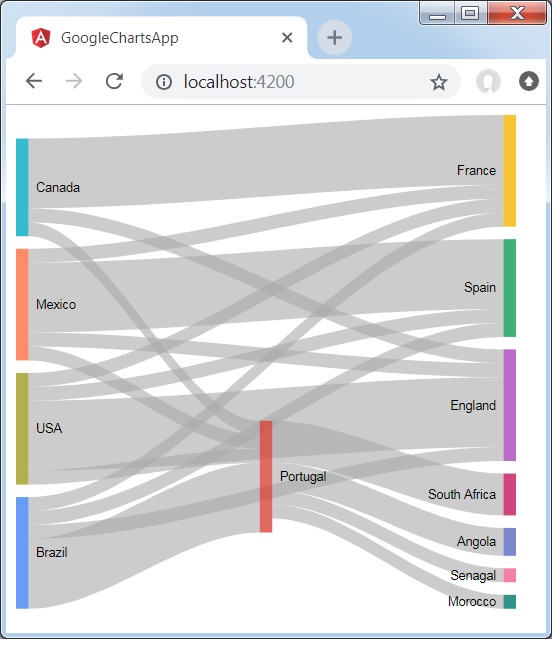
下面是一個具有多層級的 SanKey 圖示例。
我們之前已在 Google Charts 配置語法 章節中學習用於繪製圖表的配置。現在,讓我們看一個具有多層級 SanKey 圖的示例。
配置
我們使用 Sankey 類來顯示具有多層級的 SanKey 圖。
type = 'Sankey';
示例
app.component.ts
import { Component } from '@angular/core';
@Component({
   selector: 'app-root',
   templateUrl: './app.component.html',
   styleUrls: ['./app.component.css']
})
export class AppComponent {
   title = '';
   type = 'Sankey';
   data = [
      ["Brazil","Portugal",5],
      ["Brazil","France",1],
      ["Brazil","Spain",1],
      ["Brazil","England",1],
      ["Canada","Portugal",1],
      ["Canada","France",5],
      ["Canada","England",1],
      ["Mexico","Portugal",1],
      ["Mexico","France",1],
      ["Mexico","Spain",5],
      ["Mexico","England",1],
      ["USA","Portugal",1],
      ["USA","France",1],
      ["USA","Spain",1],
      ["USA","England",5],
      ["Portugal","Angola",2],
      ["Portugal","Senagal",1],
      ["Portugal","Morocco",1],
      ["Portugal","South Africa",3]
   ];
   columnNames = ['From', 'To','Weight'];
   options = {
   };
   width = 550;
   height = 400;
}
結果
確認結果。
angular_googlecharts_sankey_charts.htm
廣告