
 資料結構
資料結構 網路技術
網路技術 關係型資料庫管理系統
 作業系統
作業系統 Java
Java MS Excel
 iOS
iOS HTML
HTML CSS
CSS Android
 Python
 C 程式設計
 C++
C++ C#
C# MongoDB
 MySQL
MySQL Javascript
 PHP
PHP 物理學
物理學 化學
化學 生物學
生物學 數學
數學 英語
英語 經濟學
經濟學 心理學
心理學 社會科學
社會科學 時裝研究
時裝研究 法律研究
法律研究為 Python tkinter 按鈕新增樣式
Tkinter 為基於 python 的 GUI 程式建立提供了強大的支援。它提供了根據其字型、大小、顏色等在 Tkinter 畫布上設定按鈕樣式的不同方式。在本文中,我們將學習如何對畫布上的特定按鈕或所有按鈕應用樣式。
應用於特定按鈕
讓我們考慮一種情況,即在畫布中有兩個按鈕且我們僅想對第一個按鈕應用一些樣式。我們使用 W.TButton 作為配置的一部分,同時使用字型和前景色。
示例
from tkinter import *
from tkinter.ttk import *

# Set the canvas
canv = Tk()
canv.geometry('200x150')

#Create style object
sto = Style()

#configure style
sto.configure('W.TButton', font= ('Arial', 10, 'underline'),
foreground='Green')

#Button with style
btns = Button(canv, text='Welcome !',
      style='W.TButton',
      command=canv.destroy)
btns.grid(row=0, column=1, padx=50)

#Button without style
btnns = Button(canv, text='Click to Start !', command=None)
btnns.grid(row = 1, column = 1, pady = 10, padx = 50)

canv.mainloop()
輸出
執行以上程式碼,將產生以下結果 −

應用於所有按鈕
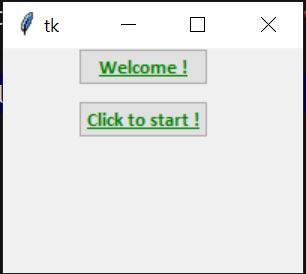
它與上述配置類似,只不過它具有作為樣式的 Tbutton,後者會自動應用於畫布上的所有按鈕。
示例
from tkinter import *
from tkinter.ttk import *

canv = Tk()
canv.geometry('200x150')

#Create style object
sto = Style()

#configure style
sto.configure('TButton', font=
('calibri', 10, 'bold', 'underline'),
foreground='Green')
# button 1
btns = Button(canv, text='Welcome !',
      style='TButton',
      command=canv.destroy)

btns.grid(row=0, column=1, padx=50)

# button 2
btnns = Button(canv, text='Click to start !', command=None)
btnns.grid(row=1, column=1, pady=10, padx=50)

canv.mainloop()
輸出
執行以上程式碼,將產生以下結果 −

更新日期:26-Aug-2020
3K+ 瀏覽量

廣告