
 資料結構
資料結構 網路
網路 RDBMS
RDBMS 作業系統
作業系統 Java
Java MS Excel
 iOS
iOS HTML
HTML CSS
CSS Android
 Python
 C 程式設計
 C++
C++ C#
C# MongoDB
 MySQL
MySQL Javascript
 PHP
PHP 物理
物理 化學
化學 生物
生物 數學
數學 英語
英語 經濟學
經濟學 心理學
心理學 社會學
社會學 時尚研究
時尚研究 法律研究
法律研究Java 中有哪些不同型別的 JOptionPane 對話方塊?\n
JOptionPane 是JComponent 類的子類,使用簡單的程式碼包含用於建立和自定義模態對話方塊的靜態方法。JOptionPane 用於代替JDialog 以降低程式碼複雜性。JOptionPane顯示帶有四個標準圖示之一(問題、資訊、警告和錯誤)或使用者指定的自定義圖示的對話方塊。
JOptionPane 類用於顯示四種類型的對話方塊
- MessageDialog - 可以新增圖示以提醒使用者的顯示訊息的對話方塊。
- ConfirmDialog - 除了傳送訊息之外,還允許使用者回答問題的對話方塊。
- InputDialog - 除了傳送訊息之外,還允許輸入文字的對話方塊。
- OptionDialog - 涵蓋前三種類型的對話方塊。
示例
import javax.swing.*;
public class JoptionPaneTest {
   public static void main(String[] args) {
      JFrame frame = new JFrame("JoptionPane Test");
      frame.setSize(200, 200);
      frame.setLocationRelativeTo(null);
      frame.setVisible(true);
      JOptionPane.showMessageDialog(frame, "Hello Java");
      JOptionPane.showMessageDialog(frame, "You have less amount, please recharge","Apocalyptic message", JOptionPane.WARNING_MESSAGE);
      int result = JOptionPane.showConfirmDialog(null, "Do you want to remove item now?");
      switch (result) {
         case JOptionPane.YES_OPTION:
         System.out.println("Yes");
         break;
         case JOptionPane.NO_OPTION:
         System.out.println("No");
         break;
         case JOptionPane.CANCEL_OPTION:
         System.out.println("Cancel");
         break;
         case JOptionPane.CLOSED_OPTION:
         System.out.println("Closed");
         break;
      }
      String name = JOptionPane.showInputDialog(null, "Please enter your name.");
      System.out.println(name);
      JTextField userField = new JTextField();
      JPasswordField passField = new JPasswordField();
      String message = "Please enter your user name and password.";
      result = JOptionPane.showOptionDialog(frame, new Object[] {message, userField, passField},
      "Login", JOptionPane.OK_CANCEL_OPTION, JOptionPane.QUESTION_MESSAGE, null, null, null);
      if (result == JOptionPane.OK_OPTION)
      System.out.println(userField.getText() + " " + new String(passField.getPassword()));
      System.exit(0);
   }
}
輸出
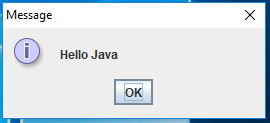
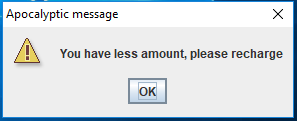
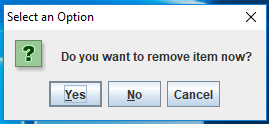
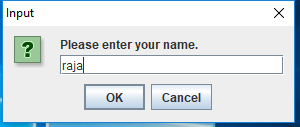
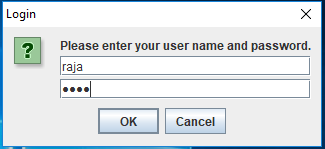

更新於: 2020-02-07
10K+ 次瀏覽

廣告