
- Web2py 教程
- Web2py - 首頁
- Web2py - 簡介
- Web2py - Python 語言
- Web2py - 框架概述
- Web2py - 核心
- Web2py - 檢視
- Web2py - 資料庫抽象層
- Web2py - 表單 & 驗證器
- Web2py - 郵件 & 簡訊
- Web2py - 訪問控制
- Web2py - 服務
- Web2py - 新增 Ajax 效果
- Web2py - 元件
- Web2py - 部署
- Web2py - 安全性
- Web2py 有用資源
- Web2py - 快速指南
- Web2py - 有用資源
- Web2py - 討論
Web2py - 新增 Ajax 效果
在本章中,我們將討論jQuery外掛與web2py整合的示例。這些外掛有助於使表單和表格更具互動性和使用者友好性,從而提高應用程式的可用性。
特別是,我們將學習
如何使用互動式新增選項按鈕改進多選下拉選單,
如何用滑塊替換輸入欄位,以及
如何使用jqGrid和WebGrid顯示錶格資料。
雖然web2py是一個伺服器端開發元件,但welcome腳手架應用程式包含基本的jQuery庫。這個腳手架web2py應用程式“welcome”包含一個名為views/web2py_ajax.html的檔案。
檢視的內容如下:
<script type = "text/javascript"><!--

   // These variables are used by the web2py_ajax_init function in web2py_ajax.js
      (which is loaded below).

   var w2p_ajax_confirm_message = "{{= T('Are you sure you want to delete this object?')}}";
   var w2p_ajax_disable_with_message = "{{= T('Working...')}}";
   var w2p_ajax_date_format = "{{= T('%Y-%m-%d')}}";
   var w2p_ajax_datetime_format = "{{= T('%Y-%m-%d %H:%M:%S')}}";

   var ajax_error_500 = '{{=T.M('An error occured, please [[reload %s]] the page') %

      URL(args = request.args, vars = request.get_vars) }}'

//--></script>

{{
   response.files.insert(0,URL('static','js/jquery.js'))
   response.files.insert(1,URL('static','css/calendar.css'))
   response.files.insert(2,URL('static','js/calendar.js'))
   response.files.insert(3,URL('static','js/web2py.js'))
   response.include_meta()
   response.include_files()
}}
該檔案包含JavaScript和AJAX實現。web2py將阻止使用者使用其他AJAX庫,如Prototype、ExtJS,因為始終觀察到實現這些庫更容易。
JQuery 效果
<select multiple = "true">..</select>的預設渲染被認為不太直觀,尤其是在需要選擇不連續選項時。這不能稱為HTML的缺點,而是大多數瀏覽器的設計缺陷。可以使用JavaScript覆蓋多選的呈現方式。這可以使用稱為jquery.multiselect.js的jQuery外掛來實現。
為此,使用者應從http://abeautifulsite.net/2008/04/jquery-multiselect下載外掛jquery.muliselect.js,並將相應的檔案放置到static/js/jquery.multiselect.js和static/css/jquery.multiselect.css中。
示例
以下程式碼應在相應的檢視中{{extend ‘layout.html’}}之前新增
{{
   response.files.append('https://ajax.googleapis.com/ajax\
      /libs/jqueryui/1.8.9/jquery-ui.js')

   response.files.append('https://ajax.googleapis.com/ajax\
      /libs/jqueryui/1.8.9/themes/ui-darkness/jquery-ui.css')

   response.files.append(URL('static','js/jquery.multiSelect.js'))
   response.files.append(URL('static','css/jquery.\multiSelect.css'))
}}
將以下內容放在{{extend 'layout.html'}}之後:
<script>
   jQuery(document).ready(function(){jQuery('[multiple]').multiSelect();});
</script>
這將有助於為給定表單設定multiselect的樣式
控制器
def index():
   is_fruits = IS_IN_SET(['Apples','Oranges','Bananas','Kiwis','Lemons'], multiple = True)
   form = SQLFORM.factory(Field('fruits','list:string', requires = is_fruits))

   if form.accepts(request,session):response.flash = 'Yummy!'
return dict(form = form)
此操作可以使用以下檢視進行嘗試:
{{
   response.files.append('https://ajax.googleapis.com/ajax\
      /libs/jqueryui/1.8.9/jquery-ui.js')

   response.files.append('https://ajax.googleapis.com/ajax\
      /libs/jqueryui/1.8.9/themes/ui-darkness/jquery-ui.css')

   response.files.append(URL('static','js/jquery.multiSelect.js'))
   response.files.append(URL('static','css/jquery.\multiSelect.css'))
}}

{{extend 'layout.html}}
<script>
   jQuery(document).ready(function(){jQuery('[multiple]'). multiSelect();});
</script>
{{= form}}
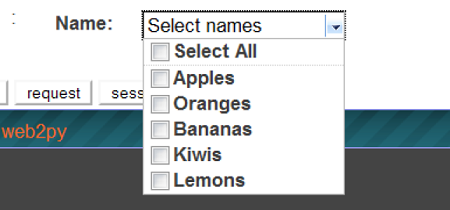
輸出的螢幕截圖如下:
以下表格列出了一些有用的Jquery事件:
| 序號 | 事件 & 用法 |
|---|---|
| 1 | onchange 元素更改時執行 |
| 2 | onsubmit 表單提交時執行 |
| 3 | onselect 元素被選中時執行 |
| 4 | onblur 元素失去焦點時執行 |
| 5 | onfocus 元素獲得焦點時執行 |
JQuery 和 Ajax-jqGrid
jqGrid是基於jQuery構建的啟用Ajax的JavaScript控制元件,它提供了一種表示和操作表格資料的解決方案。jqGrid是一個客戶端解決方案,它透過Ajax回撥動態載入資料,從而提供分頁、搜尋彈出視窗、內聯編輯等功能。
jqGrid已整合到PluginWiki中,但在這裡,我們將它作為一個獨立的web2py程式進行討論,這些程式不使用該外掛。jqGrid應該有它自己的書,但在這裡,我們只討論它的基本功能和最簡單的整合。
jqGrid的語法如下:
def JQGRID(
   table, fieldname = None,
   fieldvalue = None, col_widths = [],
   colnames = [], _id = None, fields = [],
   col_width = 80, width = 700,
   height = 300, dbname = 'db'
):