
- VBScript 教程
- VBScript - 主頁
- VBScript - 概述
- VBScript - 語法
- VBScript - 啟用
- VBScript - 放置
- VBScript - 變數
- VBScript - 常量
- VBScript - 運算子
- VBScript - 判定
- VBScript - 迴圈
- VBScript - 事件
- VBScript - Cookie
- VBScript - 數字
- VBScript - 字串
- VBScript - 陣列
- VBScript - 日期
- 高階 VBScript
- VBScript - 過程
- VBScript - 對話方塊
- VBScript - 面向物件
- VBScript - 正則表示式
- VBScript - 錯誤處理
- VBScript - 其他語句
- VBScript 有用資源
- VBScript - 問題與答案
- VBScript - 快速指南
- VBScript - 有用資源
- VBScript - 討論
VBScript Exit For 語句
當我們想要根據某些條件退出 For 迴圈時,會使用 Exit For 語句。當執行 Exit For 時,控制權會立即跳至 For 迴圈之後的下一條語句。
語法
VBScript 中 Exit For 語句的語法為:-
Exit For
流程圖
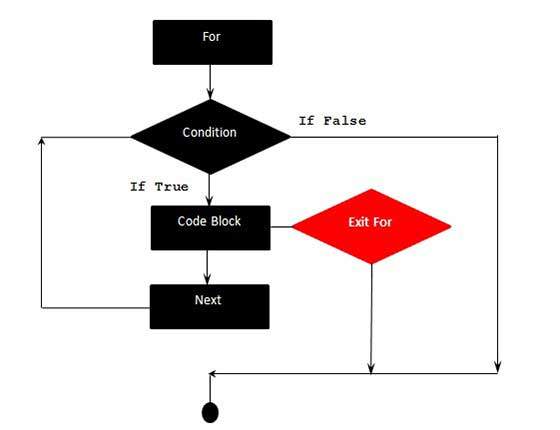
示例
以下示例使用了 Exit For。如果計數器值達到 4,則退出 For 迴圈,控制權會立即跳至 For 迴圈之後的下一條語句。
<!DOCTYPE html>
<html>
   <body>
      <script language = "vbscript" type = "text/vbscript">
         Dim a : a = 10
         For i = 0 to a Step 2 'i is the counter variable and it is incremented by 2
            document.write("The value is i is : " & i)
            document.write("<br></br>")

         If i = 4 Then
            i = i*10  'This is executed only if i = 4
            document.write("The value is i is : " & i)
            Exit For 'Exited when i = 4
         End If
         Next

      </script>
   </body>
</html>
當執行以上程式碼時,它會在控制檯列印以下輸出。
The value is i is : 0

The value is i is : 2

The value is i is : 4

The value is i is : 40
vbscript_loops.htm
廣告