
- VBScript 教程
- VBScript - 首頁
- VBScript - 概覽
- VBScript - 語法
- VBScript - 啟用
- VBScript - 位置
- VBScript - 變數
- VBScript - 常量
- VBScript - 運算子
- VBScript - 決策
- VBScript - 迴圈
- VBScript - 事件
- VBScript - Cookie
- VBScript - 數字
- VBScript - 字串
- VBScript - 陣列
- VBScript - 日期
- VBScript 高階
- VBScript - 過程
- VBScript - 對話方塊
- VBScript - 面向物件
- VBScript - 正則表示式
- VBScript - 錯誤處理
- VBScript - 雜項語句
- VBScript 實用資源
- VBScript - 問答
- VBScript - 快速指南
- VBScript - 實用資源
- VBScript - 討論
VBScript 中的 Do..Until 迴圈
當我們希望在條件為假時重複一組語句時,將使用Do..Until迴圈。條件可以在迴圈開始時或結束時檢查。
語法
VBScript 中Do..Until迴圈的語法為 −
Do Until condition
   [statement 1]
   [statement 2]
   ...
   [statement n]
   [Exit Do]
   [statement 1]
   [statement 2]
   ...
   [statement n]
Loop
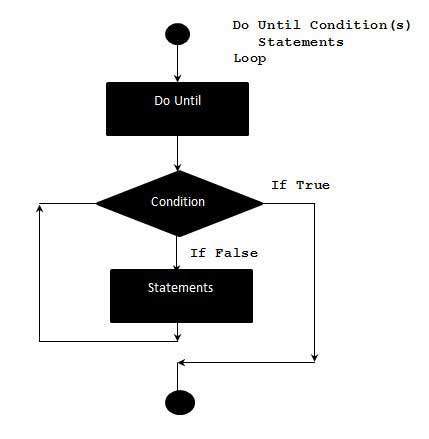
流程圖
示例
下面的示例使用Do..Until迴圈在迴圈開始時檢查條件。僅當條件為假時才會執行迴圈內的語句。當條件變為真時,它退出迴圈。
<!DOCTYPE html>
<html>
   <body>
      <script language = "vbscript" type = "text/vbscript">
         i = 10
         Do Until i>15  'Condition is False.Hence loop will be executed
            i = i + 1
            Document.write("The value of i is : " & i)
            Document.write("<br></br>")
         Loop

      </script>
   </body>
</html>
執行上述程式碼後,它會在控制檯中列印以下輸出。
The value of i is : 11

The value of i is : 12

The value of i is : 13

The value of i is : 14

The value of i is : 15

The value of i is : 16
備用語法
還有一個備用Do..Until迴圈語法,可以在迴圈結束時檢查條件。下面透過示例解釋這兩個語法的重大區別。
Do
   [statement 1]
   [statement 2]
   ...
   [statement n]
   [Exit Do]
   [statement 1]
   [statement 2]
   ...
   [statement n]
Loop Until condition
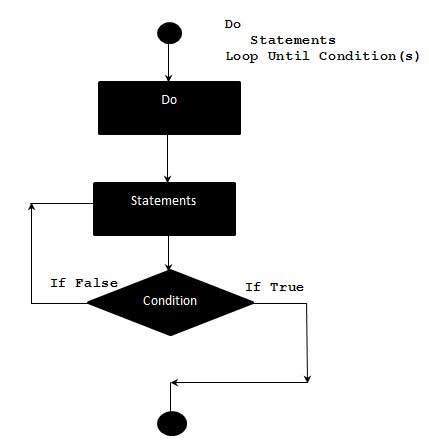
流程圖
示例
下面的示例使用Do..Until迴圈在迴圈結束時檢查條件。即使條件為真,迴圈內的語句也會執行一次。
<!DOCTYPE html>
<html>
   <body>
      <script language = "vbscript" type = "text/vbscript">
         i = 10
         Do
            i = i + 1
            Document.write("The value of i is : " & i)
            Document.write("<br></br>")
         Loop Until i<15 'Condition is True.Hence loop is executed once.

      </script>
   </body>
</html>
執行上述程式碼後,它會在控制檯中列印以下輸出。
The value of i is : 11
vbscript_loops.htm
廣告