
 資料結構
資料結構 網路
網路 關係型資料庫管理系統
 作業系統
作業系統 Java
Java MS Excel
 iOS
iOS HTML
HTML CSS
CSS Android
 Python
 C語言程式設計
 C++
C++ C#
C# MongoDB
 MySQL
MySQL Javascript
 PHP
PHP 物理學
物理學 化學
化學 生物學
生物學 數學
數學 英語
英語 經濟學
經濟學 心理學
心理學 社會學
社會學 服裝設計
服裝設計 法律研究
法律研究Python3中的文字分析
在本練習中,我們將處理檔案。檔案在宇宙中隨處可見。在計算機系統中,檔案是必不可少的組成部分。作業系統包含大量檔案。
Python 有兩種型別的檔案 - 文字檔案和二進位制檔案。
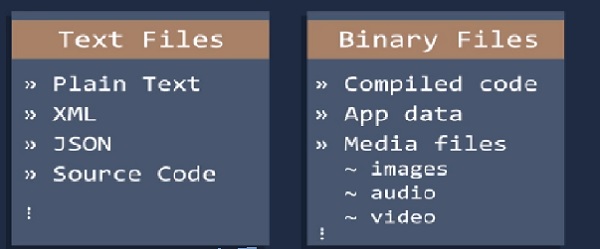
這裡我們將討論文字檔案。
這裡我們將重點介紹一些關於檔案的常用函式。
- 單詞數量
- 字元數量
- 平均單詞長度
- 停用詞數量
- 特殊字元數量
- 數字數量
- 大寫單詞數量
我們有一個測試檔案“css3.txt”,我們將在此檔案中進行操作。
單詞數量
當我們在句子中計算單詞數量時,我們使用split函式。這是最簡單的方法。在這種情況下,我們也應用split函式。
示例程式碼
filename="C:/Users/TP/Desktop/css3.txt"
try:
   with open(filename) as file_object:
   contents=file_object.read()
   except FileNotFoundError:
   message="sorry" +filename
   print(message)
else:
   words=contents.split()
   number_words=len(words)
   print("Total words of" + filename ,"is" , str(number_words))
輸出
Total words of C:/Users/TP/Desktop/css3.txt is 3574
字元數量
在這裡,我們計算一個單詞中的字元數量,這裡我們使用單詞的長度。如果長度為5,則該單詞中有5個字元。
示例程式碼
filename="C:/Users/TP/Desktop/css3.txt"
try:
   with open(filename) as file_object:
   contents=file_object.read()
   except FileNotFoundError:
   message="sorry" +filename
   print(message)
else:
   words=0
   characters=0
   wordslist=contents.split()
   words+=len(wordslist)
   characters += sum(len(word) for word in wordslist)
   #print(lineno)
   print("TOTAL CHARACTERS IN A TEXT FILE =",characters)
輸出
TOTAL CHARACTERS IN A TEXT FILE = 17783
平均單詞長度
在這裡,我們計算所有單詞長度的總和,並將其除以總長度。
示例程式碼
filename="C:/Users/TP/Desktop/css3.txt"
try:
   with open(filename) as file_object:
   contents=file_object.read()
   except FileNotFoundError:
   message="sorry" +filename
   print(message)
else:
   words=0
   wordslist=contents.split()
   words=len(wordslist)
   average= sum(len(word) for word in wordslist)/words
   print("Average=",average)
輸出
Average= 4.97
停用詞數量
要解決這個問題,我們使用Python中的NLP庫。
示例程式碼
from nltk.corpus import stopwords
from nltk.tokenize import word_tokenize
my_example_sent = "This is a sample sentence"
mystop_words = set(stopwords.words('english'))
my_word_tokens = word_tokenize(my_example_sent)
my_filtered_sentence = [w for w in my_word_tokens if not w in mystop_words]
my_filtered_sentence = []
for w in my_word_tokens:
   if w not in mystop_words:
      my_filtered_sentence.append(w)
print(my_word_tokens)
print(my_filtered_sentence)
特殊字元數量
在這裡,我們可以計算其中存在的主題標籤或提及的數量。這有助於從我們的文字資料中提取額外資訊。
示例程式碼
import collections as ct
filename="C:/Users/TP/Desktop/css3.txt"
try:
   with open(filename) as file_object:
   contents=file_object.read()
   except FileNotFoundError:
   message="sorry" +filename
   print(message)
else:
   words=contents.split()
   number_words=len(words)
   special_chars = "#"
   new=sum(v for k, v in ct.Counter(words).items() if k in special_chars)
   print("Total Special Characters", new)
輸出
Total Special Characters 0
數字數量
在這裡,我們可以計算文字檔案中存在的數字資料數量。它與計算單詞中的字元數量相同。
示例程式碼
filename="C:/Users/TP/Desktop/css3.txt"
try:
   with open(filename) as file_object:
   contents=file_object.read()
   except FileNotFoundError:
   message="sorry" +filename
   print(message)
else:
   words=sum(map(str.isdigit, contents.split()))
   print("TOTAL NUMERIC IN A TEXT FILE =",words)
輸出
TOTAL NUMERIC IN A TEXT FILE = 2
大寫單詞數量
使用isupper()函式,我們可以計算文字中大寫字母的數量。
示例程式碼
filename="C:/Users/TP/Desktop/css3.txt"
try:
   with open(filename) as file_object:
   contents=file_object.read()
   except FileNotFoundError:
   message="sorry" +filename
   print(message)
else:
   words=sum(map(str.isupper, contents.split()))
   print("TOTAL UPPERCASE WORDS IN A TEXT FILE =",words)
輸出
TOTAL UPPERCASE WORDS IN A TEXT FILE = 121

更新於: 2019年7月30日
204 次瀏覽

廣告