
- Tcl 教程
- Tcl - 首頁
- Tcl - 概述
- Tcl - 環境設定
- Tcl - 特殊變數
- Tcl - 基本語法
- Tcl - 命令
- Tcl - 資料型別
- Tcl - 變數
- Tcl - 運算子
- Tcl - 決策
- Tcl - 迴圈
- Tcl - 陣列
- Tcl - 字串
- Tcl - 列表
- Tcl - 字典
- Tcl - 過程
- Tcl - 包
- Tcl - 名稱空間
- Tcl - 檔案 I/O
- Tcl - 錯誤處理
- Tcl - 內建函式
- Tcl - 正則表示式
- Tk 教程
- Tk - 概述
- Tk - 環境
- Tk - 特殊變數
- Tk - 小部件概述
- Tk - 基本小部件
- Tk - 佈局小部件
- Tk - 選擇小部件
- Tk - 畫布小部件
- Tk - 超級小部件
- Tk - 字型
- Tk - 影像
- Tk - 事件
- Tk - 視窗管理器
- Tk - 幾何管理器
- Tcl/Tk 有用資源
- Tcl/Tk - 快速指南
- Tcl/Tk - 有用資源
- Tcl/Tk - 討論
Tcl - if else 語句
一個if語句後面可以跟著一個可選的else語句,當布林表示式為假時執行。
語法
Tcl 語言中'if...else'語句的語法如下:
if {boolean_expression} {
   # statement(s) will execute if the boolean expression is true
} else {
   # statement(s) will execute if the boolean expression is false
}
如果布林表示式計算結果為true,則將執行if 程式碼塊,否則將執行else 程式碼塊。
Tcl 語言在內部使用expr命令,因此我們不需要顯式地使用expr語句。
流程圖
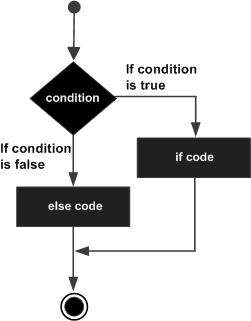
示例
#!/usr/bin/tclsh

set a 100

#check the boolean condition
if {$a < 20 } {
   #if condition is true then print the following
   puts "a is less than 20"
} else {
   #if condition is false then print the following
   puts "a is not less than 20"
}
puts "value of a is : $a"
當以上程式碼編譯並執行時,會產生以下結果:
a is not less than 20;
value of a is : 100
if...else if...else 語句
一個'if'語句後面可以跟著一個可選的else if...else語句,這對於使用單個 if...else if 語句測試各種條件非常有用。
使用 if 、else if、else 語句時,需要記住以下幾點:
一個'if'可以有零個或一個else,並且它必須放在任何else if之後。
一個'if'可以有零到多個else if,並且它們必須放在else之前。
一旦一個'else if'成功,就不會再測試任何剩餘的else if或else。
語法
Tcl 語言中'if...else if...else'語句的語法如下:
if {boolean_expression 1} {
   # Executes when the boolean expression 1 is true
} elseif {boolean_expression 2} {
   # Executes when the boolean expression 2 is true
} elseif {boolean_expression 3} {
   # Executes when the boolean expression 3 is true
} else {
   # executes when the none of the above condition is true
}
示例
#!/usr/bin/tclsh

set a 100

#check the boolean condition
if { $a == 10 } {
   # if condition is true then print the following
   puts "Value of a is 10"
} elseif { $a == 20 } {
   # if else if condition is true
   puts "Value of a is 20"
} elseif { $a == 30 } {
   # if else if condition is true
   puts "Value of a is 30"
} else {
   # if none of the conditions is true
   puts "None of the values is matching"
}

puts "Exact value of a is: $a"
當以上程式碼編譯並執行時,會產生以下結果:
None of the values is matching
Exact value of a is: 100
tcl_decisions.htm
廣告