
 資料結構
資料結構 網路
網路 RDBMS
RDBMS 作業系統
作業系統 Java
Java MS Excel
 iOS
iOS HTML
HTML CSS
CSS Android
 Python
 C 程式設計
 C++
C++ C#
C# MongoDB
 MySQL
MySQL Javascript
 PHP
PHP 物理
物理 化學
化學 生物
生物 數學
數學 英語
英語 經濟學
經濟學 心理學
心理學 社會學
社會學 時尚學
時尚學 法學
法學使用 CSS 的靜態定位
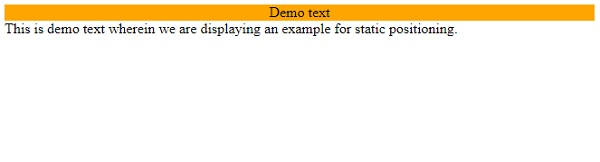
在 CSS 中,我們可以將元素的定位定義為靜態的,這樣不會以任何特殊方式呈現元素,而是以正常方式呈現。定位為靜態的元素不會受到任何 CSS 定位屬性(left、right、top 和 bottom)的影響。
示例
我們來看一個 CSS 靜態定位方法的示例 −
<!DOCTYPE html>
<html>
<head>
<style>
p {
   margin: 0;
}
div:first-child {
   position: static;
   background-color: orange;
   text-align: center;
}
</style>
</head>
<body>
<div>Demo text</div>
<p>This is demo text wherein we are displaying an example for static positioning.</p>
<div></div>
</body>
</html>
輸出
以下是對上述程式碼的輸出 −
示例
我們來看另一個定位方法的示例 −
<!DOCTYPE html>
<html>
<head>
<style>
div {
   border: 2px double #a43356;
   margin: 5px;
   padding: 5px;
}
#d1 {
   position: relative;
   height: 10em;
}
#d2 {
   position: absolute;
   width: 20%;
   bottom: 10px; /*relative to parent d1*/
}
#d3 {
   position: fixed;
   width: 30%;
   top:10em; /*relative to viewport*/
}
</style>
</head>
<body>
<div id="d1">This is demo paragraph. This is demo paragraph.
This is demo paragraph. This is demo paragraph.
This is demo paragraph. This is demo paragraph.
This is demo paragraph. This is demo paragraph.
<mark>relative</mark>
<div id="d2"><mark>absolute</mark></div>
<div id="d3"><mark>fixed</mark></div>
</div>
</body>
</html>
輸出
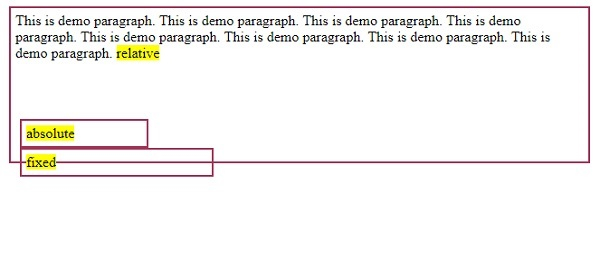
以下是對上述程式碼的輸出 −

更新於:07-Jan-2020
1K+ 瀏覽

廣告