
- Spring JDBC 教程
- Spring JDBC - 首頁
- Spring JDBC - 概述
- Spring JDBC - 環境設定
- Spring JDBC - 配置資料來源
- Spring JDBC - 第一個應用程式
- 基本CRUD示例
- Spring JDBC - 建立查詢
- Spring JDBC - 讀取查詢
- Spring JDBC - 更新查詢
- Spring JDBC - 刪除查詢
- 高階JDBC示例
- 呼叫儲存過程
- Spring JDBC - 呼叫儲存函式
- Spring JDBC - 處理BLOB
- Spring JDBC - 處理CLOB
- Spring JDBC 批處理示例
- Spring JDBC - 批處理操作
- 物件批處理操作
- 多個批處理操作
- Spring JDBC 物件
- Spring JDBC - JdbcTemplate
- PreparedStatementSetter
- Spring JDBC - ResultSetExtractor
- Spring JDBC - RowMapper
- NamedParameterJdbcTemplate
- Spring JDBC - SimpleJdbcInsert
- Spring JDBC - SimpleJdbcCall
- Spring JDBC - SqlQuery
- Spring JDBC - SqlUpdate
- Spring JDBC - StoredProcedure
- Spring JDBC 有用資源
- Spring JDBC 快速指南
- Spring JDBC - 有用資源
- Spring JDBC - 討論
Spring JDBC 快速指南
Spring JDBC - 概述
使用普通的JDBC操作資料庫時,編寫不必要的程式碼來處理異常、開啟和關閉資料庫連線等會變得很麻煩。然而,Spring JDBC框架負責所有底層細節,從開啟連線、準備和執行SQL語句、處理異常、處理事務,到最終關閉連線。
您只需要做的就是定義連線引數並指定要執行的SQL語句,並在從資料庫提取資料時為每次迭代執行所需的工作。
Spring JDBC 提供了幾種方法,以及相應的不同類來與資料庫互動。在本教程中,我們將採用經典且最流行的方法,該方法使用框架的JdbcTemplate類。這是管理所有資料庫通訊和異常處理的中心框架類。
JdbcTemplate 類
JdbcTemplate類執行SQL查詢、更新語句和儲存過程呼叫,對ResultSet進行迭代並提取返回的引數值。它還會捕獲JDBC異常並將它們轉換為在org.springframework.dao包中定義的通用、更具資訊量的異常層次結構。
一旦配置,JdbcTemplate類的例項是執行緒安全的。因此,您可以配置JdbcTemplate的單個例項,然後安全地將此共享引用注入到多個DAO中。
使用JdbcTemplate類時,一種常見的做法是在Spring配置檔案中配置一個DataSource,然後將該共享DataSource bean依賴注入到您的DAO類中。JdbcTemplate是在DataSource的setter中建立的。
資料訪問物件 (DAO)
DAO代表**資料訪問物件**,通常用於資料庫互動。DAO的存在是為了提供一種讀取和寫入資料庫資料的方法,它們應該透過一個介面公開此功能,應用程式的其餘部分將透過該介面訪問它們。
Spring中的資料訪問物件(DAO)支援使您可以以一致的方式使用JDBC、Hibernate、JPA或JDO等資料訪問技術。
Spring JDBC - 環境設定
本教程中的所有示例都是使用Eclipse IDE編寫的。因此,我們建議您應該在您的機器上安裝最新版本的Eclipse。
要安裝Eclipse IDE,請從www.eclipse.org/downloads下載最新的Eclipse二進位制檔案。下載安裝程式後,將二進位制分發版解壓縮到方便的位置。例如,在Windows上為C:\eclipse,在Linux/Unix上為/usr/local/eclipse,最後適當地設定PATH變數。
可以透過在Windows機器上執行以下命令啟動Eclipse,或者您可以簡單地雙擊eclipse.exe
%C:\eclipse\eclipse.exe
可以透過在Unix(Solaris、Linux等)機器上執行以下命令啟動Eclipse:
$/usr/local/eclipse/eclipse
成功啟動後,如果一切正常,則應顯示以下結果:
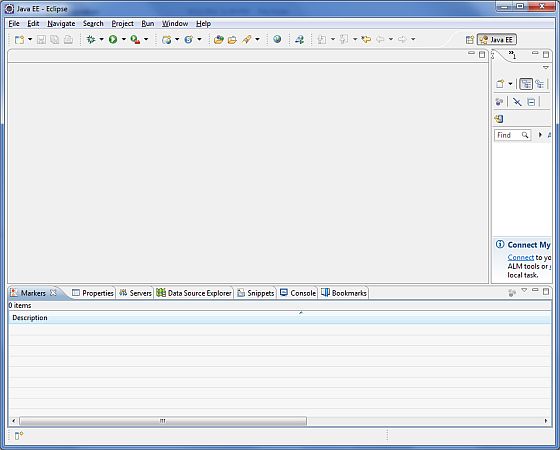
步驟3 - 下載Maven存檔
從https://maven.apache.org/download.cgi下載Maven 3.8.4。
| 作業系統 | 存檔名稱 |
|---|---|
| Windows | apache-maven-3.8.4-bin.zip |
| Linux | apache-maven-3.8.4-bin.tar.gz |
| Mac | apache-maven-3.8.4-bin.tar.gz |
步驟4 - 解壓Maven存檔
將存檔解壓縮到您希望安裝Maven 3.8.4的目錄中。將從存檔建立子目錄apache-maven-3.8.4。
| 作業系統 | 位置(根據您的安裝情況可能有所不同) |
|---|---|
| Windows | C:\Program Files\Apache Software Foundation\apache-maven-3.8.4 |
| Linux | /usr/local/apache-maven |
| Mac | /usr/local/apache-maven |
步驟5 - 設定Maven環境變數
將M2_HOME、M2、MAVEN_OPTS新增到環境變數中。
| 作業系統 | 輸出 |
|---|---|
| Windows | 使用系統屬性設定環境變數。 M2_HOME=C:\Program Files\Apache Software Foundation\apache-maven-3.8.4 M2=%M2_HOME%\bin MAVEN_OPTS=-Xms256m -Xmx512m |
| Linux | 開啟命令終端並設定環境變數。 export M2_HOME=/usr/local/apache-maven/apache-maven-3.8.4 export M2=$M2_HOME/bin export MAVEN_OPTS=-Xms256m -Xmx512m |
| Mac | 開啟命令終端並設定環境變數。 export M2_HOME=/usr/local/apache-maven/apache-maven-3.8.4 export M2=$M2_HOME/bin export MAVEN_OPTS=-Xms256m -Xmx512m |
步驟6 - 將Maven bin目錄位置新增到系統路徑
現在將M2變數附加到系統路徑。
| 作業系統 | 輸出 |
|---|---|
| Windows | 將字串;%M2%附加到系統變數Path的末尾。 |
| Linux | export PATH=$M2:$PATH |
| Mac | export PATH=$M2:$PATH |
步驟7 - 驗證Maven安裝
現在開啟控制檯並執行以下**mvn**命令。
| 作業系統 | 任務 | 命令 |
|---|---|---|
| Windows | 開啟命令控制檯 | c:\> mvn --version |
| Linux | 開啟命令終端 | $ mvn --version |
| Mac | 開啟終端 | machine:~ joseph$ mvn --version |
最後,驗證上述命令的輸出,結果應如下所示:
| 作業系統 | 輸出 |
|---|---|
| Windows | Apache Maven 3.8.4 (9b656c72d54e5bacbed989b64718c159fe39b537) Maven home: C:\Program Files\Apache Software Foundation\apache-maven-3.8.4 Java version: 11.0.11, vendor: Oracle Corporation, runtime: C:\Program Files\Java\jdk11.0.11\ Default locale: en_IN, platform encoding: Cp1252 OS name: "windows 10", version: "10.0", arch: "amd64", family: "windows" |
| Linux | Apache Maven 3.8.4 (9b656c72d54e5bacbed989b64718c159fe39b537) Java version: 11.0.11 Java home: /usr/local/java-current/jre |
| Mac | Apache Maven 3.8.4 (9b656c72d54e5bacbed989b64718c159fe39b537) Java version: 11.0.11 Java home: /Library/Java/Home/jre |
Spring JDBC - 配置資料來源
讓我們在我們的資料庫**TEST**中建立一個數據庫表**Student**。我假設您使用的是MySQL資料庫,如果您使用的是任何其他資料庫,則可以相應地更改您的DDL和SQL查詢。
CREATE TABLE Student(
   ID   INT NOT NULL AUTO_INCREMENT,
   NAME VARCHAR(20) NOT NULL,
   AGE  INT NOT NULL,
   PRIMARY KEY (ID)
);
現在我們需要向JdbcTemplate提供一個DataSource,以便它可以自行配置以獲得資料庫訪問許可權。您可以使用如下所示的程式碼片段在XML檔案中配置DataSource:
<bean id = "dataSource"
class = "org.springframework.jdbc.datasource.DriverManagerDataSource">
   <property name = "driverClassName" value = "com.mysql.cj.jdbc.Driver"/>
   <property name = "url" value = "jdbc:mysql://:3306/TEST"/>
   <property name = "username" value = "root"/>
   <property name = "password" value = "admin"/>
</bean>
在下一章中,我們將編寫第一個使用已配置資料庫的應用程式。
Spring JDBC - 第一個應用程式
概述
為了理解與使用JdbcTemplate類的Spring JDBC框架相關的概念,讓我們編寫一個簡單的示例,該示例將在以下Student表上實現插入和讀取操作。
CREATE TABLE Student(
   ID   INT NOT NULL AUTO_INCREMENT,
   NAME VARCHAR(20) NOT NULL,
   AGE  INT NOT NULL,
   PRIMARY KEY (ID)
);
讓我們繼續編寫一個簡單的基於控制檯的Spring JDBC應用程式,它將演示JDBC概念。
建立專案
讓我們開啟命令控制檯,轉到C:\MVN目錄並執行以下**mvn**命令。
C:\MVN>mvn archetype:generate -DgroupId=com.tutorialspoint
-DartifactId=Student -DarchetypeArtifactId=maven-archetype-quickstart
-DinteractiveMode=false
Maven將開始處理並將建立完整的Java應用程式專案結構。
[INFO] Scanning for projects...
[INFO]
[INFO] ------------------< org.apache.maven:standalone-pom >-------------------
[INFO] Building Maven Stub Project (No POM) 1
[INFO] --------------------------------[ pom ]---------------------------------
[INFO]
[INFO] >>> maven-archetype-plugin:3.2.0:generate (default-cli) > generate-sources @ standalone-pom >>>
[INFO]
[INFO] <<< maven-archetype-plugin:3.2.0:generate (default-cli) < generate-sources @ standalone-pom <<<
[INFO]
[INFO]
[INFO] --- maven-archetype-plugin:3.2.0:generate (default-cli) @ standalone-pom ---
[INFO] Generating project in Batch mode
[INFO] ----------------------------------------------------------------------------
[INFO] Using following parameters for creating project from Old (1.x) Archetype: maven-archetype-quickstart:1.0
[INFO] ----------------------------------------------------------------------------
[INFO] Parameter: basedir, Value: C:\MVN
[INFO] Parameter: package, Value: com.tutorialspoint
[INFO] Parameter: groupId, Value: com.tutorialspoint
[INFO] Parameter: artifactId, Value: Student
[INFO] Parameter: packageName, Value: com.tutorialspoint
[INFO] Parameter: version, Value: 1.0-SNAPSHOT
[INFO] project created from Old (1.x) Archetype in dir: C:\MVN\Student
[INFO] ------------------------------------------------------------------------
[INFO] BUILD SUCCESS
[INFO] ------------------------------------------------------------------------
[INFO] Total time:  6.842 s
[INFO] Finished at: 2022-01-01T13:49:20+05:30
[INFO] ------------------------------------------------------------------------
現在轉到C:/MVN目錄。您將看到一個名為student(如artifactId中指定)的已建立Java應用程式專案。更新POM.xml以包含Spring JDBC依賴項。新增Student.java、StudentMapper.java、MainApp.java、StudentDAO.java和StudentJDBCTemplate.java檔案。
POM.xml
<project xmlns = "http://maven.apache.org/POM/4.0.0"
   xmlns:xsi = "http://www.w3.org/2001/XMLSchema-instance"
   xsi:schemaLocation = "http://maven.apache.org/POM/4.0.0
   http://maven.apache.org/maven-v4_0_0.xsd">

   <modelVersion>4.0.0</modelVersion>
   <groupId>com.tutorialspoint</groupId>
   <artifactId>Student</artifactId>
   <packaging>jar</packaging>
   <version>1.0-SNAPSHOT</version>
   <name>Student</name>
   <url>http://maven.apache.org</url>

   <dependencies>
      <dependency>
         <groupId>junit</groupId>
         <artifactId>junit</artifactId>
         <version>4.11</version>
         <scope>test</scope>
      </dependency>

      <dependency>
         <groupId>org.springframework</groupId>
         <artifactId>spring-jdbc</artifactId>
         <version>5.3.14</version>
      </dependency>

      <dependency>
         <groupId>org.springframework</groupId>
         <artifactId>spring-context</artifactId>
         <version>5.3.14</version>
      </dependency>

      <dependency>
         <groupId>mysql</groupId>
         <artifactId>mysql-connector-java</artifactId>
         <version>8.0.27</version>
      </dependency>
   </dependencies>
</project>
StudentDAO.java
以下是資料訪問物件介面檔案**StudentDAO.java**的內容。
package com.tutorialspoint;

import java.util.List;
import javax.sql.DataSource;

public interface StudentDAO {
   /**
    * This is the method to be used to initialize
    * database resources ie. connection.
   */
   public void setDataSource(DataSource ds);

   /**
    * This is the method to be used to create
    * a record in the Student table.
   */
   public void create(String name, Integer age);

   /**
    * This is the method to be used to list down
    * all the records from the Student table.
   */
   public List<Student> listStudents();
}
Student.java
以下是**Student.java**檔案的內容。
package com.tutorialspoint;

// Student POJO for Student Table
public class Student {
   private Integer age;
   private String name;
   private Integer id;

   // setter/getter methods
   public void setAge(Integer age) {
      this.age = age;
   }
   public Integer getAge() {
      return age;
   }
   public void setName(String name) {
      this.name = name;
   }
   public String getName() {
      return name;
   }
   public void setId(Integer id) {
      this.id = id;
   }
   public Integer getId() {
      return id;
   }
}
StudentMapper.java
以下是**StudentMapper.java**檔案的內容。
package com.tutorialspoint;

import java.sql.ResultSet;
import java.sql.SQLException;
import org.springframework.jdbc.core.RowMapper;

// Row Mapper Object to map Student table entry with Student Object
public class StudentMapper implements RowMapper<Student> {
   public Student mapRow(ResultSet rs, int rowNum) throws SQLException {
      Student student = new Student();
      student.setId(rs.getInt("id"));
      student.setName(rs.getString("name"));
      student.setAge(rs.getInt("age"));
      return student;
   }
}
StudentJDBCTemplate.java
以下是為已定義的DAO介面StudentDAO編寫的實現類檔案**StudentJDBCTemplate.java**。
package com.tutorialspoint;

import java.util.List;
import javax.sql.DataSource;
import org.springframework.jdbc.core.JdbcTemplate;

// DAO instance to persist Student values
public class StudentJDBCTemplate implements StudentDAO {
   private DataSource dataSource;
   private JdbcTemplate jdbcTemplateObject;

   // set the datasource and jdbctemplate
   public void setDataSource(DataSource dataSource) {
      this.dataSource = dataSource;
      this.jdbcTemplateObject = new JdbcTemplate(dataSource);
   }

   // create and persist a new student
   public void create(String name, Integer age) {
      String SQL = "insert into Student (name, age) values (?, ?)";

      jdbcTemplateObject.update( SQL, name, age);
      System.out.println("Created Record Name = " + name + " Age = " + age);
      return;
   }

   // get list of all students
   public List<Student> listStudents() {
      String SQL = "select * from Student";
      List <Student> students = jdbcTemplateObject.query(SQL, new StudentMapper());
      return students;
   }
}
MainApp.java
以下是**MainApp.java**檔案的內容。
package com.tutorialspoint;

import java.util.List;
import org.springframework.context.ApplicationContext;
import org.springframework.context.support.ClassPathXmlApplicationContext;
import com.tutorialspoint.StudentJDBCTemplate;

public class MainApp {
   public static void main(String[] args) {

      // Create the application context by reading Beans.xml
      ApplicationContext context = new ClassPathXmlApplicationContext("Beans.xml");

      // Create the JDBCTemplate instance from spring context
      StudentJDBCTemplate studentJDBCTemplate = (StudentJDBCTemplate)
         context.getBean("studentJDBCTemplate");

	  // create and persist students
      System.out.println("------Records Creation--------" );
      studentJDBCTemplate.create("Zara", 11);
      studentJDBCTemplate.create("Nuha", 2);
      studentJDBCTemplate.create("Ayan", 15);

      // get list of all students from database
      System.out.println("------Listing Multiple Records--------" );
      List<Student> students = studentJDBCTemplate.listStudents();

      // print each student details
      for (Student record : students) {
         System.out.print("ID : " + record.getId() );
         System.out.print(", Name : " + record.getName() );
         System.out.println(", Age : " + record.getAge());
      }
   }
}
Beans.xml
以下是配置檔案**Beans.xml**。
<?xml version = "1.0" encoding = "UTF-8"?>
<beans xmlns = "http://www.springframework.org/schema/beans"
   xmlns:xsi = "http://www.w3.org/2001/XMLSchema-instance"
   xsi:schemaLocation = "http://www.springframework.org/schema/beans
   http://www.springframework.org/schema/beans/spring-beans-3.0.xsd ">

   <!-- Initialization for data source -->
   <bean id = "dataSource"
      class = "org.springframework.jdbc.datasource.DriverManagerDataSource">
      <property name = "driverClassName" value = "com.mysql.cj.jdbc.Driver"/>
      <property name = "url" value = "jdbc:mysql://:3306/TEST"/>
      <property name = "username" value = "root"/>
      <property name = "password" value = "admin"/>
   </bean>

   <!-- Definition for studentJDBCTemplate bean -->
   <bean id = "studentJDBCTemplate"
      class = "com.tutorialspoint.StudentJDBCTemplate">
      <property name = "dataSource" ref = "dataSource" />
   </bean>

</beans>
輸出
建立原始檔和bean配置檔案後,讓我們執行應用程式。如果您的應用程式一切正常,它將列印以下訊息。
------Records Creation--------
Created Record Name = Zara Age = 11
Created Record Name = Nuha Age = 2
Created Record Name = Ayan Age = 15
------Listing Multiple Records--------
ID : 1, Name : Zara, Age : 11
ID : 2, Name : Nuha, Age : 2
ID : 3, Name : Ayan, Age : 15
Spring JDBC - 建立查詢
以下示例將演示如何使用Spring JDBC藉助Insert查詢建立查詢。我們將在Student表中插入一些記錄。
語法
String insertQuery = "insert into Student (name, age) values (?, ?)";
jdbcTemplateObject.update( insertQuery, name, age);
其中,
**insertQuery** - 包含佔位符的Insert查詢。
**jdbcTemplateObject** - 用於將學生物件插入資料庫的StudentJDBCTemplate物件。
示例
為了理解上述與Spring JDBC相關的概念,讓我們編寫一個將插入查詢的示例。為了編寫我們的示例,讓我們準備好一個可執行的Eclipse IDE,並使用以下步驟建立一個Spring應用程式。
| 步驟 | 描述 |
|---|---|
| 1 | 更新在章節Spring JDBC - 第一個應用程式下建立的專案Student。 |
| 2 | 更新bean配置並按如下所述執行應用程式。 |
StudentDAO.java
以下是資料訪問物件介面檔案**StudentDAO.java**的內容。
package com.tutorialspoint;

import java.util.List;
import javax.sql.DataSource;

public interface StudentDAO {
   /**
    * This is the method to be used to initialize
    * database resources ie. connection.
   */
   public void setDataSource(DataSource ds);

   /**
    * This is the method to be used to create
    * a record in the Student table.
   */
   public void create(String name, Integer age);

   /**
    * This is the method to be used to list down
    * all the records from the Student table.
   */
   public List<Student> listStudents();
}
Student.java
以下是**Student.java**檔案的內容。
package com.tutorialspoint;

// Student POJO for Student Table
public class Student {
   private Integer age;
   private String name;
   private Integer id;

   // setter/getter methods
   public void setAge(Integer age) {
      this.age = age;
   }
   public Integer getAge() {
      return age;
   }
   public void setName(String name) {
      this.name = name;
   }
   public String getName() {
      return name;
   }
   public void setId(Integer id) {
      this.id = id;
   }
   public Integer getId() {
      return id;
   }
}
StudentMapper.java
以下是**StudentMapper.java**檔案的內容。
package com.tutorialspoint;

import java.sql.ResultSet;
import java.sql.SQLException;
import org.springframework.jdbc.core.RowMapper;

// Row Mapper Object to map Student table entry with Student Object
public class StudentMapper implements RowMapper<Student> {
   public Student mapRow(ResultSet rs, int rowNum) throws SQLException {
      Student student = new Student();
      student.setId(rs.getInt("id"));
      student.setName(rs.getString("name"));
      student.setAge(rs.getInt("age"));
      return student;
   }
}
StudentJDBCTemplate.java
以下是為已定義的DAO介面StudentDAO編寫的實現類檔案**StudentJDBCTemplate.java**。
package com.tutorialspoint;

import java.util.List;
import javax.sql.DataSource;
import org.springframework.jdbc.core.JdbcTemplate;

// DAO instance to persist Student values
public class StudentJDBCTemplate implements StudentDAO {
   private DataSource dataSource;
   private JdbcTemplate jdbcTemplateObject;

   // set the datasource and jdbctemplate
   public void setDataSource(DataSource dataSource) {
      this.dataSource = dataSource;
      this.jdbcTemplateObject = new JdbcTemplate(dataSource);
   }

   // persist a new student
   public void create(String name, Integer age) {
      String insertQuery = "insert into Student (name, age) values (?, ?)";
      jdbcTemplateObject.update( insertQuery, name, age);
      System.out.println("Created Record Name = " + name + " Age = " + age);
      return;
   }

   // get list of all students
   public List<Student> listStudents() {
      String SQL = "select * from Student";
      List <Student> students = jdbcTemplateObject.query(SQL, new StudentMapper());
      return students;
   }
}
MainApp.java
以下是**MainApp.java**檔案的內容。
package com.tutorialspoint;

import java.util.List;
import org.springframework.context.ApplicationContext;
import org.springframework.context.support.ClassPathXmlApplicationContext;
import com.tutorialspoint.StudentJDBCTemplate;

public class MainApp {
   public static void main(String[] args) {
      // Create the application context by reading Beans.xml
      ApplicationContext context = new ClassPathXmlApplicationContext("Beans.xml");

      // Create the JDBCTemplate instance from spring context
      StudentJDBCTemplate studentJDBCTemplate = (StudentJDBCTemplate)context.getBean("studentJDBCTemplate");

      // create and persist students
      System.out.println("------Records Creation--------" );
      studentJDBCTemplate.create("Zara", 11);
      studentJDBCTemplate.create("Nuha", 2);
      studentJDBCTemplate.create("Ayan", 15);

      // get all students
      System.out.println("------Listing Multiple Records--------" );
      List<Student> students = studentJDBCTemplate.listStudents();

      // print students
      for (Student record : students) {
         System.out.print("ID : " + record.getId() );
         System.out.print(", Name : " + record.getName() );
         System.out.println(", Age : " + record.getAge());
      }
   }
}
Beans.xml
以下是配置檔案**Beans.xml**。
<?xml version = "1.0" encoding = "UTF-8"?>
<beans xmlns = "http://www.springframework.org/schema/beans"
   xmlns:xsi = "http://www.w3.org/2001/XMLSchema-instance"
   xsi:schemaLocation = "http://www.springframework.org/schema/beans
   http://www.springframework.org/schema/beans/spring-beans-3.0.xsd ">

   <!-- Initialization for data source -->
   <bean id = "dataSource"
      class = "org.springframework.jdbc.datasource.DriverManagerDataSource">
      <property name = "driverClassName" value = "com.mysql.cj.jdbc.Driver"/>
      <property name = "url" value = "jdbc:mysql://:3306/TEST"/>
      <property name = "username" value = "root"/>
      <property name = "password" value = "admin"/>
   </bean>

   <!-- Definition for studentJDBCTemplate bean -->
   <bean id = "studentJDBCTemplate"
      class = "com.tutorialspoint.StudentJDBCTemplate">
      <property name = "dataSource" ref = "dataSource" />
   </bean>
</beans>
輸出
建立原始檔和bean配置檔案後,讓我們執行應用程式。如果您的應用程式一切正常,它將列印以下訊息。
------Records Creation--------
Created Record Name = Zara Age = 11
Created Record Name = Nuha Age = 2
Created Record Name = Ayan Age = 15
------Listing Multiple Records--------
ID : 1, Name : Zara, Age : 11
ID : 2, Name : Nuha, Age : 2
ID : 3, Name : Ayan, Age : 15
Spring JDBC - 讀取查詢
概述
以下示例將演示如何使用Spring JDBC讀取查詢。我們將讀取Student表中可用的記錄。
語法
String selectQuery = "select * from Student";
List <Student> students = jdbcTemplateObject.query(selectQuery, new StudentMapper());
其中,
**selectQuery** - 讀取學生的Select查詢。
**jdbcTemplateObject** - 用於從資料庫讀取學生物件的StudentJDBCTemplate物件。
**StudentMapper** - StudentMapper是一個RowMapper物件,用於將每個提取的記錄對映到學生物件。
示例
為了理解上述與Spring JDBC相關的概念,讓我們編寫一個將選擇查詢的示例。為了編寫我們的示例,讓我們準備好一個可執行的Eclipse IDE,並使用以下步驟建立一個Spring應用程式。
| 步驟 | 描述 |
|---|---|
| 1 | 更新在章節Spring JDBC - 第一個應用程式下建立的專案Student。 |
| 2 | 更新bean配置並按如下所述執行應用程式。 |
StudentDAO.java
以下是資料訪問物件介面檔案**StudentDAO.java**的內容。
package com.tutorialspoint;

import java.util.List;
import javax.sql.DataSource;

public interface StudentDAO {
   /**
    * This is the method to be used to initialize
    * database resources ie. connection.
   */
   public void setDataSource(DataSource ds);

   /**
    * This is the method to be used to list down
    * all the records from the Student table.
   */
   public List<Student> listStudents();
}
Student.java
以下是**Student.java**檔案的內容。
package com.tutorialspoint;

// Student POJO for Student Table
public class Student {
   private Integer age;
   private String name;
   private Integer id;

   // setter/getter methods
   public void setAge(Integer age) {
      this.age = age;
   }
   public Integer getAge() {
      return age;
   }
   public void setName(String name) {
      this.name = name;
   }
   public String getName() {
      return name;
   }
   public void setId(Integer id) {
      this.id = id;
   }
   public Integer getId() {
      return id;
   }
}
StudentMapper.java
以下是**StudentMapper.java**檔案的內容。
package com.tutorialspoint;

import java.sql.ResultSet;
import java.sql.SQLException;
import org.springframework.jdbc.core.RowMapper;

// Row Mapper Object to map Student table entry with Student Object
public class StudentMapper implements RowMapper<Student> {
   public Student mapRow(ResultSet rs, int rowNum) throws SQLException {
      Student student = new Student();
      student.setId(rs.getInt("id"));
      student.setName(rs.getString("name"));
      student.setAge(rs.getInt("age"));
      return student;
   }
}
StudentJDBCTemplate.java
以下是為已定義的DAO介面StudentDAO編寫的實現類檔案**StudentJDBCTemplate.java**。
package com.tutorialspoint;

import java.util.List;
import javax.sql.DataSource;
import org.springframework.jdbc.core.JdbcTemplate;

// DAO instance to persist Student values
public class StudentJDBCTemplate implements StudentDAO {
   private DataSource dataSource;
   private JdbcTemplate jdbcTemplateObject;

   // set the datasource and jdbctemplate
   public void setDataSource(DataSource dataSource) {
      this.dataSource = dataSource;
      this.jdbcTemplateObject = new JdbcTemplate(dataSource);
   }

   // get all the students from the database
   public List<Student> listStudents() {
      String SQL = "select * from Student";
      List <Student> students = jdbcTemplateObject.query(SQL, new StudentMapper());
      return students;
   }
}
MainApp.java
以下是**MainApp.java**檔案的內容。
package com.tutorialspoint;

import java.util.List;
import org.springframework.context.ApplicationContext;
import org.springframework.context.support.ClassPathXmlApplicationContext;
import com.tutorialspoint.StudentJDBCTemplate;

public class MainApp {
   public static void main(String[] args) {

      // Create the application context by reading Beans.xml
      ApplicationContext context = new ClassPathXmlApplicationContext("Beans.xml");

      // Create the JDBCTemplate instance from spring context
      StudentJDBCTemplate studentJDBCTemplate = (StudentJDBCTemplate)context.getBean("studentJDBCTemplate");

      // get all the students
      System.out.println("------Listing Multiple Records--------" );
      List<Student> students = studentJDBCTemplate.listStudents();

      // print all the students
      for (Student record : students) {
         System.out.print("ID : " + record.getId() );
         System.out.print(", Name : " + record.getName() );
         System.out.println(", Age : " + record.getAge());
      }
   }
}
Beans.xml
以下是配置檔案**Beans.xml**。
<?xml version = "1.0" encoding = "UTF-8"?>
<beans xmlns = "http://www.springframework.org/schema/beans"
   xmlns:xsi = "http://www.w3.org/2001/XMLSchema-instance"
   xsi:schemaLocation = "http://www.springframework.org/schema/beans
   http://www.springframework.org/schema/beans/spring-beans-3.0.xsd ">

   <!-- Initialization for data source -->
   <bean id = "dataSource"
      class = "org.springframework.jdbc.datasource.DriverManagerDataSource">
      <property name = "driverClassName" value = "com.mysql.cj.jdbc.Driver"/>
      <property name = "url" value = "jdbc:mysql://:3306/TEST"/>
      <property name = "username" value = "root"/>
      <property name = "password" value = "admin"/>
   </bean>

   <!-- Definition for studentJDBCTemplate bean -->
   <bean id="studentJDBCTemplate"
      class = "com.tutorialspoint.StudentJDBCTemplate">
      <property name = "dataSource" ref = "dataSource" />
   </bean>
</beans>
輸出
建立原始檔和bean配置檔案後,讓我們執行應用程式。如果您的應用程式一切正常,它將列印以下訊息。
------Listing Multiple Records--------
ID : 1, Name : Zara, Age : 11
ID : 2, Name : Nuha, Age : 2
ID : 3, Name : Ayan, Age : 15
Spring JDBC - 更新查詢
概述
以下示例將演示如何使用Spring JDBC更新查詢。我們將更新Student表中可用的記錄。
語法
String updateQuery = "update Student set age = ? where id = ?";
jdbcTemplateObject.update(updateQuery, age, id);
其中,
**updateQuery** - 用於更新帶有佔位符的學生的Update查詢。
**jdbcTemplateObject** - 用於在資料庫中更新學生物件的StudentJDBCTemplate物件。
示例
為了理解上述與 Spring JDBC 相關的概念,讓我們編寫一個更新查詢的示例。為了編寫示例,讓我們準備好一個可執行的 Eclipse IDE,並使用以下步驟建立一個 Spring 應用程式。
| 步驟 | 描述 |
|---|---|
| 1 | 更新在章節 Spring JDBC - 第一個應用程式 中建立的 Student 專案。 |
| 2 | 更新bean配置並按如下所述執行應用程式。 |
StudentDAO.java
以下是資料訪問物件介面檔案**StudentDAO.java**的內容。
package com.tutorialspoint;

import java.util.List;
import javax.sql.DataSource;

public interface StudentDAO {
   /**
    * This is the method to be used to initialize
    * database resources ie. connection.
   */
   public void setDataSource(DataSource ds);

   /**
    * This is the method to be used to update
    * a record into the Student table.
   */
   public void update(Integer id, Integer age);

   /**
    * This is the method to be used to list down
    * a record from the Student table corresponding
    * to a passed student id.
   */
   public Student getStudent(Integer id);
}
Student.java
以下是**Student.java**檔案的內容。
package com.tutorialspoint;

// Student POJO for Student Table
public class Student {
   private Integer age;
   private String name;
   private Integer id;

   // setter/getter methods
   public void setAge(Integer age) {
      this.age = age;
   }
   public Integer getAge() {
      return age;
   }
   public void setName(String name) {
      this.name = name;
   }
   public String getName() {
      return name;
   }
   public void setId(Integer id) {
      this.id = id;
   }
   public Integer getId() {
      return id;
   }
}
StudentMapper.java
以下是**StudentMapper.java**檔案的內容。
package com.tutorialspoint;

import java.sql.ResultSet;
import java.sql.SQLException;
import org.springframework.jdbc.core.RowMapper;

// Row Mapper Object to map Student table entry with Student Object
public class StudentMapper implements RowMapper<Student> {
   public Student mapRow(ResultSet rs, int rowNum) throws SQLException {
      Student student = new Student();
      student.setId(rs.getInt("id"));
      student.setName(rs.getString("name"));
      student.setAge(rs.getInt("age"));
      return student;
   }
}
StudentJDBCTemplate.java
以下是為已定義的DAO介面StudentDAO編寫的實現類檔案**StudentJDBCTemplate.java**。
package com.tutorialspoint;

import java.util.List;
import javax.sql.DataSource;
import org.springframework.jdbc.core.JdbcTemplate;

// DAO instance to persist Student values
public class StudentJDBCTemplate implements StudentDAO {
   private DataSource dataSource;
   private JdbcTemplate jdbcTemplateObject;

   // set the datasource and jdbctemplate
   public void setDataSource(DataSource dataSource) {
      this.dataSource = dataSource;
      this.jdbcTemplateObject = new JdbcTemplate(dataSource);
   }

   // update the student age based on id
   public void update(Integer id, Integer age){
      String SQL = "update Student set age = ? where id = ?";
      jdbcTemplateObject.update(SQL, age, id);
      System.out.println("Updated Record with ID = " + id );
      return;
   }

   // get the student based on id
   public Student getStudent(Integer id) {
      String SQL = "select * from Student where id = ?";
      Student student = jdbcTemplateObject.queryForObject(
         SQL, new Object[]{id}, new StudentMapper()
      );
      return student;
   }
}
MainApp.java
以下是**MainApp.java**檔案的內容。
package com.tutorialspoint;

import java.util.List;
import org.springframework.context.ApplicationContext;
import org.springframework.context.support.ClassPathXmlApplicationContext;
import com.tutorialspoint.StudentJDBCTemplate;

public class MainApp {
   public static void main(String[] args) {
      // Create the application context by reading Beans.xml
      ApplicationContext context = new ClassPathXmlApplicationContext("Beans.xml");

	  // Create the JDBCTemplate instance from spring context
      StudentJDBCTemplate studentJDBCTemplate =
         (StudentJDBCTemplate)context.getBean("studentJDBCTemplate");

      // update the student based on id
      System.out.println("----Updating Record with ID = 2 -----" );
      studentJDBCTemplate.update(2, 20);

      // get the student based on id and print its details
      System.out.println("----Listing Record with ID = 2 -----" );
      Student student = studentJDBCTemplate.getStudent(2);
      System.out.print("ID : " + student.getId() );
      System.out.print(", Name : " + student.getName() );
      System.out.println(", Age : " + student.getAge());
   }
}
Beans.xml
以下是配置檔案**Beans.xml**。
<?xml version = "1.0" encoding = "UTF-8"?>
<beans xmlns = "http://www.springframework.org/schema/beans"
   xmlns:xsi = "http://www.w3.org/2001/XMLSchema-instance"
   xsi:schemaLocation = "http://www.springframework.org/schema/beans
   http://www.springframework.org/schema/beans/spring-beans-3.0.xsd ">

   <!-- Initialization for data source -->
   <bean id = "dataSource"
      class = "org.springframework.jdbc.datasource.DriverManagerDataSource">
      <property name = "driverClassName" value = "com.mysql.cj.jdbc.Driver"/>
      <property name = "url" value = "jdbc:mysql://:3306/TEST"/>
      <property name = "username" value = "root"/>
      <property name = "password" value = "admin"/>
   </bean>

   <!-- Definition for studentJDBCTemplate bean -->
   <bean id = "studentJDBCTemplate"
      class = "com.tutorialspoint.StudentJDBCTemplate">
      <property name = "dataSource" ref = "dataSource" />
   </bean>

</beans>
輸出
建立原始檔和bean配置檔案後,讓我們執行應用程式。如果您的應用程式一切正常,它將列印以下訊息。
----Updating Record with ID = 2 -----
Updated Record with ID = 2
----Listing Record with ID = 2 -----
ID : 2, Name : Nuha, Age : 20
Spring JDBC - 刪除查詢
概述
以下示例將演示如何使用 Spring JDBC 刪除查詢。我們將刪除 Student 表中的一條可用記錄。
語法
String deleteQuery = "delete from Student where id = ?";
jdbcTemplateObject.update(deleteQuery, id);
其中,
deleteQuery − 刪除帶有佔位符的學生的刪除查詢。
jdbcTemplateObject − 用於在資料庫中刪除學生物件的 StudentJDBCTemplate 物件。
示例
為了理解上述與 Spring JDBC 相關的概念,讓我們編寫一個刪除查詢的示例。為了編寫示例,讓我們準備好一個可執行的 Eclipse IDE,並使用以下步驟建立一個 Spring 應用程式。
| 步驟 | 描述 |
|---|---|
| 1 | 更新在章節Spring JDBC - 第一個應用程式下建立的專案Student。 |
| 2 | 更新bean配置並按如下所述執行應用程式。 |
StudentDAO.java
以下是資料訪問物件介面檔案**StudentDAO.java**的內容。
package com.tutorialspoint;

import java.util.List;
import javax.sql.DataSource;

public interface StudentDAO {
   /**
    * This is the method to be used to initialize
    * database resources ie. connection.
   */
   public void setDataSource(DataSource ds);

   /**
    * This is the method to be used to list down
    * all the records from the Student table.
   */
   public List<Student> listStudents();

   /**
    * This is the method to be used to delete
    * a record from the Student table corresponding
    * to a passed student id.
   */
   public void delete(Integer id);
}
Student.java
以下是**Student.java**檔案的內容。
package com.tutorialspoint;

// Student POJO for Student Table
public class Student {
   private Integer age;
   private String name;
   private Integer id;

   // setter/getter methods
   public void setAge(Integer age) {
      this.age = age;
   }
   public Integer getAge() {
      return age;
   }
   public void setName(String name) {
      this.name = name;
   }
   public String getName() {
      return name;
   }
   public void setId(Integer id) {
      this.id = id;
   }
   public Integer getId() {
      return id;
   }
}
StudentMapper.java
以下是**StudentMapper.java**檔案的內容。
package com.tutorialspoint;

import java.sql.ResultSet;
import java.sql.SQLException;
import org.springframework.jdbc.core.RowMapper;


// Row Mapper Object to map Student table entry with Student Object
public class StudentMapper implements RowMapper<Student> {
   public Student mapRow(ResultSet rs, int rowNum) throws SQLException {
      Student student = new Student();
      student.setId(rs.getInt("id"));
      student.setName(rs.getString("name"));
      student.setAge(rs.getInt("age"));
      return student;
   }
}
StudentJDBCTemplate.java
以下是為已定義的DAO介面StudentDAO編寫的實現類檔案**StudentJDBCTemplate.java**。
package com.tutorialspoint;

import java.util.List;
import javax.sql.DataSource;
import org.springframework.jdbc.core.JdbcTemplate;

// DAO instance to persist Student values
public class StudentJDBCTemplate implements StudentDAO {
   private DataSource dataSource;
   private JdbcTemplate jdbcTemplateObject;

   // set the datasource and jdbctemplate
   public void setDataSource(DataSource dataSource) {
      this.dataSource = dataSource;
      this.jdbcTemplateObject = new JdbcTemplate(dataSource);
   }

   // get all the students from the database
   public List<Student> listStudents() {
      String SQL = "select * from Student";
      List <Student> students = jdbcTemplateObject.query(SQL, new StudentMapper());
      return students;
   }

   // delete a student based on id
   public void delete(Integer id){
      String SQL = "delete from Student where id = ?";
      jdbcTemplateObject.update(SQL, id);
      System.out.println("Deleted Record with ID = " + id );
      return;
   }
}
MainApp.java
以下是**MainApp.java**檔案的內容。
package com.tutorialspoint;

import java.util.List;
import org.springframework.context.ApplicationContext;
import org.springframework.context.support.ClassPathXmlApplicationContext;
import com.tutorialspoint.StudentJDBCTemplate;

public class MainApp {
   public static void main(String[] args) {
      // Create the application context by reading Beans.xml
      ApplicationContext context = new ClassPathXmlApplicationContext("Beans.xml");

      // Create the JDBCTemplate instance from spring context
      StudentJDBCTemplate studentJDBCTemplate =
         (StudentJDBCTemplate)context.getBean("studentJDBCTemplate");

      // delete a record based on id
      System.out.println("----Delete Record with ID = 2 -----" );
      studentJDBCTemplate.delete(2);

      // get list of all students
      System.out.println("------Listing Multiple Records--------" );
      List<Student> students = studentJDBCTemplate.listStudents();

      // print all students
      for (Student record : students) {
         System.out.print("ID : " + record.getId() );
         System.out.print(", Name : " + record.getName() );
         System.out.println(", Age : " + record.getAge());
      }
   }
}
Beans.xml
以下是配置檔案**Beans.xml**。
<?xml version = "1.0" encoding = "UTF-8"?>
<beans xmlns = "http://www.springframework.org/schema/beans"
   xmlns:xsi = "http://www.w3.org/2001/XMLSchema-instance"
   xsi:schemaLocation = "http://www.springframework.org/schema/beans
   http://www.springframework.org/schema/beans/spring-beans-3.0.xsd ">

   <!-- Initialization for data source -->
   <bean id = "dataSource"
      class = "org.springframework.jdbc.datasource.DriverManagerDataSource">
      <property name = "driverClassName" value = "com.mysql.cj.jdbc.Driver"/>
      <property name = "url" value = "jdbc:mysql://:3306/TEST"/>
      <property name = "username" value = "root"/>
      <property name = "password" value = "admin"/>
   </bean>

   <!-- Definition for studentJDBCTemplate bean -->
   <bean id = "studentJDBCTemplate"
      class = "com.tutorialspoint.StudentJDBCTemplate">
      <property name = "dataSource"  ref = "dataSource" />
   </bean>

</beans>
輸出
建立原始檔和bean配置檔案後,讓我們執行應用程式。如果您的應用程式一切正常,它將列印以下訊息。
----Updating Record with ID = 2 -----
Updated Record with ID = 2
----Listing Record with ID = 2 -----
ID : 2, Name : Nuha, Age : 20
Spring JDBC - 呼叫儲存過程
概述
以下示例將演示如何使用 Spring JDBC 呼叫儲存過程。我們將透過呼叫儲存過程來讀取 Student 表中的一條可用記錄。我們將傳遞一個 ID 並接收學生記錄。
語法
SimpleJdbcCall jdbcCall = new SimpleJdbcCall(dataSource).withProcedureName("getRecord");
SqlParameterSource in = new MapSqlParameterSource().addValue("in_id", id);
Map<String, Object> out = jdbcCall.execute(in);

Student student = new Student();
student.setId(id);
student.setName((String) out.get("out_name"));
student.setAge((Integer) out.get("out_age"));
其中,
jdbcCall − 表示儲存過程的 SimpleJdbcCall 物件。
in − 用於向儲存過程傳遞引數的 SqlParameterSource 物件。
student − Student 物件。
out − 表示儲存過程呼叫結果輸出的 Map 物件。
SimpleJdbcCall 類可用於呼叫帶有輸入 (IN) 和輸出 (OUT) 引數的儲存過程。在使用 Apache Derby、DB2、MySQL、Microsoft SQL Server、Oracle 和 Sybase 等任何 RDBMS 時,都可以使用這種方法。
為了理解這種方法,請考慮以下 MySQL 儲存過程,它接受學生 ID 並使用 OUT 引數返回相應學生的姓名和年齡。讓我們使用 MySQL 命令提示符在 TEST 資料庫中建立此儲存過程:
DELIMITER $$

DROP PROCEDURE IF EXISTS 'TEST'.'getRecord' $$
CREATE PROCEDURE 'TEST'.'getRecord' (
IN in_id INTEGER,
OUT out_name VARCHAR(20),
OUT out_age  INTEGER)
BEGIN
   SELECT name, age
   INTO out_name, out_age
   FROM Student where id = in_id;
END $$

DELIMITER ;
示例
為了理解上述與 Spring JDBC 相關的概念,讓我們編寫一個呼叫儲存過程的示例。為了編寫示例,讓我們準備好一個可執行的 Eclipse IDE,並使用以下步驟建立一個 Spring 應用程式。
| 步驟 | 描述 |
|---|---|
| 1 | 更新在章節Spring JDBC - 第一個應用程式下建立的專案Student。 |
| 2 | 更新bean配置並按如下所述執行應用程式。 |
StudentDAO.java
以下是資料訪問物件介面檔案**StudentDAO.java**的內容。
package com.tutorialspoint;

import java.util.List;
import javax.sql.DataSource;

public interface StudentDAO {
   /**
    * This is the method to be used to initialize
    * database resources ie. connection.
   */
   public void setDataSource(DataSource ds);

   /**
    * This is the method to be used to list down
    * a record from the Student table corresponding
    * to a passed student id.
   */
   public Student getStudent(Integer id);
}
Student.java
以下是**Student.java**檔案的內容。
package com.tutorialspoint;

// Student POJO for Student Table
public class Student {
   private Integer age;
   private String name;
   private Integer id;

   // setter/getter methods
   public void setAge(Integer age) {
      this.age = age;
   }
   public Integer getAge() {
      return age;
   }
   public void setName(String name) {
      this.name = name;
   }
   public String getName() {
      return name;
   }
   public void setId(Integer id) {
      this.id = id;
   }
   public Integer getId() {
      return id;
   }
}
StudentMapper.java
以下是**StudentMapper.java**檔案的內容。
package com.tutorialspoint;

import java.sql.ResultSet;
import java.sql.SQLException;
import org.springframework.jdbc.core.RowMapper;

// Row Mapper Object to map Student table entry with Student Object
public class StudentMapper implements RowMapper<Student> {
   public Student mapRow(ResultSet rs, int rowNum) throws SQLException {
      Student student = new Student();
      student.setId(rs.getInt("id"));
      student.setName(rs.getString("name"));
      student.setAge(rs.getInt("age"));
      return student;
   }
}
StudentJDBCTemplate.java
以下是為已定義的DAO介面StudentDAO編寫的實現類檔案**StudentJDBCTemplate.java**。
package com.tutorialspoint;

import java.util.List;
import javax.sql.DataSource;
import org.springframework.jdbc.core.JdbcTemplate;
import org.springframework.jdbc.core.namedparam.MapSqlParameterSource;
import org.springframework.jdbc.core.namedparam.SqlParameterSource;
import org.springframework.jdbc.core.simple.SimpleJdbcCall;

// DAO instance to persist Student values
public class StudentJDBCTemplate implements StudentDAO {
   private DataSource dataSource;
   private JdbcTemplate jdbcTemplateObject;

   // set the datasource and jdbctemplate
   public void setDataSource(DataSource dataSource) {
      this.dataSource = dataSource;
      this.jdbcTemplateObject = new JdbcTemplate(dataSource);
   }

   // get the student based on id
   public Student getStudent(Integer id) {
      SimpleJdbcCall jdbcCall = new SimpleJdbcCall(dataSource).withProcedureName("getRecord");

      SqlParameterSource in = new MapSqlParameterSource().addValue("in_id", id);
      Map<String, Object> out = jdbcCall.execute(in);

      Student student = new Student();
      student.setId(id);
      student.setName((String) out.get("out_name"));
      student.setAge((Integer) out.get("out_age"));
      return student;
   }
}
您為執行呼叫編寫的程式碼涉及建立包含輸入 (IN) 引數的 SqlParameterSource。務必使為輸入值提供的名稱與儲存過程中宣告的引數名稱相匹配。execute 方法接受輸入 (IN) 引數並返回一個 Map,其中包含任何按儲存過程中指定的名稱作為鍵的輸出 (out) 引數。
MainApp.java
以下是**MainApp.java**檔案的內容。
package com.tutorialspoint;

import java.util.List;
import org.springframework.context.ApplicationContext;
import org.springframework.context.support.ClassPathXmlApplicationContext;
import com.tutorialspoint.StudentJDBCTemplate;

public class MainApp {
   public static void main(String[] args) {
      // Create the application context by reading Beans.xml
      ApplicationContext context = new ClassPathXmlApplicationContext("Beans.xml");

      // Create the JDBCTemplate instance from spring context
      StudentJDBCTemplate studentJDBCTemplate = (StudentJDBCTemplate)context.getBean("studentJDBCTemplate");

      // get the student details based on id and print its details
	  Student student = studentJDBCTemplate.getStudent(1);
      System.out.print("ID : " + student.getId() );
      System.out.print(", Name : " + student.getName() );
      System.out.println(", Age : " + student.getAge());
   }
}
Beans.xml
以下是配置檔案**Beans.xml**。
<?xml version = "1.0" encoding = "UTF-8"?>
<beans xmlns="http://www.springframework.org/schema/beans"
   xmlns:xsi = "http://www.w3.org/2001/XMLSchema-instance"
   xsi:schemaLocation = "http://www.springframework.org/schema/beans
   http://www.springframework.org/schema/beans/spring-beans-3.0.xsd ">

   <!-- Initialization for data source -->
   <bean id = "dataSource"
      class = "org.springframework.jdbc.datasource.DriverManagerDataSource">
      <property name = "driverClassName" value = "com.mysql.cj.jdbc.Driver"/>
      <property name = "url" value = "jdbc:mysql://:3306/TEST"/>
      <property name = "username" value = "root"/>
      <property name = "password" value = "admin"/>
   </bean>

   <!-- Definition for studentJDBCTemplate bean -->
   <bean id = "studentJDBCTemplate"
      class = "com.tutorialspoint.StudentJDBCTemplate">
      <property name = "dataSource" ref = "dataSource" />
   </bean>
</beans>
輸出
建立原始檔和bean配置檔案後,讓我們執行應用程式。如果您的應用程式一切正常,它將列印以下訊息。
ID : 1, Name : Zara, Age : 11
Spring JDBC - 呼叫儲存函式
概述
以下示例將演示如何使用 Spring JDBC 呼叫儲存函式。我們將透過呼叫儲存函式來讀取 Student 表中的一條可用記錄。我們將傳遞一個 ID 並接收學生姓名。
語法
SimpleJdbcCall jdbcCall = new SimpleJdbcCall(dataSource).withFunctionName("get_student_name");

SqlParameterSource in = new MapSqlParameterSource().addValue("in_id", id);
String name = jdbcCall.executeFunction(String.class, in);

Student student = new Student();
student.setId(id);
student.setName(name);
其中,
in − 用於向儲存函式傳遞引數的 SqlParameterSource 物件。
jdbcCall − 表示儲存函式的 SimpleJdbcCall 物件。
jdbcTemplateObject − 用於從資料庫呼叫儲存函式的 StudentJDBCTemplate 物件。
student − Student 物件。
SimpleJdbcCall 類可用於呼叫帶有輸入 (IN) 引數和返回值的儲存函式。在使用 Apache Derby、DB2、MySQL、Microsoft SQL Server、Oracle 和 Sybase 等任何 RDBMS 時,都可以使用這種方法。
為了理解這種方法,請考慮以下 MySQL 儲存函式,它接受學生 ID 並返回相應學生的姓名。因此,讓我們使用 MySQL 命令提示符在您的 TEST 資料庫中建立此儲存函式:
DELIMITER $$

DROP FUNCTION IF EXISTS `TEST`.`get_student_name` $$
CREATE FUNCTION `get_student_name` (in_id INTEGER)
RETURNS varchar(200)
BEGIN
DECLARE out_name VARCHAR(200);
   SELECT name
   INTO out_name
   FROM Student where id = in_id;

RETURN out_name;

DELIMITER ;
示例
為了理解上述與 Spring JDBC 相關的概念,讓我們編寫一個呼叫儲存函式的示例。為了編寫示例,讓我們準備好一個可執行的 Eclipse IDE,並使用以下步驟建立一個 Spring 應用程式。
| 步驟 | 描述 |
|---|---|
| 1 | 更新在章節Spring JDBC - 第一個應用程式下建立的專案Student。 |
| 2 | 更新bean配置並按如下所述執行應用程式。 |
StudentDAO.java
以下是資料訪問物件介面檔案**StudentDAO.java**的內容。
package com.tutorialspoint;

import java.util.List;
import javax.sql.DataSource;

public interface StudentDAO {
   /**
    * This is the method to be used to initialize
    * database resources ie. connection.
   */
   public void setDataSource(DataSource ds);

   /**
    * This is the method to be used to list down
    * a record from the Student table corresponding
    * to a passed student id.
   */
   public Student getStudent(Integer id);
}
Student.java
以下是**Student.java**檔案的內容。
package com.tutorialspoint;

// Student POJO for Student Table
public class Student {
   private Integer age;
   private String name;
   private Integer id;

   // setter/getter methods
   public void setAge(Integer age) {
      this.age = age;
   }
   public Integer getAge() {
      return age;
   }
   public void setName(String name) {
      this.name = name;
   }
   public String getName() {
      return name;
   }
   public void setId(Integer id) {
      this.id = id;
   }
   public Integer getId() {
      return id;
   }
}
StudentMapper.java
以下是**StudentMapper.java**檔案的內容。
package com.tutorialspoint;

import java.sql.ResultSet;
import java.sql.SQLException;
import org.springframework.jdbc.core.RowMapper;

// Row Mapper Object to map Student table entry with Student Object
public class StudentMapper implements RowMapper<Student> {
   public Student mapRow(ResultSet rs, int rowNum) throws SQLException {
      Student student = new Student();
      student.setId(rs.getInt("id"));
      student.setName(rs.getString("name"));
      student.setAge(rs.getInt("age"));
      return student;
   }
}
StudentJDBCTemplate.java
以下是為已定義的DAO介面StudentDAO編寫的實現類檔案**StudentJDBCTemplate.java**。
package com.tutorialspoint;

import java.util.List;
import javax.sql.DataSource;
import org.springframework.jdbc.core.JdbcTemplate;
import org.springframework.jdbc.core.namedparam.MapSqlParameterSource;
import org.springframework.jdbc.core.namedparam.SqlParameterSource;
import org.springframework.jdbc.core.simple.SimpleJdbcCall;

// DAO instance to persist Student values
public class StudentJDBCTemplate implements StudentDAO {
   private DataSource dataSource;
   private JdbcTemplate jdbcTemplateObject;

   // set the datasource and jdbctemplate
   public void setDataSource(DataSource dataSource) {
      this.dataSource = dataSource;
      this.jdbcTemplateObject = new JdbcTemplate(dataSource);
   }

   // get the student based on id
   public Student getStudent(Integer id) {
      SimpleJdbcCall jdbcCall = new SimpleJdbcCall(dataSource).withFunctionName("get_student_name");
      SqlParameterSource in = new MapSqlParameterSource().addValue("in_id", id);
      String name = jdbcCall.executeFunction(String.class, in);

      Student student = new Student();
      student.setId(id);
      student.setName(name);
      return student;
   }
}
您為執行呼叫編寫的程式碼涉及建立包含輸入 (IN) 引數的 SqlParameterSource。務必使為輸入值提供的名稱與儲存函式中宣告的引數名稱相匹配。executeFunction 方法接受輸入 (IN) 引數並返回儲存函式中指定的字串。
MainApp.java
以下是 MainApp.java 檔案的內容
package com.tutorialspoint;

import java.util.List;
import org.springframework.context.ApplicationContext;
import org.springframework.context.support.ClassPathXmlApplicationContext;
import com.tutorialspoint.StudentJDBCTemplate;

public class MainApp {
   public static void main(String[] args) {
      // Create the application context by reading Beans.xml
      ApplicationContext context = new ClassPathXmlApplicationContext("Beans.xml");

      // Create the JDBCTemplate instance from spring context
      StudentJDBCTemplate studentJDBCTemplate = (StudentJDBCTemplate)context.getBean("studentJDBCTemplate");

      // get student details based on id and print its details
      Student student = studentJDBCTemplate.getStudent(1);
      System.out.print("ID : " + student.getId() );
      System.out.print(", Name : " + student.getName() );
   }
}
Beans.xml
以下是配置檔案**Beans.xml**。
<?xml version = "1.0" encoding = "UTF-8"?>
<beans xmlns = "http://www.springframework.org/schema/beans"
   xmlns:xsi = "http://www.w3.org/2001/XMLSchema-instance"
   xsi:schemaLocation = "http://www.springframework.org/schema/beans
   http://www.springframework.org/schema/beans/spring-beans-3.0.xsd ">

   <!-- Initialization for data source -->
   <bean id = "dataSource"
      class = "org.springframework.jdbc.datasource.DriverManagerDataSource">
      <property name = "driverClassName" value = "com.mysql.cj.jdbc.Driver"/>
      <property name = "url" value = "jdbc:mysql://:3306/TEST"/>
      <property name = "username" value = "root"/>
      <property name = "password" value = "admin"/>
   </bean>

   <!-- Definition for studentJDBCTemplate bean -->
   <bean id = "studentJDBCTemplate"
      class = "com.tutorialspoint.StudentJDBCTemplate">
      <property name = "dataSource" ref = "dataSource" />
   </bean>
</beans>
輸出
建立原始檔和bean配置檔案後,讓我們執行應用程式。如果您的應用程式一切正常,它將列印以下訊息。
ID : 1, Name : Zara
Spring JDBC - 處理BLOB
概述
以下示例將演示如何在 Spring JDBC 的幫助下使用更新查詢更新 BLOB。我們將更新 Student 表中的可用記錄。
Student 表
CREATE TABLE Student(
   ID INT NOT NULL AUTO_INCREMENT,
   NAME VARCHAR(20) NOT NULL,
   AGE INT NOT NULL,
   IMAGE BLOB,
   PRIMARY KEY (ID)
);
語法
MapSqlParameterSource in = new MapSqlParameterSource();
in.addValue("id", id);
in.addValue("image",  new SqlLobValue(new ByteArrayInputStream(imageData),
   imageData.length, new DefaultLobHandler()), Types.BLOB);

String SQL = "update Student set image = :image where id = :id";
NamedParameterJdbcTemplate jdbcTemplateObject = new NamedParameterJdbcTemplate(dataSource);
jdbcTemplateObject.update(SQL, in);
其中,
in − 用於向更新查詢傳遞引數的 SqlParameterSource 物件。
SqlLobValue − 用於表示 SQL BLOB/CLOB 值引數的物件。
jdbcTemplateObject − 用於在資料庫中更新學生物件的 NamedParameterJdbcTemplate 物件。
示例
為了理解上述與 Spring JDBC 相關的概念,讓我們編寫一個更新查詢的示例。為了編寫示例,讓我們準備好一個可執行的 Eclipse IDE,並使用以下步驟建立一個 Spring 應用程式。
| 步驟 | 描述 |
|---|---|
| 1 | 更新在章節Spring JDBC - 第一個應用程式下建立的專案Student。 |
| 2 | 更新bean配置並按如下所述執行應用程式。 |
StudentDAO.java
以下是資料訪問物件介面檔案**StudentDAO.java**的內容。
package com.tutorialspoint;

import java.util.List;
import javax.sql.DataSource;

public interface StudentDAO {
   /**
    * This is the method to be used to initialize
    * database resources ie. connection.
   */
   public void setDataSource(DataSource ds);

   /**
    * This is the method to be used to update
    * a record into the Student table.
   */
   public void updateImage(Integer id, byte[] imageData);
}
Student.java
以下是**Student.java**檔案的內容。
package com.tutorialspoint;

// Student POJO for Student Table
public class Student {
   private Integer age;
   private String name;
   private Integer id;
   private byte[] image;

   // setter/getter methods
   public void setAge(Integer age) {
      this.age = age;
   }
   public Integer getAge() {
      return age;
   }
   public void setName(String name) {
      this.name = name;
   }
   public String getName() {
      return name;
   }
   public void setId(Integer id) {
      this.id = id;
   }
   public Integer getId() {
      return id;
   }
   public byte[] getImage() {
      return image;
   }
   public void setImage(byte[] image) {
      this.image = image;
   }
}
StudentMapper.java
以下是**StudentMapper.java**檔案的內容。
package com.tutorialspoint;

import java.sql.ResultSet;
import java.sql.SQLException;
import org.springframework.jdbc.core.RowMapper;

// Row Mapper Object to map Student table entry with Student Object
public class StudentMapper implements RowMapper<Student> {
   public Student mapRow(ResultSet rs, int rowNum) throws SQLException {
      Student student = new Student();
      student.setId(rs.getInt("id"));
      student.setName(rs.getString("name"));
      student.setAge(rs.getInt("age"));
      student.setImage(rs.getBytes("image"));
      return student;
   }
}
StudentJDBCTemplate.java
以下是為已定義的DAO介面StudentDAO編寫的實現類檔案**StudentJDBCTemplate.java**。
package com.tutorialspoint;

import java.util.List;
import javax.sql.DataSource;

import org.springframework.jdbc.core.JdbcTemplate;
import org.springframework.jdbc.core.namedparam.MapSqlParameterSource;
import org.springframework.jdbc.core.namedparam.NamedParameterJdbcTemplate;
import org.springframework.jdbc.core.namedparam.SqlParameterSource;
import org.springframework.jdbc.core.simple.SimpleJdbcCall;
import org.springframework.jdbc.core.support.SqlLobValue;
import org.springframework.jdbc.support.lob.DefaultLobHandler;
import java.io.ByteArrayInputStream;
import java.sql.Types;

// DAO instance to persist Student values
public class StudentJDBCTemplate implements StudentDAO {
   private DataSource dataSource;
   private JdbcTemplate jdbcTemplateObject;

   // set the datasource and jdbctemplate
   public void setDataSource(DataSource dataSource) {
      this.dataSource = dataSource;
	  this.jdbcTemplateObject = new NamedParameterJdbcTemplate(dataSource);
   }

   // update the image based on id
   public void updateImage(Integer id, byte[] imageData) {
      MapSqlParameterSource in = new MapSqlParameterSource();
      in.addValue("id", id);
      in.addValue("image",  new SqlLobValue(new ByteArrayInputStream(imageData),
         imageData.length, new DefaultLobHandler()), Types.BLOB);

      String SQL = "update Student set image = :image where id = :id";

      jdbcTemplateObject.update(SQL, in);
      System.out.println("Updated Record with ID = " + id );
   }
}
MainApp.java
以下是**MainApp.java**檔案的內容。
package com.tutorialspoint;

import java.util.List;
import org.springframework.context.ApplicationContext;
import org.springframework.context.support.ClassPathXmlApplicationContext;
import com.tutorialspoint.StudentJDBCTemplate;

public class MainApp {
   public static void main(String[] args) {
      // Create the application context by reading Beans.xml
      ApplicationContext context = new ClassPathXmlApplicationContext("Beans.xml");

      // Create the JDBCTemplate instance from spring context
      StudentJDBCTemplate studentJDBCTemplate =
         (StudentJDBCTemplate)context.getBean("studentJDBCTemplate");

      // create an image data
      byte[] imageData = {0,1,0,8,20,40,95};
      // persist the image
      studentJDBCTemplate.updateImage(1, imageData);
   }
}
Beans.xml
以下是配置檔案**Beans.xml**。
<?xml version = "1.0" encoding = "UTF-8"?>
<beans xmlns="http://www.springframework.org/schema/beans"
   xmlns:xsi = "http://www.w3.org/2001/XMLSchema-instance"
   xsi:schemaLocation = "http://www.springframework.org/schema/beans
   http://www.springframework.org/schema/beans/spring-beans-3.0.xsd ">

   <!-- Initialization for data source -->
   <bean id = "dataSource"
      class = "org.springframework.jdbc.datasource.DriverManagerDataSource">
      <property name = "driverClassName" value = "com.mysql.cj.jdbc.Driver"/>
      <property name = "url" value = "jdbc:mysql://:3306/TEST"/>
      <property name = "username" value = "root"/>
      <property name = "password" value = "admin"/>
   </bean>

   <!-- Definition for studentJDBCTemplate bean -->
   <bean id = "studentJDBCTemplate"
      class = "com.tutorialspoint.StudentJDBCTemplate">
      <property name = "dataSource" ref = "dataSource" />
   </bean>
</beans>
輸出
建立原始檔和bean配置檔案後,讓我們執行應用程式。如果您的應用程式一切正常,它將列印以下訊息。
Updated Record with ID = 1
您可以透過查詢資料庫來檢查儲存的 byte[]。
Spring JDBC - 處理CLOB
概述
以下示例將演示如何在 Spring JDBC 的幫助下使用更新查詢更新 CLOB。我們將更新 Student 表中的可用記錄。
Student 表
CREATE TABLE Student(
   ID   INT NOT NULL AUTO_INCREMENT,
   NAME VARCHAR(20) NOT NULL,
   AGE  INT NOT NULL,
   DESCRIPTION LONGTEXT,
   PRIMARY KEY (ID)
);
語法
MapSqlParameterSource in = new MapSqlParameterSource();
in.addValue("id", id);
in.addValue("description",  new SqlLobValue(description, new DefaultLobHandler()), Types.CLOB);

String SQL = "update Student set description = :description where id = :id";
NamedParameterJdbcTemplate jdbcTemplateObject = new NamedParameterJdbcTemplate(dataSource);

jdbcTemplateObject.update(SQL, in);
其中,
in − 用於向更新查詢傳遞引數的 SqlParameterSource 物件。
SqlLobValue − 用於表示 SQL BLOB/CLOB 值引數的物件。
jdbcTemplateObject − 用於在資料庫中更新學生物件的 NamedParameterJdbcTemplate 物件。
示例
為了理解上述與 Spring JDBC 相關的概念,讓我們編寫一個更新查詢的示例。為了編寫示例,讓我們準備好一個可執行的 Eclipse IDE,並使用以下步驟建立一個 Spring 應用程式。
| 步驟 | 描述 |
|---|---|
| 1 | 更新在章節Spring JDBC - 第一個應用程式下建立的專案Student。 |
| 2 | 更新bean配置並按如下所述執行應用程式。 |
StudentDAO.java
以下是資料訪問物件介面檔案**StudentDAO.java**的內容。
package com.tutorialspoint;

import java.util.List;
import javax.sql.DataSource;

public interface StudentDAO {
   /**
    * This is the method to be used to initialize
    * database resources ie. connection.
   */
   public void setDataSource(DataSource ds);

   /**
    * This is the method to be used to update
    * a record into the Student table.
   */
   public void updateDescription(Integer id, String description);
}
Student.java
以下是**Student.java**檔案的內容。
package com.tutorialspoint;

// Student POJO for Student Table
public class Student {
   private Integer age;
   private String name;
   private Integer id;
   private String description;

   // setter/getter methods
   public void setAge(Integer age) {
      this.age = age;
   }
   public Integer getAge() {
      return age;
   }
   public void setName(String name) {
      this.name = name;
   }
   public String getName() {
      return name;
   }
   public void setId(Integer id) {
      this.id = id;
   }
   public Integer getId() {
      return id;
   }
   public String getDescription() {
      return description;
   }
   public void setDescription(String description) {
      this.description = description;
   }
}
StudentMapper.java
以下是**StudentMapper.java**檔案的內容。
package com.tutorialspoint;

import java.sql.ResultSet;
import java.sql.SQLException;
import org.springframework.jdbc.core.RowMapper;

// Row Mapper Object to map Student table entry with Student Object
public class StudentMapper implements RowMapper<Student> {
   public Student mapRow(ResultSet rs, int rowNum) throws SQLException {
      Student student = new Student();
      student.setId(rs.getInt("id"));
      student.setName(rs.getString("name"));
      student.setAge(rs.getInt("age"));
      student.setDescription(rs.getString("description"));
      return student;
   }
}
StudentJDBCTemplate.java
以下是為已定義的DAO介面StudentDAO編寫的實現類檔案**StudentJDBCTemplate.java**。
package com.tutorialspoint;

import java.util.List;
import javax.sql.DataSource;
import org.springframework.jdbc.core.JdbcTemplate;
import org.springframework.jdbc.core.namedparam.MapSqlParameterSource;
import org.springframework.jdbc.core.namedparam.NamedParameterJdbcTemplate;
import org.springframework.jdbc.core.namedparam.SqlParameterSource;
import org.springframework.jdbc.core.simple.SimpleJdbcCall;
import org.springframework.jdbc.core.support.SqlLobValue;
import org.springframework.jdbc.support.lob.DefaultLobHandler;
import java.io.ByteArrayInputStream;
import java.sql.Types;

// DAO instance to persist Student values
public class StudentJDBCTemplate implements StudentDAO {
   private DataSource dataSource;
   private JdbcTemplate jdbcTemplateObject;

   // set the datasource and jdbctemplate
   public void setDataSource(DataSource dataSource) {
      this.dataSource = dataSource;
	  this.jdbcTemplateObject = new NamedParameterJdbcTemplate(dataSource);
   }

   // Update the description of student based on id
   public void updateDescription(Integer id, String description) {
      MapSqlParameterSource in = new MapSqlParameterSource();
      in.addValue("id", id);
      in.addValue("description",  new SqlLobValue(description, new DefaultLobHandler()), Types.CLOB);

      String SQL = "update Student set description = :description where id = :id";

      jdbcTemplateObject.update(SQL, in);
      System.out.println("Updated Record with ID = " + id );
   }
}
MainApp.java
以下是**MainApp.java**檔案的內容。
package com.tutorialspoint;

import java.util.List;
import org.springframework.context.ApplicationContext;
import org.springframework.context.support.ClassPathXmlApplicationContext;
import com.tutorialspoint.StudentJDBCTemplate;

public class MainApp {
   public static void main(String[] args) {
      // Create the application context by reading Beans.xml
      ApplicationContext context = new ClassPathXmlApplicationContext("Beans.xml");

      // Create the JDBCTemplate instance from spring context
      StudentJDBCTemplate studentJDBCTemplate = (StudentJDBCTemplate)context.getBean("studentJDBCTemplate");

      // Update the description field
      studentJDBCTemplate.updateDescription(1, "This can be a very long text upto 4 GB of size.");
   }
}
Beans.xml
以下是配置檔案**Beans.xml**。
<?xml version = "1.0" encoding = "UTF-8"?>
<beans xmlns = "http://www.springframework.org/schema/beans"
   xmlns:xsi = "http://www.w3.org/2001/XMLSchema-instance"
   xsi:schemaLocation = "http://www.springframework.org/schema/beans
   http://www.springframework.org/schema/beans/spring-beans-3.0.xsd ">

   <!-- Initialization for data source -->
   <bean id = "dataSource"
      class = "org.springframework.jdbc.datasource.DriverManagerDataSource">
      <property name = "driverClassName" value = "com.mysql.cj.jdbc.Driver"/>
      <property name = "url" value = "jdbc:mysql://:3306/TEST"/>
      <property name = "username" value = "root"/>
      <property name = "password" value = "admin"/>
   </bean>

   <!-- Definition for studentJDBCTemplate bean -->
   <bean id = "studentJDBCTemplate"
      class = "com.tutorialspoint.StudentJDBCTemplate">
      <property name = "dataSource" ref = "dataSource" />
   </bean>
</beans>
輸出
建立原始檔和bean配置檔案後,讓我們執行應用程式。如果您的應用程式一切正常,它將列印以下訊息。
Updated Record with ID = 1
您可以透過查詢資料庫來檢查儲存的描述。
Spring JDBC - 批處理操作
概述
以下示例將演示如何使用 Spring JDBC 進行批次更新。我們將透過單個批次操作更新 Student 表中的可用記錄。
語法
String SQL = "update Student set age = ? where id = ?";
int[] updateCounts = jdbcTemplateObject.batchUpdate(SQL, new BatchPreparedStatementSetter() {

   public void setValues(PreparedStatement ps, int i) throws SQLException {
      ps.setInt(1, students.get(i).getAge());
      ps.setInt(2, students.get(i).getId());
   }
   public int getBatchSize() {
      return students.size();
   }
});
其中,
SQL − 更新學生年齡的更新查詢。
jdbcTemplateObject − 用於在資料庫中更新學生物件的 StudentJDBCTemplate 物件。
BatchPreparedStatementSetter − 批次執行器,根據學生物件列表和索引 i 為 PerparedStatement 設定值。getBatchSize() 返回批處理的大小。
updateCounts − 包含每個更新查詢的已更新行數的 int 陣列。
示例
為了理解上述與 Spring JDBC 相關的概念,讓我們編寫一個批次操作更新的示例。為了編寫示例,讓我們準備好一個可執行的 Eclipse IDE,並使用以下步驟建立一個 Spring 應用程式。
| 步驟 | 描述 |
|---|---|
| 1 | 更新在章節Spring JDBC - 第一個應用程式下建立的專案Student。 |
| 2 | 更新bean配置並按如下所述執行應用程式。 |
StudentDAO.java
以下是資料訪問物件介面檔案**StudentDAO.java**的內容。
package com.tutorialspoint;

import java.util.List;
import javax.sql.DataSource;

public interface StudentDAO {
   /**
    * This is the method to be used to initialize
    * database resources ie. connection.
   */
   public void setDataSource(DataSource ds);

   /**
    * This is the method to be used to list down
    * all the records from the Student table.
   */
   public List<Student> listStudents();
   public void batchUpdate(final List<Student> students);
}
Student.java
以下是**Student.java**檔案的內容。
package com.tutorialspoint;

// Student POJO for Student Table
public class Student {
   private Integer age;
   private String name;
   private Integer id;

   // setter/getter methods
   public void setAge(Integer age) {
      this.age = age;
   }
   public Integer getAge() {
      return age;
   }
   public void setName(String name) {
      this.name = name;
   }
   public String getName() {
      return name;
   }
   public void setId(Integer id) {
      this.id = id;
   }
   public Integer getId() {
      return id;
   }
}
StudentMapper.java
以下是**StudentMapper.java**檔案的內容。
package com.tutorialspoint;

import java.sql.ResultSet;
import java.sql.SQLException;
import org.springframework.jdbc.core.RowMapper;

// Row Mapper Object to map Student table entry with Student Object
public class StudentMapper implements RowMapper<Student> {
   public Student mapRow(ResultSet rs, int rowNum) throws SQLException {
      Student student = new Student();
      student.setId(rs.getInt("id"));
      student.setName(rs.getString("name"));
      student.setAge(rs.getInt("age"));
      return student;
   }
}
StudentJDBCTemplate.java
以下是為已定義的DAO介面StudentDAO編寫的實現類檔案**StudentJDBCTemplate.java**。
package com.tutorialspoint;

import java.sql.PreparedStatement;
import java.util.List;
import javax.sql.DataSource;
import org.springframework.jdbc.core.JdbcTemplate;
import org.springframework.jdbc.core.BatchPreparedStatementSetter;
import java.sql.SQLException;

// DAO instance to persist Student values
public class StudentJDBCTemplate implements StudentDAO {
   private DataSource dataSource;
   private JdbcTemplate jdbcTemplateObject;

   // set the datasource and jdbctemplate
   public void setDataSource(DataSource dataSource) {
      this.dataSource = dataSource;
      this.jdbcTemplateObject = new JdbcTemplate(dataSource);
   }
   // get all the students from the database
   public List<Student> listStudents() {
      String SQL = "select * from Student";
      List <Student> students = jdbcTemplateObject.query(SQL, new StudentMapper());
      return students;
   }
   // update a batch of multiple students
   public void batchUpdate(final List<Student> students){
      String SQL = "update Student set age = ? where id = ?";
      // run the batch of multiple SQL commands
      int[] updateCounts = jdbcTemplateObject.batchUpdate(SQL,
         new BatchPreparedStatementSetter() {

         public void setValues(PreparedStatement ps, int i) throws SQLException {
            ps.setInt(1, students.get(i).getAge());
            ps.setInt(2, students.get(i).getId());
         }
         public int getBatchSize() {
            return students.size();
         }
      });
      System.out.println("Records updated!");
   }
}
MainApp.java
以下是**MainApp.java**檔案的內容。
package com.tutorialspoint;

import java.util.ArrayList;
import java.util.List;
import org.springframework.context.ApplicationContext;
import org.springframework.context.support.ClassPathXmlApplicationContext;

public class MainApp {
   public static void main(String[] args) {
      // Create the application context by reading Beans.xml
      ApplicationContext context = new ClassPathXmlApplicationContext("Beans.xml");

      // Create the JDBCTemplate instance from spring context
      StudentJDBCTemplate studentJDBCTemplate = (StudentJDBCTemplate)context.getBean("studentJDBCTemplate");

      // get all the students
      List<Student> initialStudents = studentJDBCTemplate.listStudents();

      System.out.println("Initial Students");
      // print all the students
      for(Student student2: initialStudents){
         System.out.print("ID : " + student2.getId() );
         System.out.println(", Age : " + student2.getAge());
      }

      // create a new student to persist
      Student student = new Student();
      student.setId(1);
      student.setAge(10);

      // create another student to persist
      Student student1 = new Student();
      student1.setId(3);
      student1.setAge(10);

      // create a list of students to persist
      List<Student> students = new ArrayList<Student>();
      students.add(student);
      students.add(student1);

      // persist list of students
      studentJDBCTemplate.batchUpdate(students);

      // get updated list of students
      List<Student> updatedStudents = studentJDBCTemplate.listStudents();
      System.out.println("Updated Students");

      // print all the students including new students
      for(Student student3: updatedStudents){
         System.out.print("ID : " + student3.getId() );
         System.out.println(", Age : " + student3.getAge());
      }
   }
}
Beans.xml
以下是配置檔案**Beans.xml**。
<?xml version = "1.0" encoding = "UTF-8"?>
<beans xmlns = "http://www.springframework.org/schema/beans"
   xmlns:xsi = "http://www.w3.org/2001/XMLSchema-instance"
   xsi:schemaLocation="http://www.springframework.org/schema/beans
   http://www.springframework.org/schema/beans/spring-beans-3.0.xsd ">

   <!-- Initialization for data source -->
   <bean id = "dataSource"
      class = "org.springframework.jdbc.datasource.DriverManagerDataSource">
      <property name = "driverClassName" value = "com.mysql.cj.jdbc.Driver"/>
      <property name = "url" value = "jdbc:mysql://:3306/TEST"/>
      <property name = "username" value = "root"/>
      <property name = "password" value = "admin"/>
   </bean>

   <!-- Definition for studentJDBCTemplate bean -->
   <bean id = "studentJDBCTemplate"
      class = "com.tutorialspoint.StudentJDBCTemplate">
      <property name = "dataSource" ref = "dataSource" />
   </bean>
</beans>
輸出
建立原始檔和bean配置檔案後,讓我們執行應用程式。如果您的應用程式一切正常,它將列印以下訊息。
Initial Students
ID : 1, Age : 11
ID : 3, Age : 15
Records updated!
Updated Students
ID : 1, Age : 10
ID : 3, Age : 10
Spring JDBC - 物件批次操作
概述
以下示例將演示如何在 Spring JDBC 中使用物件進行批次更新。我們將透過單個批次操作更新 Student 表中的可用記錄。
語法
String SQL = "update Student set age = :age where id = :id";
SqlParameterSource[] batch = SqlParameterSourceUtils.createBatch(students.toArray());

NamedParameterJdbcTemplate jdbcTemplateObject = new NamedParameterJdbcTemplate(dataSource);

int[] updateCounts = jdbcTemplateObject.batchUpdate(SQL,batch);
System.out.println("records updated!");
其中,
SQL − 更新學生年齡的更新查詢。
jdbcTemplateObject − 用於在資料庫中更新學生物件的 StudentJDBCTemplate 物件。
batch − 用於表示物件批處理的 SqlParameterSource 物件。
updateCounts − 包含每個更新查詢的已更新行數的 int 陣列。
示例
為了理解上述與 Spring JDBC 相關的概念,讓我們編寫一個批次操作更新的示例。為了編寫示例,讓我們準備好一個可執行的 Eclipse IDE,並使用以下步驟建立一個 Spring 應用程式。
| 步驟 | 描述 |
|---|---|
| 1 | 更新在章節Spring JDBC - 第一個應用程式下建立的專案Student。 |
| 2 | 更新bean配置並按如下所述執行應用程式。 |
StudentDAO.java
以下是資料訪問物件介面檔案**StudentDAO.java**的內容。
package com.tutorialspoint;

import java.util.List;
import javax.sql.DataSource;

public interface StudentDAO {
   /**
    * This is the method to be used to initialize
    * database resources ie. connection.
   */
   public void setDataSource(DataSource ds);

   /**
    * This is the method to be used to list down
    * all the records from the Student table.
   */
   public List<Student> listStudents();
   public void batchUpdate(final List<Student> students);
}
Student.java
以下是**Student.java**檔案的內容。
package com.tutorialspoint;

// Student POJO for Student Table
public class Student {
   private Integer age;
   private String name;
   private Integer id;

   // setter/getter methods
   public void setAge(Integer age) {
      this.age = age;
   }
   public Integer getAge() {
      return age;
   }
   public void setName(String name) {
      this.name = name;
   }
   public String getName() {
      return name;
   }
   public void setId(Integer id) {
      this.id = id;
   }
   public Integer getId() {
      return id;
   }
}
StudentMapper.java
以下是**StudentMapper.java**檔案的內容。
package com.tutorialspoint;

import java.sql.ResultSet;
import java.sql.SQLException;
import org.springframework.jdbc.core.RowMapper;

// Row Mapper Object to map Student table entry with Student Object
public class StudentMapper implements RowMapper<Student> {
   public Student mapRow(ResultSet rs, int rowNum) throws SQLException {
      Student student = new Student();
      student.setId(rs.getInt("id"));
      student.setName(rs.getString("name"));
      student.setAge(rs.getInt("age"));
      return student;
   }
}
StudentJDBCTemplate.java
以下是為已定義的DAO介面StudentDAO編寫的實現類檔案**StudentJDBCTemplate.java**。
package com.tutorialspoint;

import java.util.List;
import javax.sql.DataSource;
import org.springframework.jdbc.core.JdbcTemplate;
import org.springframework.jdbc.core.namedparam.SqlParameterSource;
import org.springframework.jdbc.core.namedparam.SqlParameterSourceUtils;
import org.springframework.jdbc.core.namedparam.NamedParameterJdbcTemplate;

// DAO instance to persist Student values
public class StudentJDBCTemplate implements StudentDAO {
   private DataSource dataSource;
   private JdbcTemplate jdbcTemplateObject;

   // set the datasource and jdbctemplate
   public void setDataSource(DataSource dataSource) {
      this.dataSource = dataSource;
      this.jdbcTemplateObject = new JdbcTemplate(dataSource);
   }
   // get all the students from the database
   public List<Student> listStudents() {
      String SQL = "select * from Student";
      List <Student> students = jdbcTemplateObject.query(SQL, new StudentMapper());
      return students;
   }
   // update a batch of multiple students
   public void batchUpdate(final List<Student> students){
      String SQL = "update Student set age = :age where id = :id";
      SqlParameterSource[] batch = SqlParameterSourceUtils.createBatch(students.toArray());
      NamedParameterJdbcTemplate jdbcTemplateObject = new NamedParameterJdbcTemplate(dataSource);

      int[] updateCounts = jdbcTemplateObject.batchUpdate(SQL,batch);
      System.out.println("Records updated!");
   }
}
MainApp.java
以下是**MainApp.java**檔案的內容。
package com.tutorialspoint;

import java.util.ArrayList;
import java.util.List;
import org.springframework.context.ApplicationContext;
import org.springframework.context.support.ClassPathXmlApplicationContext;

public class MainApp {
   public static void main(String[] args) {
      // Create the application context by reading Beans.xml
      ApplicationContext context = new ClassPathXmlApplicationContext("Beans.xml");

      // Create the JDBCTemplate instance from spring context
      StudentJDBCTemplate studentJDBCTemplate = (StudentJDBCTemplate)context.getBean("studentJDBCTemplate");

      // get all the students
      List<Student> initialStudents = studentJDBCTemplate.listStudents();
      System.out.println("Initial Students");

      // print all the students
      for(Student student2: initialStudents){
         System.out.print("ID : " + student2.getId() );
         System.out.println(", Age : " + student2.getAge());
      }

      // create a new student to persist
      Student student = new Student();
      student.setId(1);
      student.setAge(15);

      // create another student to persist
      Student student1 = new Student();
      student1.setId(3);
      student1.setAge(16);

      // create a list of students to persist
      List<Student> students = new ArrayList<Student>();
      students.add(student);
      students.add(student1);

      // persist list of students
      studentJDBCTemplate.batchUpdate(students);

      // get updated list of students
      List<Student> updatedStudents = studentJDBCTemplate.listStudents();
      System.out.println("Updated Students");

      // print all the students including new students
      for(Student student3: updatedStudents){
         System.out.print("ID : " + student3.getId() );
         System.out.println(", Age : " + student3.getAge());
      }
   }
}
Beans.xml
以下是配置檔案**Beans.xml**。
<?xml version = "1.0" encoding = "UTF-8"?>
<beans xmlns="http://www.springframework.org/schema/beans"
   xmlns:xsi = "http://www.w3.org/2001/XMLSchema-instance"
   xsi:schemaLocation = "http://www.springframework.org/schema/beans
   http://www.springframework.org/schema/beans/spring-beans-3.0.xsd ">

   <!-- Initialization for data source -->
   <bean id = "dataSource"
      class = "org.springframework.jdbc.datasource.DriverManagerDataSource">
      <property name = "driverClassName" value = "com.mysql.cj.jdbc.Driver"/>
      <property name = "url" value = "jdbc:mysql://:3306/TEST"/>
      <property name = "username" value = "root"/>
      <property name = "password" value = "admin"/>
   </bean>

   <!-- Definition for studentJDBCTemplate bean -->
   <bean id = "studentJDBCTemplate"
      class = "com.tutorialspoint.StudentJDBCTemplate">
      <property name = "dataSource" ref = "dataSource" />
   </bean>
</beans>
輸出
建立原始檔和bean配置檔案後,讓我們執行應用程式。如果您的應用程式一切正常,它將列印以下訊息。
Initial Students
ID : 1, Age : 10
ID : 3, Age : 10
Records updated!
Updated Students
ID : 1, Age : 15
ID : 3, Age : 16
Spring JDBC - 物件批次操作
概述
以下示例將演示如何在 Spring JDBC 中使用物件進行批次更新。我們將透過單個批次操作更新 Student 表中的可用記錄。
語法
String SQL = "update Student set age = :age where id = :id";
SqlParameterSource[] batch = SqlParameterSourceUtils.createBatch(students.toArray());

NamedParameterJdbcTemplate jdbcTemplateObject = new NamedParameterJdbcTemplate(dataSource);

int[] updateCounts = jdbcTemplateObject.batchUpdate(SQL,batch);
System.out.println("records updated!");
其中,
SQL − 更新學生年齡的更新查詢。
jdbcTemplateObject − 用於在資料庫中更新學生物件的 StudentJDBCTemplate 物件。
batch − 用於表示物件批處理的 SqlParameterSource 物件。
updateCounts − 包含每個更新查詢的已更新行數的 int 陣列。
示例
為了理解上述與 Spring JDBC 相關的概念,讓我們編寫一個批次操作更新的示例。為了編寫示例,讓我們準備好一個可執行的 Eclipse IDE,並使用以下步驟建立一個 Spring 應用程式。
| 步驟 | 描述 |
|---|---|
| 1 | 更新在章節Spring JDBC - 第一個應用程式下建立的專案Student。 |
| 2 | 更新bean配置並按如下所述執行應用程式。 |
StudentDAO.java
以下是資料訪問物件介面檔案**StudentDAO.java**的內容。
package com.tutorialspoint;

import java.util.List;
import javax.sql.DataSource;

public interface StudentDAO {
   /**
    * This is the method to be used to initialize
    * database resources ie. connection.
   */
   public void setDataSource(DataSource ds);

   /**
    * This is the method to be used to list down
    * all the records from the Student table.
   */
   public List<Student> listStudents();
   public void batchUpdate(final List<Student> students);
}
Student.java
以下是**Student.java**檔案的內容。
package com.tutorialspoint;

// Student POJO for Student Table
public class Student {
   private Integer age;
   private String name;
   private Integer id;

   // setter/getter methods
   public void setAge(Integer age) {
      this.age = age;
   }
   public Integer getAge() {
      return age;
   }
   public void setName(String name) {
      this.name = name;
   }
   public String getName() {
      return name;
   }
   public void setId(Integer id) {
      this.id = id;
   }
   public Integer getId() {
      return id;
   }
}
StudentMapper.java
以下是**StudentMapper.java**檔案的內容。
package com.tutorialspoint;

import java.sql.ResultSet;
import java.sql.SQLException;
import org.springframework.jdbc.core.RowMapper;

// Row Mapper Object to map Student table entry with Student Object
public class StudentMapper implements RowMapper<Student> {
   public Student mapRow(ResultSet rs, int rowNum) throws SQLException {
      Student student = new Student();
      student.setId(rs.getInt("id"));
      student.setName(rs.getString("name"));
      student.setAge(rs.getInt("age"));
      return student;
   }
}
StudentJDBCTemplate.java
以下是為已定義的DAO介面StudentDAO編寫的實現類檔案**StudentJDBCTemplate.java**。
package com.tutorialspoint;

import java.util.List;
import javax.sql.DataSource;
import org.springframework.jdbc.core.JdbcTemplate;
import org.springframework.jdbc.core.namedparam.SqlParameterSource;
import org.springframework.jdbc.core.namedparam.SqlParameterSourceUtils;
import org.springframework.jdbc.core.namedparam.NamedParameterJdbcTemplate;

// DAO instance to persist Student values
public class StudentJDBCTemplate implements StudentDAO {
   private DataSource dataSource;
   private JdbcTemplate jdbcTemplateObject;

   // set the datasource and jdbctemplate
   public void setDataSource(DataSource dataSource) {
      this.dataSource = dataSource;
      this.jdbcTemplateObject = new JdbcTemplate(dataSource);
   }
   // get all the students from the database
   public List<Student> listStudents() {
      String SQL = "select * from Student";
      List <Student> students = jdbcTemplateObject.query(SQL, new StudentMapper());
      return students;
   }
   // update a batch of multiple students
   public void batchUpdate(final List<Student> students){
      String SQL = "update Student set age = :age where id = :id";
      SqlParameterSource[] batch = SqlParameterSourceUtils.createBatch(students.toArray());
      NamedParameterJdbcTemplate jdbcTemplateObject = new NamedParameterJdbcTemplate(dataSource);

      int[] updateCounts = jdbcTemplateObject.batchUpdate(SQL,batch);
      System.out.println("Records updated!");
   }
}
MainApp.java
以下是**MainApp.java**檔案的內容。
package com.tutorialspoint;

import java.util.ArrayList;
import java.util.List;
import org.springframework.context.ApplicationContext;
import org.springframework.context.support.ClassPathXmlApplicationContext;

public class MainApp {
   public static void main(String[] args) {
      // Create the application context by reading Beans.xml
      ApplicationContext context = new ClassPathXmlApplicationContext("Beans.xml");

      // Create the JDBCTemplate instance from spring context
      StudentJDBCTemplate studentJDBCTemplate = (StudentJDBCTemplate)context.getBean("studentJDBCTemplate");

      // get all the students
      List<Student> initialStudents = studentJDBCTemplate.listStudents();
      System.out.println("Initial Students");

      // print all the students
      for(Student student2: initialStudents){
         System.out.print("ID : " + student2.getId() );
         System.out.println(", Age : " + student2.getAge());
      }

      // create a new student to persist
      Student student = new Student();
      student.setId(1);
      student.setAge(15);

      // create another student to persist
      Student student1 = new Student();
      student1.setId(3);
      student1.setAge(16);

      // create a list of students to persist
      List<Student> students = new ArrayList<Student>();
      students.add(student);
      students.add(student1);

      // persist list of students
      studentJDBCTemplate.batchUpdate(students);

      // get updated list of students
      List<Student> updatedStudents = studentJDBCTemplate.listStudents();
      System.out.println("Updated Students");

      // print all the students including new students
      for(Student student3: updatedStudents){
         System.out.print("ID : " + student3.getId() );
         System.out.println(", Age : " + student3.getAge());
      }
   }
}
Beans.xml
以下是配置檔案**Beans.xml**。
<?xml version = "1.0" encoding = "UTF-8"?>
<beans xmlns="http://www.springframework.org/schema/beans"
   xmlns:xsi = "http://www.w3.org/2001/XMLSchema-instance"
   xsi:schemaLocation = "http://www.springframework.org/schema/beans
   http://www.springframework.org/schema/beans/spring-beans-3.0.xsd ">

   <!-- Initialization for data source -->
   <bean id = "dataSource"
      class = "org.springframework.jdbc.datasource.DriverManagerDataSource">
      <property name = "driverClassName" value = "com.mysql.cj.jdbc.Driver"/>
      <property name = "url" value = "jdbc:mysql://:3306/TEST"/>
      <property name = "username" value = "root"/>
      <property name = "password" value = "admin"/>
   </bean>

   <!-- Definition for studentJDBCTemplate bean -->
   <bean id = "studentJDBCTemplate"
      class = "com.tutorialspoint.StudentJDBCTemplate">
      <property name = "dataSource" ref = "dataSource" />
   </bean>
</beans>
輸出
建立原始檔和bean配置檔案後,讓我們執行應用程式。如果您的應用程式一切正常,它將列印以下訊息。
Initial Students
ID : 1, Age : 10
ID : 3, Age : 10
Records updated!
Updated Students
ID : 1, Age : 15
ID : 3, Age : 16
Spring JDBC - 多個批處理操作
概述
以下示例將演示如何在 Spring JDBC 中使用單個呼叫執行多個批次更新。我們將透過多個批處理操作更新 Student 表中的可用記錄,其中批處理大小為 1。
語法
String SQL = "update Student set age = ? where id = ?";
int[][] updateCounts = jdbcTemplateObject.batchUpdate(SQL,students,1,
   new ParameterizedPreparedStatementSetter<Student>() {

   public void setValues(PreparedStatement ps, Student student)
      throws SQLException {
      ps.setInt(1, student.getAge());
      ps.setInt(2, student.getId());
   }
});
其中,
SQL − 更新學生年齡的更新查詢。
**jdbcTemplateObject** - 用於在資料庫中更新學生物件的StudentJDBCTemplate物件。
ParameterizedPreparedStatementSetter − 批次執行器,根據學生物件列表為 PerparedStatement 設定值。
updateCounts − 包含每個更新查詢的每個批處理的已更新行數的 int[][] 陣列。
示例
為了理解上述與 Spring JDBC 相關的概念,讓我們編寫一個多個批次操作更新的示例。為了編寫示例,讓我們準備好一個可執行的 Eclipse IDE,並使用以下步驟建立一個 Spring 應用程式。
| 步驟 | 描述 |
|---|---|
| 1 | 更新在章節Spring JDBC - 第一個應用程式下建立的專案Student。 |
| 2 | 更新bean配置並按如下所述執行應用程式。 |
StudentDAO.java
以下是資料訪問物件介面檔案**StudentDAO.java**的內容。
package com.tutorialspoint;

import java.util.List;
import javax.sql.DataSource;

public interface StudentDAO {
   /**
    * This is the method to be used to initialize
    * database resources ie. connection.
   */
   public void setDataSource(DataSource ds);

   /**
    * This is the method to be used to list down
    * all the records from the Student table.
   */
   public List<Student> listStudents();
   public void batchUpdate(final List<Student> students);
}
Student.java
以下是**Student.java**檔案的內容。
package com.tutorialspoint;

// Student POJO for Student Table
public class Student {
   private Integer age;
   private String name;
   private Integer id;

   // setter/getter methods
   public void setAge(Integer age) {
      this.age = age;
   }
   public Integer getAge() {
      return age;
   }
   public void setName(String name) {
      this.name = name;
   }
   public String getName() {
      return name;
   }
   public void setId(Integer id) {
      this.id = id;
   }
   public Integer getId() {
      return id;
   }
}
StudentMapper.java
以下是**StudentMapper.java**檔案的內容。
package com.tutorialspoint;

import java.sql.ResultSet;
import java.sql.SQLException;
import org.springframework.jdbc.core.RowMapper;

// Row Mapper Object to map Student table entry with Student Object
public class StudentMapper implements RowMapper<Student> {
   public Student mapRow(ResultSet rs, int rowNum) throws SQLException {
      Student student = new Student();
      student.setId(rs.getInt("id"));
      student.setName(rs.getString("name"));
      student.setAge(rs.getInt("age"));
      return student;
   }
}
StudentJDBCTemplate.java
以下是為已定義的DAO介面StudentDAO編寫的實現類檔案**StudentJDBCTemplate.java**。
package com.tutorialspoint;

import java.sql.PreparedStatement;
import java.util.List;
import javax.sql.DataSource;
import org.springframework.jdbc.core.JdbcTemplate;
import org.springframework.jdbc.core.ParameterizedPreparedStatementSetter;
import java.sql.SQLException;

// DAO instance to persist Student values
public class StudentJDBCTemplate implements StudentDAO {
   private DataSource dataSource;
   private JdbcTemplate jdbcTemplateObject;

   // set the datasource and jdbctemplate
   public void setDataSource(DataSource dataSource) {
      this.dataSource = dataSource;
      this.jdbcTemplateObject = new JdbcTemplate(dataSource);
   }

   // get all the students from the database
   public List<Student> listStudents() {
      String SQL = "select * from Student";
      List <Student> students = jdbcTemplateObject.query(SQL, new StudentMapper());
      return students;
   }

   // update a batch of multiple students
   public void batchUpdate(final List<Student> students){
      String SQL = "update Student set age = ? where id = ?";
      int[][] updateCounts = jdbcTemplateObject.batchUpdate(
         SQL,students,1,new ParameterizedPreparedStatementSetter<Student>() {
            public void setValues(PreparedStatement ps, Student student)
               throws SQLException {
               ps.setInt(1, student.getAge());
               ps.setInt(2, student.getId());
            }
         }
      );
      System.out.println("Records updated!");
   }
}
MainApp.java
以下是**MainApp.java**檔案的內容。
package com.tutorialspoint;

import java.util.ArrayList;
import java.util.List;
import org.springframework.context.ApplicationContext;
import org.springframework.context.support.ClassPathXmlApplicationContext;

public class MainApp {
   public static void main(String[] args) {
      // Create the application context by reading Beans.xml
      ApplicationContext context = new ClassPathXmlApplicationContext("Beans.xml");

      // Create the JDBCTemplate instance from spring context
      StudentJDBCTemplate studentJDBCTemplate = (StudentJDBCTemplate)context.getBean("studentJDBCTemplate");

      // get all the students
      List<Student> initialStudents = studentJDBCTemplate.listStudents();
      System.out.println("Initial Students");

      // print all the students
      for(Student student2: initialStudents){
         System.out.print("ID : " + student2.getId() );
         System.out.println(", Age : " + student2.getAge());
      }

      // create a new student to persist
      Student student = new Student();
      student.setId(1);
      student.setAge(17);

      // create another student to persist
      Student student1 = new Student();
      student1.setId(3);
      student1.setAge(18);

      // create a list of students to persist
      List<Student> students = new ArrayList<Student>();
      students.add(student);
      students.add(student1);

      // persist list of students
      studentJDBCTemplate.batchUpdate(students);

      // get updated list of students
      List<Student> updatedStudents = studentJDBCTemplate.listStudents();
      System.out.println("Updated Students");

      // print all the students including new students
      for(Student student3: updatedStudents){
         System.out.print("ID : " + student3.getId() );
         System.out.println(", Age : " + student3.getAge());
      }
   }
}
Beans.xml
以下是配置檔案**Beans.xml**。
<?xml version = "1.0" encoding = "UTF-8"?>
<beans xmlns = "http://www.springframework.org/schema/beans"
   xmlns:xsi = "http://www.w3.org/2001/XMLSchema-instance"
   xsi:schemaLocation = "http://www.springframework.org/schema/beans
   http://www.springframework.org/schema/beans/spring-beans-3.0.xsd ">

   <!-- Initialization for data source -->
   <bean id = "dataSource"
      class = "org.springframework.jdbc.datasource.DriverManagerDataSource">
      <property name = "driverClassName" value = "com.mysql.cj.jdbc.Driver"/>
      <property name = "url" value = "jdbc:mysql://:3306/TEST"/>
      <property name = "username" value = "root"/>
      <property name = "password" value = "admin"/>
   </bean>

   <!-- Definition for studentJDBCTemplate bean -->
   <bean id = "studentJDBCTemplate"
      class = "com.tutorialspoint.StudentJDBCTemplate">
      <property name = "dataSource" ref = "dataSource" />
   </bean>
</beans>
輸出
建立原始檔和bean配置檔案後,讓我們執行應用程式。如果您的應用程式一切正常,它將列印以下訊息。
Initial Students
ID : 1, Age : 15
ID : 3, Age : 16
records updated!
Updated Students
ID : 1, Age : 17
ID : 3, Age : 18
Spring JDBC - JdbcTemplate 類
概述
org.springframework.jdbc.core.JdbcTemplate 類是 JDBC 核心包中的核心類。它簡化了 JDBC 的使用,並有助於避免常見錯誤。它執行核心 JDBC 工作流程,讓應用程式程式碼提供 SQL 並提取結果。此類執行 SQL 查詢或更新,啟動對 ResultSet 的迭代,並捕獲 JDBC 異常並將它們轉換為在 org.springframework.dao 包中定義的通用、更具資訊量的異常層次結構。
類宣告
以下是 org.springframework.jdbc.core.JdbcTemplate 類的宣告:
public class JdbcTemplate
   extends JdbcAccessor
      implements JdbcOperations
用法
步驟 1 − 使用已配置的資料來源建立 JdbcTemplate 物件。
步驟 2 − 使用 JdbcTemplate 物件方法進行資料庫操作。
示例
以下示例將演示如何使用 JdbcTemplate 類讀取查詢。我們將讀取 Student 表中的可用記錄。
語法
String selectQuery = "select * from Student";
List <Student> students = jdbcTemplateObject.query(selectQuery, new StudentMapper());
其中,
**selectQuery** - 讀取學生的Select查詢。
jdbcTemplateObject − 用於從資料庫讀取學生物件的 StudentJDBCTemplate 物件。
StudentMapper − StudentMapper 是一個 RowMapper 物件,用於將每個提取的記錄對映到學生物件。
為了理解上述與 Spring JDBC 相關的概念,讓我們編寫一個選擇查詢的示例。為了編寫示例,讓我們準備好一個可執行的 Eclipse IDE,並使用以下步驟建立一個 Spring 應用程式。
| 步驟 | 描述 |
|---|---|
| 1 | 更新在章節Spring JDBC - 第一個應用程式下建立的專案Student。 |
| 2 | 更新bean配置並按如下所述執行應用程式。 |
StudentDAO.java
以下是資料訪問物件介面檔案**StudentDAO.java**的內容。
package com.tutorialspoint;

import java.util.List;
import javax.sql.DataSource;

public interface StudentDAO {
   /**
    * This is the method to be used to initialize
    * database resources ie. connection.
   */
   public void setDataSource(DataSource ds);

   /**
    * This is the method to be used to list down
    * all the records from the Student table.
   */
   public List<Student> listStudents();
}
Student.java
以下是**Student.java**檔案的內容。
package com.tutorialspoint;

// Student POJO for Student Table
public class Student {
   private Integer age;
   private String name;
   private Integer id;

   // setter/getter methods
   public void setAge(Integer age) {
      this.age = age;
   }
   public Integer getAge() {
      return age;
   }
   public void setName(String name) {
      this.name = name;
   }
   public String getName() {
      return name;
   }
   public void setId(Integer id) {
      this.id = id;
   }
   public Integer getId() {
      return id;
   }
}
StudentMapper.java
以下是**StudentMapper.java**檔案的內容。
package com.tutorialspoint;

import java.sql.ResultSet;
import java.sql.SQLException;
import org.springframework.jdbc.core.RowMapper;

// Row Mapper Object to map Student table entry with Student Object
public class StudentMapper implements RowMapper<Student> {
   public Student mapRow(ResultSet rs, int rowNum) throws SQLException {
      Student student = new Student();
      student.setId(rs.getInt("id"));
      student.setName(rs.getString("name"));
      student.setAge(rs.getInt("age"));
      return student;
   }
}
StudentJDBCTemplate.java
以下是為已定義的DAO介面StudentDAO編寫的實現類檔案**StudentJDBCTemplate.java**。
package com.tutorialspoint;

import java.util.List;
import javax.sql.DataSource;
import org.springframework.jdbc.core.JdbcTemplate;

// DAO instance to persist Student values
public class StudentJDBCTemplate implements StudentDAO {
   private DataSource dataSource;
   private JdbcTemplate jdbcTemplateObject;

   // set the datasource and jdbctemplate
   public void setDataSource(DataSource dataSource) {
      this.dataSource = dataSource;
      this.jdbcTemplateObject = new JdbcTemplate(dataSource);
   }

   // get all the students from the database
   public List<Student> listStudents() {
      String SQL = "select * from Student";
      List <Student> students = jdbcTemplateObject.query(SQL, new StudentMapper());
      return students;
   }
}
MainApp.java
以下是**MainApp.java**檔案的內容。
package com.tutorialspoint;

import java.util.List;
import org.springframework.context.ApplicationContext;
import org.springframework.context.support.ClassPathXmlApplicationContext;
import com.tutorialspoint.StudentJDBCTemplate;

public class MainApp {
   public static void main(String[] args) {
      // Create the application context by reading Beans.xml
	  ApplicationContext context = new ClassPathXmlApplicationContext("Beans.xml");

      // Create the JDBCTemplate instance from spring context
      StudentJDBCTemplate studentJDBCTemplate = (StudentJDBCTemplate)context.getBean("studentJDBCTemplate");

      // get all the students
      System.out.println("------Listing Multiple Records--------" );
      List<Student> students = studentJDBCTemplate.listStudents();

	  // print all the students
      for (Student record : students) {
         System.out.print("ID : " + record.getId() );
         System.out.print(", Name : " + record.getName() );
         System.out.println(", Age : " + record.getAge());
      }
   }
}
Beans.xml
以下是配置檔案**Beans.xml**。
<?xml version = "1.0" encoding = "UTF-8"?>
<beans xmlns = "http://www.springframework.org/schema/beans"
   xmlns:xsi = "http://www.w3.org/2001/XMLSchema-instance"
   xsi:schemaLocation = "http://www.springframework.org/schema/beans
   http://www.springframework.org/schema/beans/spring-beans-3.0.xsd ">

   <!-- Initialization for data source -->
   <bean id="dataSource"
      class = "org.springframework.jdbc.datasource.DriverManagerDataSource">
      <property name = "driverClassName" value = "com.mysql.cj.jdbc.Driver"/>
      <property name = "url" value = "jdbc:mysql://:3306/TEST"/>
      <property name = "username" value = "root"/>
      <property name = "password" value = "admin"/>
   </bean>

   <!-- Definition for studentJDBCTemplate bean -->
   <bean id="studentJDBCTemplate"
      class = "com.tutorialspoint.StudentJDBCTemplate">
      <property name = "dataSource" ref = "dataSource" />
   </bean>
</beans>
輸出
建立原始檔和bean配置檔案後,讓我們執行應用程式。如果您的應用程式一切正常,它將列印以下訊息。
------Listing Multiple Records--------
ID : 1, Name : Zara, Age : 11
ID : 2, Name : Nuha, Age : 2
ID : 3, Name : Ayan, Age : 15
Spring JDBC - PreparedStatementSetter 介面
概述
org.springframework.jdbc.core.PreparedStatementSetter 介面充當 JdbcTemplate 類使用的通用回撥介面。此介面使用相同的 SQL 為批次中的多個更新中的每一個設定 JdbcTemplate 類提供的 PreparedStatement 上的值。
實現負責設定任何必要的引數。帶有佔位符的 SQL 已經提供。使用此介面比 PreparedStatementCreator 更容易。JdbcTemplate 將建立 PreparedStatement,回撥只負責設定引數值。
介面宣告
以下是 org.springframework.jdbc.core.PreparedStatementSetter 介面的宣告:
public interface PreparedStatementSetter
用法
步驟 1 − 使用已配置的資料來源建立 JdbcTemplate 物件。
步驟 2 − 使用 JdbcTemplate 物件方法進行資料庫操作,同時傳遞 PreparedStatementSetter 物件以替換查詢中的佔位符。
示例
以下示例將演示如何使用 JdbcTemplate 類和 PreparedStatementSetter 介面讀取查詢。我們將讀取 Student 表中學生的一條可用記錄。
語法
final String SQL = "select * from Student where id = ? ";
List <Student> students = jdbcTemplateObject.query(
   SQL, new PreparedStatementSetter() {

   public void setValues(PreparedStatement preparedStatement) throws SQLException {
      preparedStatement.setInt(1, id);
   }
},
new StudentMapper());
其中,
SQL − 讀取學生的查詢。
**jdbcTemplateObject** - 用於從資料庫讀取學生物件的StudentJDBCTemplate物件。
PreparedStatementSetter − 用於在查詢中設定引數的 PreparedStatementSetter 物件。
**StudentMapper** - StudentMapper是一個RowMapper物件,用於將每個提取的記錄對映到學生物件。
為了理解上述與 Spring JDBC 相關的概念,讓我們編寫一個選擇查詢的示例。為了編寫示例,讓我們準備好一個可執行的 Eclipse IDE,並使用以下步驟建立一個 Spring 應用程式。
| 步驟 | 描述 |
|---|---|
| 1 | 更新在章節Spring JDBC - 第一個應用程式下建立的專案Student。 |
| 2 | 更新bean配置並按如下所述執行應用程式。 |
StudentDAO.java
以下是資料訪問物件介面檔案**StudentDAO.java**的內容。
package com.tutorialspoint;

import java.util.List;
import javax.sql.DataSource;

public interface StudentDAO {
   /**
    * This is the method to be used to initialize
    * database resources ie. connection.
   */
   public void setDataSource(DataSource ds);

   /**
    * This is the method to be used to list down
    * a record from the Student table corresponding
    * to a passed student id.
   */
   public Student getStudent(Integer id);
}
Student.java
以下是**Student.java**檔案的內容。
package com.tutorialspoint;

// Student POJO for Student Table
public class Student {
   private Integer age;
   private String name;
   private Integer id;

   // setter/getter methods
   public void setAge(Integer age) {
      this.age = age;
   }
   public Integer getAge() {
      return age;
   }
   public void setName(String name) {
      this.name = name;
   }
   public String getName() {
      return name;
   }
   public void setId(Integer id) {
      this.id = id;
   }
   public Integer getId() {
      return id;
   }
}
StudentMapper.java
以下是**StudentMapper.java**檔案的內容。
package com.tutorialspoint;

import java.sql.ResultSet;
import java.sql.SQLException;
import org.springframework.jdbc.core.RowMapper;

// Row Mapper Object to map Student table entry with Student Object
public class StudentMapper implements RowMapper<Student> {
   public Student mapRow(ResultSet rs, int rowNum) throws SQLException {
      Student student = new Student();
      student.setId(rs.getInt("id"));
      student.setName(rs.getString("name"));
      student.setAge(rs.getInt("age"));
      return student;
   }
}
StudentJDBCTemplate.java
以下是為已定義的DAO介面StudentDAO編寫的實現類檔案**StudentJDBCTemplate.java**。
package com.tutorialspoint;

import java.util.List;
import javax.sql.DataSource;
import org.springframework.jdbc.core.JdbcTemplate;

// DAO instance to persist Student values
public class StudentJDBCTemplate implements StudentDAO {
   private DataSource dataSource;
   private JdbcTemplate jdbcTemplateObject;

   // set the datasource and jdbctemplate
   public void setDataSource(DataSource dataSource) {
      this.dataSource = dataSource;
      this.jdbcTemplateObject = new JdbcTemplate(dataSource);
   }
   // get all the students from the database
   public Student getStudent(final Integer id) {
      final String SQL = "select * from Student where id = ? ";
      List <Student> students = jdbcTemplateObject.query(
         SQL, new PreparedStatementSetter() {
            public void setValues(PreparedStatement preparedStatement) throws SQLException {
               preparedStatement.setInt(1, id);
            }
         },
         new StudentMapper()
      );
      return students.get(0);
   }
}
MainApp.java
以下是**MainApp.java**檔案的內容。
package com.tutorialspoint;

import org.springframework.context.ApplicationContext;
import org.springframework.context.support.ClassPathXmlApplicationContext;

public class MainApp {
   public static void main(String[] args) {
      // Create the application context by reading Beans.xml
      ApplicationContext context = new ClassPathXmlApplicationContext("Beans.xml");
      // Create the JDBCTemplate instance from spring context
      StudentJDBCTemplate studentJDBCTemplate = (StudentJDBCTemplate)context.getBean("studentJDBCTemplate");
      // get the student
      Student student = studentJDBCTemplate.getStudent(1);
      // print the student details
      System.out.print("ID : " + student.getId() );
      System.out.println(", Age : " + student.getAge());
   }
}
Beans.xml
以下是配置檔案**Beans.xml**。
<?xml version = "1.0" encoding = "UTF-8"?>
<beans xmlns = "http://www.springframework.org/schema/beans"
   xmlns:xsi = "http://www.w3.org/2001/XMLSchema-instance"
   xsi:schemaLocation = "http://www.springframework.org/schema/beans
   http://www.springframework.org/schema/beans/spring-beans-3.0.xsd ">

   <!-- Initialization for data source -->
   <bean id = "dataSource"
      class = "org.springframework.jdbc.datasource.DriverManagerDataSource">
      <property name = "driverClassName" value = "com.mysql.cj.jdbc.Driver"/>
      <property name = "url" value = "jdbc:mysql://:3306/TEST"/>
      <property name = "username" value = "root"/>
      <property name = "password" value = "admin"/>
   </bean>

   <!-- Definition for studentJDBCTemplate bean -->
   <bean id = "studentJDBCTemplate"
      class = "com.tutorialspoint.StudentJDBCTemplate">
      <property name = "dataSource" ref = "dataSource" />
   </bean>
</beans>
輸出
建立原始檔和bean配置檔案後,讓我們執行應用程式。如果您的應用程式一切正常,它將列印以下訊息。
ID : 1, Age : 17
Spring JDBC - ResultSetExtractor 介面
概述
org.springframework.jdbc.core.ResultSetExtractor 介面是 JdbcTemplate 的查詢方法使用的回撥介面。此介面的實現執行從 ResultSet 提取結果的實際工作,但無需擔心異常處理。
SQLException 將被呼叫的 JdbcTemplate 捕獲和處理。此介面主要用於 JDBC 框架本身。RowMapper 通常是 ResultSet 處理的更簡單的選擇,每個行對映一個結果物件,而不是為整個 ResultSet 對映一個結果物件。
介面宣告
以下是 org.springframework.jdbc.core.ResultSetExtractor 介面的宣告:
public interface ResultSetExtractor
用法
步驟 1 − 使用已配置的資料來源建立 JdbcTemplate 物件。
步驟 2 − 使用 JdbcTemplate 物件方法進行資料庫操作,同時使用 ResultSetExtractor 解析結果集。
示例
以下示例將演示如何使用 JdbcTemplate 類和 ResultSetExtractor 介面讀取查詢。我們將讀取 Student 表中學生的一條可用記錄。
語法
public List<Student> listStudents() {
   String SQL = "select * from Student";
   List <Student> students = jdbcTemplateObject.query(
      SQL, new ResultSetExtractor<List<Student>>(){
         public List<Student> extractData(ResultSet rs) throws SQLException, DataAccessException {
            List<Student> list = new ArrayList<Student>();
            while(rs.next()){
               Student student = new Student();
               student.setId(rs.getInt("id"));
               student.setName(rs.getString("name"));
               student.setAge(rs.getInt("age"));
               student.setDescription(rs.getString("description"));
               student.setImage(rs.getBytes("image"));
               list.add(student);
            }
            return list;
         }
      }
   );
   return students;
}
其中,
SQL − 讀取學生的查詢。
**jdbcTemplateObject** - 用於從資料庫讀取學生物件的StudentJDBCTemplate物件。
ResultSetExtractor − 用於解析結果集物件的 ResultSetExtractor 物件。
為了理解上述與 Spring JDBC 相關的概念,讓我們編寫一個選擇查詢的示例。為了編寫示例,讓我們準備好一個可執行的 Eclipse IDE,並使用以下步驟建立一個 Spring 應用程式。
| 步驟 | 描述 |
|---|---|
| 1 | 更新在章節Spring JDBC - 第一個應用程式下建立的專案Student。 |
| 2 | 更新bean配置並按如下所述執行應用程式。 |
StudentDAO.java
以下是資料訪問物件介面檔案**StudentDAO.java**的內容。
package com.tutorialspoint;

import java.util.List;
import javax.sql.DataSource;

public interface StudentDAO {
   /**
    * This is the method to be used to initialize
    * database resources ie. connection.
   */
   public void setDataSource(DataSource ds);

   /**
    * This is the method to be used to list down
    * all the records from the Student table.
   */
   public List<Student> listStudents();
}
Student.java
以下是**Student.java**檔案的內容。
package com.tutorialspoint;

// Student POJO for Student Table
public class Student {
   private Integer age;
   private String name;
   private Integer id;

   // setter/getter methods
   public void setAge(Integer age) {
      this.age = age;
   }
   public Integer getAge() {
      return age;
   }
   public void setName(String name) {
      this.name = name;
   }
   public String getName() {
      return name;
   }
   public void setId(Integer id) {
      this.id = id;
   }
   public Integer getId() {
      return id;
   }
}
StudentJDBCTemplate.java
以下是為已定義的DAO介面StudentDAO編寫的實現類檔案**StudentJDBCTemplate.java**。
package com.tutorialspoint;

import java.util.List;
import java.util.ArrayList;
import javax.sql.DataSource;
import org.springframework.jdbc.core.JdbcTemplate;

// DAO instance to persist Student values
public class StudentJDBCTemplate implements StudentDAO {
   private DataSource dataSource;
   private JdbcTemplate jdbcTemplateObject;

   // set the datasource and jdbctemplate
   public void setDataSource(DataSource dataSource) {
      this.dataSource = dataSource;
      this.jdbcTemplateObject = new JdbcTemplate(dataSource);
   }

   // get all the students from the database
   public List<Student> listStudents() {
      String SQL = "select * from Student";
      List <Student> students = jdbcTemplateObject.query(SQL,
         new ResultSetExtractor<List<Student>>(){
         public List<Student> extractData(ResultSet rs) throws SQLException, DataAccessException {
            List<Student> list = new ArrayList<Student>();
            while(rs.next()){
               Student student = new Student();
               student.setId(rs.getInt("id"));
               student.setName(rs.getString("name"));
               student.setAge(rs.getInt("age"));
               student.setDescription(rs.getString("description"));
               student.setImage(rs.getBytes("image"));
               list.add(student);
            }
            return list;
         }
      });
      return students;
   }
}
MainApp.java
以下是**MainApp.java**檔案的內容。
package com.tutorialspoint;

import java.util.List;
import org.springframework.context.ApplicationContext;
import org.springframework.context.support.ClassPathXmlApplicationContext;

public class MainApp {
   public static void main(String[] args) {
      // Create the application context by reading Beans.xml
      ApplicationContext context = new ClassPathXmlApplicationContext("Beans.xml");

      // Create the JDBCTemplate instance from spring context
      StudentJDBCTemplate studentJDBCTemplate = (StudentJDBCTemplate)context.getBean("studentJDBCTemplate");

      // get all the students
	  List<Student> students = studentJDBCTemplate.listStudents();
      // print all the students
      for(Student student: students){
         System.out.print("ID : " + student.getId() );
         System.out.println(", Age : " + student.getAge());
      }
   }
}
Beans.xml
以下是配置檔案**Beans.xml**。
<?xml version = "1.0" encoding = "UTF-8"?>
<beans xmlns = "http://www.springframework.org/schema/beans"
   xmlns:xsi = "http://www.w3.org/2001/XMLSchema-instance"
   xsi:schemaLocation = "http://www.springframework.org/schema/beans
   http://www.springframework.org/schema/beans/spring-beans-3.0.xsd ">

   <!-- Initialization for data source -->
   <bean id = "dataSource"
      class = "org.springframework.jdbc.datasource.DriverManagerDataSource">
      <property name = "driverClassName" value = "com.mysql.cj.jdbc.Driver"/>
      <property name = "url" value = "jdbc:mysql://:3306/TEST"/>
      <property name = "username" value = "root"/>
      <property name = "password" value = "admin"/>
   </bean>

   <!-- Definition for studentJDBCTemplate bean -->
   <bean id = "studentJDBCTemplate"
      class = "com.tutorialspoint.StudentJDBCTemplate">
      <property name = "dataSource" ref = "dataSource" />
   </bean>

</beans>
輸出
建立原始檔和bean配置檔案後,讓我們執行應用程式。如果您的應用程式一切正常,它將列印以下訊息。
ID : 1, Age : 17
ID : 3, Age : 18
Spring JDBC - RowMapper 介面
概述
org.springframework.jdbc.core.RowMapper<T> 介面由 JdbcTemplate 用於逐行對映 ResultSet 的行。此介面的實現執行將每一行對映到結果物件的實際工作。任何丟擲的 SQLException 都將被呼叫的 JdbcTemplate 捕獲和處理。
介面宣告
以下是 org.springframework.jdbc.core.RowMapper<T> 介面的宣告:
public interface RowMapper<T>
用法
步驟 1 − 使用已配置的資料來源建立 JdbcTemplate 物件。
步驟 2 − 建立一個實現 RowMapper 介面的 StudentMapper 物件。
步驟 3 − 使用 JdbcTemplate 物件方法進行資料庫操作,同時使用 StudentMapper 物件。
示例
以下示例將演示如何使用 Spring JDBC 讀取查詢。我們將使用 StudentMapper 物件將從 Student 表讀取的記錄對映到 Student 物件。
語法
String SQL = "select * from Student";
List <Student> students = jdbcTemplateObject.query(SQL, new StudentMapper());
其中
SQL − 讀取所有學生記錄的讀取查詢。
jdbcTemplateObject − 用於從資料庫讀取學生記錄的 StudentJDBCTemplate 物件。
StudentMapper − 用於將學生記錄對映到學生物件的 StudentMapper 物件。
為了理解前面提到的關於Spring JDBC的概念,讓我們編寫一個示例,該示例將讀取查詢並使用StudentMapper物件對映結果。為了編寫我們的示例,讓我們準備好一個可用的Eclipse IDE,並使用以下步驟建立一個Spring應用程式。
| 步驟 | 描述 |
|---|---|
| 1 | 更新在章節Spring JDBC - 第一個應用程式下建立的專案Student。 |
| 2 | 更新bean配置並按如下所述執行應用程式。 |
StudentDAO.java
以下是資料訪問物件介面檔案**StudentDao.java**的內容。
package com.tutorialspoint;

import java.util.List;
import javax.sql.DataSource;

public interface StudentDao {
   /**
    * This is the method to be used to initialize
    * database resources ie. connection.
   */
   public void setDataSource(DataSource ds);

   /**
    * This is the method to be used to list down
    * all the records from the Student table.
   */
   public List<Student> listStudents();
}
Student.java
以下是**Student.java**檔案的內容。
package com.tutorialspoint;

// Student POJO for Student Table
public class Student {
   private Integer age;
   private String name;
   private Integer id;

   // setter/getter methods
   public void setAge(Integer age) {
      this.age = age;
   }
   public Integer getAge() {
      return age;
   }
   public void setName(String name) {
      this.name = name;
   }
   public String getName() {
      return name;
   }
   public void setId(Integer id) {
      this.id = id;
   }
   public Integer getId() {
      return id;
   }
}
StudentMapper.java
以下是**StudentMapper.java**檔案的內容。
package com.tutorialspoint;

import java.sql.ResultSet;
import java.sql.SQLException;
import org.springframework.jdbc.core.RowMapper;

// Row Mapper Object to map Student table entry with Student Object
public class StudentMapper implements RowMapper<Student> {
   public Student mapRow(ResultSet rs, int rowNum) throws SQLException {
      Student student = new Student();
      student.setId(rs.getInt("id"));
      student.setName(rs.getString("name"));
      student.setAge(rs.getInt("age"));
      return student;
   }
}
StudentJDBCTemplate.java
以下是為已定義的DAO介面StudentDAO編寫的實現類檔案**StudentJDBCTemplate.java**。
package com.tutorialspoint;

import java.util.List;
import javax.sql.DataSource;
import org.springframework.jdbc.core.JdbcTemplate;

// DAO instance to persist Student values
public class StudentJDBCTemplate implements StudentDao {
   private DataSource dataSource;
   private JdbcTemplate jdbcTemplateObject;

   // set the datasource and jdbctemplate
   public void setDataSource(DataSource dataSource) {
      this.dataSource = dataSource;
      this.jdbcTemplateObject = new JdbcTemplate(dataSource);
   }

   // get all the students from the database
   public List<Student> listStudents() {
      String SQL = "select * from Student";
      List <Student> students = jdbcTemplateObject.query(SQL, new StudentMapper());
      return students;
   }
}
MainApp.java
以下是 MainApp.java 檔案的內容
package com.tutorialspoint;

import java.util.List
import org.springframework.context.ApplicationContext;
import org.springframework.context.support.ClassPathXmlApplicationContext;
import com.tutorialspoint.StudentJDBCTemplate;

public class MainApp {
   public static void main(String[] args) {
      // Create the application context by reading Beans.xml
      ApplicationContext context = new ClassPathXmlApplicationContext("Beans.xml");

      // Create the JDBCTemplate instance from spring context
      StudentJDBCTemplate studentJDBCTemplate = (StudentJDBCTemplate)context.getBean("studentJDBCTemplate");

      // get all the students
      System.out.println("------Listing Multiple Records--------" );
      List<Student> students = studentJDBCTemplate.listStudents();

      // print all the students
      for (Student record : students) {
         System.out.print("ID : " + record.getId() );
         System.out.print(", Name : " + record.getName() );
         System.out.println(", Age : " + record.getAge());
      }
   }
}
Beans.xml
以下是配置檔案**Beans.xml**。
<?xml version = "1.0" encoding = "UTF-8"?>
<beans xmlns = "http://www.springframework.org/schema/beans"
   xmlns:xsi = "http://www.w3.org/2001/XMLSchema-instance"
   xsi:schemaLocation = "http://www.springframework.org/schema/beans
   http://www.springframework.org/schema/beans/spring-beans-3.0.xsd ">

   <!-- Initialization for data source -->
   <bean id = "dataSource"
      class = "org.springframework.jdbc.datasource.DriverManagerDataSource">
      <property name = "driverClassName" value = "com.mysql.cj.jdbc.Driver"/>
      <property name = "url" value = "jdbc:mysql://:3306/TEST"/>
      <property name = "username" value = "root"/>
      <property name = "password" value = "admin"/>
   </bean>

   <!-- Definition for studentJDBCTemplate bean -->
   <bean id = "studentJDBCTemplate"
      class = "com.tutorialspoint.StudentJDBCTemplate">
      <property name = "dataSource" ref = "dataSource" />
   </bean>
</beans>
輸出
建立原始檔和bean配置檔案後,讓我們執行應用程式。如果您的應用程式一切正常,它將列印以下訊息。
------Listing Multiple Records--------
ID : 1, Name : Zara, Age : 17
ID : 3, Name : Ayan, Age : 18
Spring JDBC - NamedParameterJdbcTemplate 類
概述
**org.springframework.jdbc.core.NamedParameterJdbcTemplate** 類是一個模板類,它具有基本的JDBC操作集,允許使用命名引數而不是傳統的“?”佔位符。此類在執行時將命名引數替換為JDBC樣式的“?”佔位符後,委託給包裝的JdbcTemplate。它還允許將值列表擴充套件到適當數量的佔位符。
介面宣告
以下是**org.springframework.jdbc.core.NamedParameterJdbcTemplate**類的宣告:
public class NamedParameterJdbcTemplate
   extends Object
      implements NamedParameterJdbcOperations
語法
MapSqlParameterSource in = new MapSqlParameterSource();
in.addValue("id", id);
in.addValue("description",  new SqlLobValue(description, new DefaultLobHandler()), Types.CLOB);

String SQL = "update Student set description = :description where id = :id";
NamedParameterJdbcTemplate jdbcTemplateObject = new NamedParameterJdbcTemplate(dataSource);
jdbcTemplateObject.update(SQL, in);
其中,
in − 用於向更新查詢傳遞引數的 SqlParameterSource 物件。
SqlLobValue − 用於表示 SQL BLOB/CLOB 值引數的物件。
jdbcTemplateObject − 用於在資料庫中更新學生物件的 NamedParameterJdbcTemplate 物件。
示例
為了理解上述與 Spring JDBC 相關的概念,讓我們編寫一個更新查詢的示例。為了編寫示例,讓我們準備好一個可執行的 Eclipse IDE,並使用以下步驟建立一個 Spring 應用程式。
| 步驟 | 描述 |
|---|---|
| 1 | 更新在章節Spring JDBC - 第一個應用程式下建立的專案Student。 |
| 2 | 更新bean配置並按如下所述執行應用程式。 |
StudentDAO.java
以下是資料訪問物件介面檔案**StudentDAO.java**的內容。
package com.tutorialspoint;

import java.util.List;
import javax.sql.DataSource;

public interface StudentDAO {
   /**
    * This is the method to be used to initialize
    * database resources ie. connection.
   */
   public void setDataSource(DataSource ds);

   /**
    * This is the method to be used to update
    * a record into the Student table.
   */
   public void updateDescription(Integer id, String description);
}
Student.java
以下是**Student.java**檔案的內容。
package com.tutorialspoint;

// Student POJO for Student Table
public class Student {
   private Integer age;
   private String name;
   private Integer id;
   private String description;

   // setter/getter methods
   public void setAge(Integer age) {
      this.age = age;
   }
   public Integer getAge() {
      return age;
   }
   public void setName(String name) {
      this.name = name;
   }
   public String getName() {
      return name;
   }
   public void setId(Integer id) {
      this.id = id;
   }
   public Integer getId() {
      return id;
   }
   public String getDescription() {
      return description;
   }
   public void setDescription(String description) {
      this.description = description;
   }
}
StudentMapper.java
以下是**StudentMapper.java**檔案的內容。
package com.tutorialspoint;

import java.sql.ResultSet;
import java.sql.SQLException;
import org.springframework.jdbc.core.RowMapper;

// Row Mapper Object to map Student table entry with Student Object
public class StudentMapper implements RowMapper<Student> {
   public Student mapRow(ResultSet rs, int rowNum) throws SQLException {
      Student student = new Student();
      student.setId(rs.getInt("id"));
      student.setName(rs.getString("name"));
      student.setAge(rs.getInt("age"));
      student.setDescription(rs.getString("description"));
      return student;
   }
}
StudentJDBCTemplate.java
以下是為已定義的DAO介面StudentDAO編寫的實現類檔案**StudentJDBCTemplate.java**。
package com.tutorialspoint;

import java.util.List;
import javax.sql.DataSource;
import org.springframework.jdbc.core.JdbcTemplate;
import org.springframework.jdbc.core.namedparam.MapSqlParameterSource;
import org.springframework.jdbc.core.namedparam.NamedParameterJdbcTemplate;
import org.springframework.jdbc.core.namedparam.SqlParameterSource;
import org.springframework.jdbc.core.simple.SimpleJdbcCall;
import org.springframework.jdbc.core.support.SqlLobValue;
import org.springframework.jdbc.support.lob.DefaultLobHandler;
import java.io.ByteArrayInputStream;
import java.sql.Types;

// DAO instance to persist Student values
public class StudentJDBCTemplate implements StudentDAO {
   private DataSource dataSource;
   private JdbcTemplate jdbcTemplateObject;

   // set the datasource and jdbctemplate
   public void setDataSource(DataSource dataSource) {
      this.dataSource = dataSource;
	  this.jdbcTemplateObject = new NamedParameterJdbcTemplate(dataSource);
   }
   // update description
   public void updateDescription(Integer id, String description) {
      MapSqlParameterSource in = new MapSqlParameterSource();
      in.addValue("id", id);
      in.addValue("description",  new SqlLobValue(description, new DefaultLobHandler()), Types.CLOB);

      String SQL = "update Student set description = :description where id = :id";

      jdbcTemplateObject.update(SQL, in);
      System.out.println("Updated Record with ID = " + id );
   }
}
MainApp.java
以下是**MainApp.java**檔案的內容。
package com.tutorialspoint;

import java.util.List;
import org.springframework.context.ApplicationContext;
import org.springframework.context.support.ClassPathXmlApplicationContext;
import com.tutorialspoint.StudentJDBCTemplate;

public class MainApp {
   public static void main(String[] args) {
      // Create the application context by reading Beans.xml
      ApplicationContext context = new ClassPathXmlApplicationContext("Beans.xml");
      // Create the JDBCTemplate instance from spring context
      StudentJDBCTemplate studentJDBCTemplate = (StudentJDBCTemplate)context.getBean("studentJDBCTemplate");
      // update student description
      studentJDBCTemplate.updateDescription(1, "This can be a very long text upto 4 GB of size.");
   }
}
Beans.xml
以下是配置檔案**Beans.xml**。
<?xml version = "1.0" encoding = "UTF-8"?>
<beans xmlns = "http://www.springframework.org/schema/beans"
   xmlns:xsi = "http://www.w3.org/2001/XMLSchema-instance"
   xsi:schemaLocation = "http://www.springframework.org/schema/beans
   http://www.springframework.org/schema/beans/spring-beans-3.0.xsd ">

   <!-- Initialization for data source -->
   <bean id = "dataSource"
      class = "org.springframework.jdbc.datasource.DriverManagerDataSource">
      <property name = "driverClassName" value = "com.mysql.jdbc.Driver"/>
      <property name = "url" value = "jdbc:mysql://:3306/TEST"/>
      <property name = "username" value = "root"/>
      <property name = "password" value = "admin"/>
   </bean>

   <!-- Definition for studentJDBCTemplate bean -->
   <bean id = "studentJDBCTemplate"
      class = "com.tutorialspoint.StudentJDBCTemplate">
      <property name = "dataSource" ref = "dataSource" />
   </bean>
</beans>
輸出
建立原始檔和bean配置檔案後,讓我們執行應用程式。如果您的應用程式一切正常,它將列印以下訊息。
Updated Record with ID = 1
您可以透過查詢資料庫來檢查儲存的描述。
Spring JDBC - SimpleJdbcInsert 類
概述
**org.springframework.jdbc.core.SimpleJdbcInsert** 類是一個多執行緒的、可重用的物件,為表提供了簡單的插入功能。它提供元資料處理以簡化構建基本插入語句所需的程式碼。實際的插入操作由Spring的JdbcTemplate處理。
類宣告
以下是**org.springframework.jdbc.core.SimpleJdbcInsert**類的宣告:
public class SimpleJdbcInsert
   extends AbstractJdbcInsert
      implements SimpleJdbcInsertOperations
下面的示例將演示如何使用Spring JDBC插入查詢。我們將使用SimpleJdbcInsert物件在Student表中插入一條記錄。
語法
jdbcInsert = new SimpleJdbcInsert(dataSource).withTableName("Student");
Map<String,Object> parameters = new HashMap<String,Object>();

parameters.put("name", name);
parameters.put("age", age);
jdbcInsert.execute(parameters);
其中,
**jdbcInsert** - 用於在學生表中插入記錄的SimpleJdbcInsert物件。
**jdbcTemplateObject** - 用於讀取資料庫中學生物件的StudentJDBCTemplate物件。
示例
為了理解上述與Spring JDBC相關的概念,讓我們編寫一個將插入查詢的示例。為了編寫我們的示例,讓我們準備好一個可執行的Eclipse IDE,並使用以下步驟建立一個Spring應用程式。
| 步驟 | 描述 |
|---|---|
| 1 | 更新在章節Spring JDBC - 第一個應用程式下建立的專案Student。 |
| 2 | 更新bean配置並按如下所述執行應用程式。 |
StudentDAO.java
以下是資料訪問物件介面檔案**StudentDAO.java**的內容。
package com.tutorialspoint;

import java.util.List;
import javax.sql.DataSource;

public interface StudentDAO {
   /**
    * This is the method to be used to initialize
    * database resources ie. connection.
   */
   public void setDataSource(DataSource ds);

   /**
    * This is the method to be used to create
    * a record in the Student table.
   */
   public void create(String name, Integer age);

   /**
    * This is the method to be used to list down
    * all the records from the Student table.
   */
   public List<Student> listStudents();
}
Student.java
以下是**Student.java**檔案的內容。
package com.tutorialspoint;

// Student POJO for Student Table
public class Student {
   private Integer age;
   private String name;
   private Integer id;

   // setter/getter methods
   public void setAge(Integer age) {
      this.age = age;
   }
   public Integer getAge() {
      return age;
   }
   public void setName(String name) {
      this.name = name;
   }
   public String getName() {
      return name;
   }
   public void setId(Integer id) {
      this.id = id;
   }
   public Integer getId() {
      return id;
   }
}
StudentMapper.java
以下是**StudentMapper.java**檔案的內容。
package com.tutorialspoint;

import java.sql.ResultSet;
import java.sql.SQLException;
import org.springframework.jdbc.core.RowMapper;

// Row Mapper Object to map Student table entry with Student Object
public class StudentMapper implements RowMapper<Student> {
   public Student mapRow(ResultSet rs, int rowNum) throws SQLException {
      Student student = new Student();
      student.setId(rs.getInt("id"));
      student.setName(rs.getString("name"));
      student.setAge(rs.getInt("age"));
      return student;
   }
}
StudentJDBCTemplate.java
以下是為已定義的DAO介面StudentDAO編寫的實現類檔案**StudentJDBCTemplate.java**。
package com.tutorialspoint;

import java.util.HashMap;
import java.util.List;
import java.util.Map;
import javax.sql.DataSource;
import org.springframework.jdbc.core.JdbcTemplate;
import org.springframework.jdbc.core.simple.SimpleJdbcInsert;

// DAO instance to persist Student values
public class StudentJDBCTemplate implements StudentDao {
   private DataSource dataSource;
   private JdbcTemplate jdbcTemplateObject;
   SimpleJdbcInsert jdbcInsert;

   // set the datasource and jdbctemplate
   public void setDataSource(DataSource dataSource) {
      this.dataSource = dataSource;
      this.jdbcTemplateObject = new JdbcTemplate(dataSource);
      this.jdbcInsert = new SimpleJdbcInsert(dataSource).withTableName("Student");
   }

   // create and persist a new student
   public void create(String name, Integer age) {
      Map<String,Object> parameters = new HashMap<String,Object>();
      parameters.put("name", name);
      parameters.put("age", age);

      jdbcInsert.execute(parameters);
      System.out.println("Created Record Name = " + name + " Age = " + age);
      return;
   }

   // get all the students from the database
   public List<Student> listStudents() {
      String SQL = "select * from Student";
      List <Student> students = jdbcTemplateObject.query(SQL, new StudentMapper());
      return students;
   }
}
MainApp.java
以下是**MainApp.java**檔案的內容。
package com.tutorialspoint;

import java.util.List;
import org.springframework.context.ApplicationContext;
import org.springframework.context.support.ClassPathXmlApplicationContext;
import com.tutorialspoint.StudentJDBCTemplate;

public class MainApp {
   public static void main(String[] args) {
      // Create the application context by reading Beans.xml
      ApplicationContext context = new ClassPathXmlApplicationContext("Beans.xml");

      // Create the JDBCTemplate instance from spring context
      StudentJDBCTemplate studentJDBCTemplate = (StudentJDBCTemplate)context.getBean("studentJDBCTemplate");

      // Create a new student
      System.out.println("------Records Creation--------" );
      studentJDBCTemplate.create("Nuha", 2);

      // get all the students
      System.out.println("------Listing Multiple Records--------" );
      List<Student> students = studentJDBCTemplate.listStudents();

      // print all students
      for (Student record : students) {
         System.out.print("ID : " + record.getId() );
         System.out.print(", Name : " + record.getName() );
         System.out.println(", Age : " + record.getAge());
      }
   }
}
Beans.xml
以下是配置檔案**Beans.xml**。
<?xml version = "1.0" encoding = "UTF-8"?>
<beans xmlns="http://www.springframework.org/schema/beans"
   xmlns:xsi = "http://www.w3.org/2001/XMLSchema-instance"
   xsi:schemaLocation = "http://www.springframework.org/schema/beans
   http://www.springframework.org/schema/beans/spring-beans-3.0.xsd ">

   <!-- Initialization for data source -->
   <bean id = "dataSource"
      class = "org.springframework.jdbc.datasource.DriverManagerDataSource">
      <property name = "driverClassName" value = "com.mysql.cj.jdbc.Driver"/>
      <property name = "url" value = "jdbc:mysql://:3306/TEST"/>
      <property name = "username" value = "root"/>
      <property name = "password" value = "admin"/>
   </bean>

   <!-- Definition for studentJDBCTemplate bean -->
   <bean id = "studentJDBCTemplate"
      class = "com.tutorialspoint.StudentJDBCTemplate">
      <property name = "dataSource" ref = "dataSource" />
   </bean>
</beans>
輸出
建立原始檔和bean配置檔案後,讓我們執行應用程式。如果您的應用程式一切正常,它將列印以下訊息。
------Records Creation--------
Created Record Name = Nuha Age = 12
------Listing Multiple Records--------
ID : 1, Name : Zara, Age : 17
ID : 3, Name : Ayan, Age : 18
ID : 4, Name : Nuha, Age : 12
Spring JDBC - SimpleJdbcCall 類
概述
**org.springframework.jdbc.core.SimpleJdbcCall** 類是一個多執行緒的、可重用的物件,表示對儲存過程或儲存函式的呼叫。它提供元資料處理以簡化訪問基本儲存過程/函式所需的程式碼。
您只需要提供過程/函式的名稱以及在執行呼叫時包含引數的對映。提供的引數名稱將與建立儲存過程時宣告的輸入和輸出引數匹配。
類宣告
以下是**org.springframework.jdbc.core.SimpleJdbcCall**類的宣告:
public class SimpleJdbcCall
   extends AbstractJdbcCall
      implements SimpleJdbcCallOperations
下面的示例將演示如何使用Spring SimpleJdbcCall呼叫儲存過程。我們將透過呼叫儲存過程來讀取Student表中的一條可用記錄。我們將傳遞一個ID並接收學生記錄。
語法
SimpleJdbcCall jdbcCall = new SimpleJdbcCall(dataSource).withProcedureName("getRecord");
SqlParameterSource in = new MapSqlParameterSource().addValue("in_id", id);
Map<String, Object> out = jdbcCall.execute(in);

Student student = new Student();
student.setId(id);
student.setName((String) out.get("out_name"));
student.setAge((Integer) out.get("out_age"));
其中,
jdbcCall − 表示儲存過程的 SimpleJdbcCall 物件。
in − 用於向儲存過程傳遞引數的 SqlParameterSource 物件。
student − Student 物件。
**out** - 用於表示儲存過程呼叫結果輸出的Map物件。
示例
為了理解上述與 Spring JDBC 相關的概念,讓我們編寫一個呼叫儲存過程的示例。為了編寫示例,讓我們準備好一個可執行的 Eclipse IDE,並使用以下步驟建立一個 Spring 應用程式。
| 步驟 | 描述 |
|---|---|
| 1 | 更新在章節Spring JDBC - 第一個應用程式下建立的專案Student。 |
| 2 | 更新bean配置並按如下所述執行應用程式。 |
StudentDAO.java
以下是資料訪問物件介面檔案**StudentDAO.java**的內容。
package com.tutorialspoint;

import java.util.List;
import javax.sql.DataSource;

public interface StudentDAO {
   /**
    * This is the method to be used to initialize
    * database resources ie. connection.
   */
   public void setDataSource(DataSource ds);

   /**
    * This is the method to be used to list down
    * a record from the Student table corresponding
    * to a passed student id.
   */
   public Student getStudent(Integer id);
}
Student.java
以下是**Student.java**檔案的內容。
package com.tutorialspoint;

// Student POJO for Student Table
public class Student {
   private Integer age;
   private String name;
   private Integer id;

   // setter/getter methods
   public void setAge(Integer age) {
      this.age = age;
   }
   public Integer getAge() {
      return age;
   }
   public void setName(String name) {
      this.name = name;
   }
   public String getName() {
      return name;
   }
   public void setId(Integer id) {
      this.id = id;
   }
   public Integer getId() {
      return id;
   }
}
StudentMapper.java
以下是**StudentMapper.java**檔案的內容。
package com.tutorialspoint;

import java.sql.ResultSet;
import java.sql.SQLException;
import org.springframework.jdbc.core.RowMapper;

// Row Mapper Object to map Student table entry with Student Object
public class StudentMapper implements RowMapper<Student> {
   public Student mapRow(ResultSet rs, int rowNum) throws SQLException {
      Student student = new Student();
      student.setId(rs.getInt("id"));
      student.setName(rs.getString("name"));
      student.setAge(rs.getInt("age"));
      return student;
   }
}
StudentJDBCTemplate.java
以下是為已定義的DAO介面StudentDAO編寫的實現類檔案**StudentJDBCTemplate.java**。
package com.tutorialspoint;

import java.util.List;
import javax.sql.DataSource;
import org.springframework.jdbc.core.JdbcTemplate;
import org.springframework.jdbc.core.namedparam.MapSqlParameterSource;
import org.springframework.jdbc.core.namedparam.SqlParameterSource;
import org.springframework.jdbc.core.simple.SimpleJdbcCall;

// DAO instance to persist Student values
public class StudentJDBCTemplate implements StudentDAO {
   private DataSource dataSource;
   private JdbcTemplate jdbcTemplateObject;

   // set the datasource and jdbctemplate
   public void setDataSource(DataSource dataSource) {
      this.dataSource = dataSource;
      this.jdbcTemplateObject = new JdbcTemplate(dataSource);
   }
   // get the student based on id
   public Student getStudent(Integer id) {
      SimpleJdbcCall jdbcCall = new SimpleJdbcCall(dataSource).withProcedureName("getRecord");

      SqlParameterSource in = new MapSqlParameterSource().addValue("in_id", id);
      Map<String, Object> out = jdbcCall.execute(in);

      Student student = new Student();
      student.setId(id);
      student.setName((String) out.get("out_name"));
      student.setAge((Integer) out.get("out_age"));
      return student;
   }
}
您為執行呼叫編寫的程式碼涉及建立包含輸入 (IN) 引數的 SqlParameterSource。務必使為輸入值提供的名稱與儲存過程中宣告的引數名稱相匹配。execute 方法接受輸入 (IN) 引數並返回一個 Map,其中包含任何按儲存過程中指定的名稱作為鍵的輸出 (out) 引數。
MainApp.java
以下是**MainApp.java**檔案的內容。
package com.tutorialspoint;

import java.util.List;
import org.springframework.context.ApplicationContext;
import org.springframework.context.support.ClassPathXmlApplicationContext;
import com.tutorialspoint.StudentJDBCTemplate;

public class MainApp {
   public static void main(String[] args) {
      // Create the application context by reading Beans.xml
      ApplicationContext context = new ClassPathXmlApplicationContext("Beans.xml");
	  // Create the JDBCTemplate instance from spring context
      StudentJDBCTemplate studentJDBCTemplate = (StudentJDBCTemplate)context.getBean("studentJDBCTemplate");

      // get the student and print its details
      Student student = studentJDBCTemplate.getStudent(1);
      System.out.print("ID : " + student.getId() );
      System.out.print(", Name : " + student.getName() );
      System.out.println(", Age : " + student.getAge());
   }
}
Beans.xml
以下是配置檔案**Beans.xml**。
<?xml version = "1.0" encoding = "UTF-8"?>
<beans xmlns="http://www.springframework.org/schema/beans"
   xmlns:xsi = "http://www.w3.org/2001/XMLSchema-instance"
   xsi:schemaLocation = "http://www.springframework.org/schema/beans
   http://www.springframework.org/schema/beans/spring-beans-3.0.xsd ">

   <!-- Initialization for data source -->
   <bean id = "dataSource"
      class = "org.springframework.jdbc.datasource.DriverManagerDataSource">
      <property name = "driverClassName" value = "com.mysql.cj.jdbc.Driver"/>
      <property name = "url" value = "jdbc:mysql://:3306/TEST"/>
      <property name = "username" value = "root"/>
      <property name = "password" value = "admin"/>
   </bean>

   <!-- Definition for studentJDBCTemplate bean -->
   <bean id = "studentJDBCTemplate"
      class = "com.tutorialspoint.StudentJDBCTemplate">
      <property name = "dataSource" ref = "dataSource" />
   </bean>
</beans>
輸出
建立原始檔和bean配置檔案後,讓我們執行應用程式。如果您的應用程式一切正常,它將列印以下訊息。
ID : 1, Name : Zara, Age : 11
Spring JDBC - SqlQuery 類
概述
**org.springframework.jdbc.object.SqlQuery** 類提供了一個可重用的操作物件,表示一個SQL查詢。
類宣告
以下是**org.springframework.jdbc.object.SqlQuery**類的宣告:
public abstract class SqlQuery<T>
   extends SqlOperation
用法
步驟 1 − 使用已配置的資料來源建立 JdbcTemplate 物件。
步驟 2 − 建立一個實現 RowMapper 介面的 StudentMapper 物件。
**步驟3** - 使用JdbcTemplate物件方法在使用SqlQuery物件時執行資料庫操作。
下面的示例將演示如何使用SqlQuery物件讀取查詢。我們將使用StudentMapper物件將從Student表讀取的記錄對映到Student物件。
語法
String sql = "select * from Student";
SqlQuery<Student> sqlQuery = new SqlQuery<Student>() {
   @Override
   protected RowMapper<Student> newRowMapper(Object[] parameters,
      Map<?, ?> context) {
      return new StudentMapper();
   }
};
sqlQuery.setDataSource(dataSource);
sqlQuery.setSql(sql);
List <Student> students = sqlQuery.execute();
其中,
SQL − 讀取所有學生記錄的讀取查詢。
**jdbcTemplateObject** - 用於從資料庫讀取學生記錄的StudentJDBCTemplate物件。
**StudentMapper** - 用於將學生記錄對映到學生物件的StudentMapper物件。
**SqlQuery** - 用於查詢學生記錄並將其對映到學生物件的SqlQuery物件。
示例
為了理解前面提到的關於Spring JDBC的概念,讓我們編寫一個示例,該示例將讀取查詢並使用StudentMapper物件對映結果。為了編寫我們的示例,讓我們準備好一個可用的Eclipse IDE,並使用以下步驟建立一個Spring應用程式。
| 步驟 | 描述 |
|---|---|
| 1 | 更新在章節Spring JDBC - 第一個應用程式下建立的專案Student。 |
| 2 | 更新bean配置並按如下所述執行應用程式。 |
StudentDAO.java
以下是資料訪問物件介面檔案**StudentDao.java**的內容。
package com.tutorialspoint;

import java.util.List;
import javax.sql.DataSource;

public interface StudentDao {
   /**
    * This is the method to be used to initialize
    * database resources ie. connection.
   */
   public void setDataSource(DataSource ds);

   /**
    * This is the method to be used to list down
    * all the records from the Student table.
   */
   public List<Student> listStudents();
}
Student.java
以下是**Student.java**檔案的內容。
package com.tutorialspoint;

// Student POJO for Student Table
public class Student {
   private Integer age;
   private String name;
   private Integer id;

   // setter/getter methods
   public void setAge(Integer age) {
      this.age = age;
   }
   public Integer getAge() {
      return age;
   }
   public void setName(String name) {
      this.name = name;
   }
   public String getName() {
      return name;
   }
   public void setId(Integer id) {
      this.id = id;
   }
   public Integer getId() {
      return id;
   }
}
StudentMapper.java
以下是**StudentMapper.java**檔案的內容。
package com.tutorialspoint;

import java.sql.ResultSet;
import java.sql.SQLException;
import org.springframework.jdbc.core.RowMapper;

// Row Mapper Object to map Student table entry with Student Object
public class StudentMapper implements RowMapper<Student> {
   public Student mapRow(ResultSet rs, int rowNum) throws SQLException {
      Student student = new Student();
      student.setId(rs.getInt("id"));
      student.setName(rs.getString("name"));
      student.setAge(rs.getInt("age"));
      return student;
   }
}
StudentJDBCTemplate.java
以下是為已定義的DAO介面StudentDAO編寫的實現類檔案**StudentJDBCTemplate.java**。
package com.tutorialspoint;

import java.util.List;
import java.util.Map;
import javax.sql.DataSource;
import org.springframework.jdbc.core.JdbcTemplate;
import org.springframework.jdbc.core.RowMapper;
import org.springframework.jdbc.object.SqlQuery;

// DAO instance to persist Student values
public class StudentJDBCTemplate implements StudentDao {
   private DataSource dataSource;
   private JdbcTemplate jdbcTemplateObject;

   // set the datasource and jdbctemplate
   public void setDataSource(DataSource dataSource) {
      this.dataSource = dataSource;
      this.jdbcTemplateObject = new JdbcTemplate(dataSource);
   }
   // get all the students from the database
   public List<Student> listStudents() {
      String sql = "select * from Student";
      SqlQuery<Student> sqlQuery = new SqlQuery<Student>() {
         @Override
         protected RowMapper<Student> newRowMapper(Object[] parameters, Map<?, ?> context){
            return new StudentMapper();
         }
      };
      sqlQuery.setDataSource(dataSource);
      sqlQuery.setSql(sql);
      List <Student> students = sqlQuery.execute();
      return students;
   }
}
MainApp.java
以下是**MainApp.java**檔案的內容。
package com.tutorialspoint;

import java.util.List;
import org.springframework.context.ApplicationContext;
import org.springframework.context.support.ClassPathXmlApplicationContext;
import com.tutorialspoint.StudentJDBCTemplate;

public class MainApp {
   public static void main(String[] args) {
      // Create the application context by reading Beans.xml
      ApplicationContext context = new ClassPathXmlApplicationContext("Beans.xml");

      // Create the JDBCTemplate instance from spring context
      StudentJDBCTemplate studentJDBCTemplate = (StudentJDBCTemplate)context.getBean("studentJDBCTemplate");

      System.out.println("------Listing Multiple Records--------" );
      // get all the students
      List<Student> students = studentJDBCTemplate.listStudents();

      // print all the students
      for (Student record : students) {
         System.out.print("ID : " + record.getId() );
         System.out.print(", Name : " + record.getName() );
         System.out.println(", Age : " + record.getAge());
      }
   }
}
Beans.xml
以下是配置檔案**Beans.xml**。
<?xml version = "1.0" encoding = "UTF-8"?>
<beans xmlns = "http://www.springframework.org/schema/beans"
   xmlns:xsi = "http://www.w3.org/2001/XMLSchema-instance"
   xsi:schemaLocation = "http://www.springframework.org/schema/beans
   http://www.springframework.org/schema/beans/spring-beans-3.0.xsd ">

   <!-- Initialization for data source -->
   <bean id = "dataSource"
      class = "org.springframework.jdbc.datasource.DriverManagerDataSource">
      <property name = "driverClassName" value = "com.mysql.jdbc.Driver"/>
      <property name = "url" value = "jdbc:mysql://:3306/TEST"/>
      <property name = "username" value = "root"/>
      <property name = "password" value = "admin"/>
   </bean>

   <!-- Definition for studentJDBCTemplate bean -->
   <bean id = "studentJDBCTemplate"
      class = "com.tutorialspoint.StudentJDBCTemplate">
      <property name = "dataSource" ref = "dataSource" />
   </bean>
</beans>
輸出
建立原始檔和bean配置檔案後,讓我們執行應用程式。如果您的應用程式一切正常,它將列印以下訊息。
------Listing Multiple Records--------
ID : 1, Name : Zara, Age : 17
ID : 3, Name : Ayan, Age : 18
ID : 4, Name : Nuha, Age : 12
Spring JDBC - SqlUpdate 類
概述
**org.springframework.jdbc.object.SqlUpdate** 類提供了一個可重用的操作物件,表示一個SQL更新。
類宣告
以下是**org.springframework.jdbc.object.SqlUpdate**類的宣告:
public abstract class SqlUpdate<T>
   extends SqlOperation
用法
步驟 1 − 使用已配置的資料來源建立 JdbcTemplate 物件。
步驟 2 − 建立一個實現 RowMapper 介面的 StudentMapper 物件。
**步驟3** - 使用JdbcTemplate物件方法在使用SqlUpdate物件時執行資料庫操作。
下面的示例將演示如何使用SqlUpdate物件更新查詢。我們將使用StudentMapper物件將從Student表更新的記錄對映到Student物件。
語法
String SQL = "update Student set age = ? where id = ?";

SqlUpdate sqlUpdate = new SqlUpdate(dataSource,SQL);
sqlUpdate.declareParameter(new SqlParameter("age", Types.INTEGER));
sqlUpdate.declareParameter(new SqlParameter("id", Types.INTEGER));
sqlUpdate.compile();

sqlUpdate.update(age.intValue(),id.intValue());
其中,
**SQL** - 用於更新學生記錄的更新查詢。
**jdbcTemplateObject** - 用於從資料庫讀取學生記錄的StudentJDBCTemplate物件。
StudentMapper − 用於將學生記錄對映到學生物件的 StudentMapper 物件。
**sqlUpdate** - 用於更新學生記錄的SqlUpdate物件。
示例
為了理解前面提到的關於Spring JDBC的概念,讓我們編寫一個示例,該示例將讀取查詢並使用StudentMapper物件對映結果。為了編寫我們的示例,讓我們準備好一個可用的Eclipse IDE,並使用以下步驟建立一個Spring應用程式。
| 步驟 | 描述 |
|---|---|
| 1 | 更新在章節Spring JDBC - 第一個應用程式下建立的專案Student。 |
| 2 | 更新bean配置並按如下所述執行應用程式。 |
StudentDao.java
以下是資料訪問物件介面檔案**StudentDao.java**的內容。
package com.tutorialspoint;

import java.util.List;
import javax.sql.DataSource;

public interface StudentDao {
   /**
    * This is the method to be used to initialize
    * database resources ie. connection.
   */
   public void setDataSource(DataSource ds);

   /**
    * This is the method to be used to update
    * a record into the Student table.
   */
   public void update(Integer id, Integer age);

   /**
    * This is the method to be used to list down
    * a record from the Student table corresponding
    * to a passed student id.
   */
   public Student getStudent(Integer id);
}
Student.java
以下是**Student.java**檔案的內容。
package com.tutorialspoint;

// Student POJO for Student Table
public class Student {
   private Integer age;
   private String name;
   private Integer id;

   // setter/getter methods
   public void setAge(Integer age) {
      this.age = age;
   }
   public Integer getAge() {
      return age;
   }
   public void setName(String name) {
      this.name = name;
   }
   public String getName() {
      return name;
   }
   public void setId(Integer id) {
      this.id = id;
   }
   public Integer getId() {
      return id;
   }
}
StudentMapper.java
以下是**StudentMapper.java**檔案的內容。
package com.tutorialspoint;

import java.sql.ResultSet;
import java.sql.SQLException;
import org.springframework.jdbc.core.RowMapper;

// Row Mapper Object to map Student table entry with Student Object
public class StudentMapper implements RowMapper<Student> {
   public Student mapRow(ResultSet rs, int rowNum) throws SQLException {
      Student student = new Student();
      student.setId(rs.getInt("id"));
      student.setName(rs.getString("name"));
      student.setAge(rs.getInt("age"));
      return student;
   }
}
StudentJDBCTemplate.java
以下是為已定義的DAO介面StudentDAO編寫的實現類檔案**StudentJDBCTemplate.java**。
package com.tutorialspoint;

import java.sql.Types;
import javax.sql.DataSource;
import org.springframework.jdbc.core.JdbcTemplate;
import org.springframework.jdbc.core.SqlParameter;
import org.springframework.jdbc.object.SqlUpdate;

// DAO instance to persist Student values
public class StudentJDBCTemplate implements StudentDao {
   private DataSource dataSource;
   private JdbcTemplate jdbcTemplateObject;

   // set the datasource and jdbctemplate
   public void setDataSource(DataSource dataSource) {
      this.dataSource = dataSource;
      this.jdbcTemplateObject = new JdbcTemplate(dataSource);
   }

   // update a student's age based on id
   public void update(Integer id, Integer age){
      String SQL = "update Student set age = ? where id = ?";

      SqlUpdate sqlUpdate = new SqlUpdate(dataSource,SQL);
      sqlUpdate.declareParameter(new SqlParameter("age", Types.INTEGER));
      sqlUpdate.declareParameter(new SqlParameter("id", Types.INTEGER));
      sqlUpdate.compile();
      sqlUpdate.update(age.intValue(),id.intValue());
      System.out.println("Updated Record with ID = " + id );
      return;
   }

   // get a student based on id
   public Student getStudent(Integer id) {
      String SQL = "select * from Student where id = ?";
      Student student = jdbcTemplateObject.queryForObject(SQL, new Object[]{id}, new StudentMapper());
      return student;
   }
}
MainApp.java
以下是**MainApp.java**檔案的內容。
package com.tutorialspoint;

import org.springframework.context.ApplicationContext;
import org.springframework.context.support.ClassPathXmlApplicationContext;
import com.tutorialspoint.StudentJDBCTemplate;

public class MainApp {
   public static void main(String[] args) {
      // Create the application context by reading Beans.xml
      ApplicationContext context = new ClassPathXmlApplicationContext("Beans.xml");

      // Create the JDBCTemplate instance from spring context
      StudentJDBCTemplate studentJDBCTemplate = (StudentJDBCTemplate)context.getBean("studentJDBCTemplate");

      // Update a student with id as 1
      System.out.println("----Updating Record with ID = 1 -----" );
      studentJDBCTemplate.update(1, 10);

      // get a student of id 1
      System.out.println("----Listing Record with ID = 1 -----" );
      Student student = studentJDBCTemplate.getStudent(1);

      // print student details
      System.out.print("ID : " + student.getId() );
      System.out.print(", Name : " + student.getName() );
      System.out.println(", Age : " + student.getAge());
   }
}
Beans.xml
以下是配置檔案**Beans.xml**。
<?xml version = "1.0" encoding = "UTF-8"?>
<beans xmlns = "http://www.springframework.org/schema/beans"
   xmlns:xsi = "http://www.w3.org/2001/XMLSchema-instance"
   xsi:schemaLocation = "http://www.springframework.org/schema/beans
   http://www.springframework.org/schema/beans/spring-beans-3.0.xsd ">

   <!-- Initialization for data source -->
   <bean id = "dataSource"
      class = "org.springframework.jdbc.datasource.DriverManagerDataSource">
      <property name = "driverClassName" value = "com.mysql.jdbc.cj.Driver"/>
      <property name = "url" value = "jdbc:mysql://:3306/TEST"/>
      <property name = "username" value = "root"/>
      <property name = "password" value = "admin"/>
   </bean>

   <!-- Definition for studentJDBCTemplate bean -->
   <bean id = "studentJDBCTemplate"
      class = "com.tutorialspoint.StudentJDBCTemplate">
      <property name = "dataSource" ref = "dataSource" />
   </bean>
</beans>
輸出
建立原始檔和bean配置檔案後,讓我們執行應用程式。如果您的應用程式一切正常,它將列印以下訊息。
----Updating Record with ID = 1 -----
Updated Record with ID = 1
----Listing Record with ID = 1 -----
ID : 1, Name : Zara, Age : 10
Spring JDBC - StoredProcedure 類
概述
**org.springframework.jdbc.core.StoredProcedure** 類是RDBMS儲存過程物件抽象的超類。此類是抽象類,目的是子類將提供一種型別的呼叫方法,該方法委託給提供的execute(java.lang.Object...)方法。繼承的SQL屬性是RDBMS中儲存過程的名稱。
類宣告
以下是**org.springframework.jdbc.core.StoredProcedure**類的宣告:
public abstract class StoredProcedure
   extends SqlCall
下面的示例將演示如何使用Spring StoredProcedure呼叫儲存過程。我們將透過呼叫儲存過程來讀取Student表中的一條可用記錄。我們將傳遞一個ID並接收學生記錄。
語法
class StudentProcedure extends StoredProcedure{
   public StudentProcedure(DataSource dataSource, String procedureName){
      super(dataSource,procedureName);
      declareParameter(new SqlParameter("in_id", Types.INTEGER));
      declareParameter(new SqlOutParameter("out_name", Types.VARCHAR));
      declareParameter(new SqlOutParameter("out_age", Types.INTEGER));
      compile();
   }
   public Student execute(Integer id){
      Map<String, Object> out = super.execute(id);
      Student student = new Student();
      student.setId(id);
      student.setName((String) out.get("out_name"));
      student.setAge((Integer) out.get("out_age"));
      return student;
   }
}
其中,
**StoredProcedure** - 用於表示儲存過程的StoredProcedure物件。
**StudentProcedure** - StudentProcedure物件擴充套件StoredProcedure以宣告輸入、輸出變數並將結果對映到Student物件。
student − Student 物件。
示例
為了理解上述與 Spring JDBC 相關的概念,讓我們編寫一個呼叫儲存過程的示例。為了編寫示例,讓我們準備好一個可執行的 Eclipse IDE,並使用以下步驟建立一個 Spring 應用程式。
| 步驟 | 描述 |
|---|---|
| 1 | 更新在章節Spring JDBC - 第一個應用程式下建立的專案Student。 |
| 2 | 更新bean配置並按如下所述執行應用程式。 |
StudentDAO.java
以下是資料訪問物件介面檔案**StudentDAO.java**的內容。
package com.tutorialspoint;

import java.util.List;
import javax.sql.DataSource;

public interface StudentDAO {
   /**
    * This is the method to be used to initialize
    * database resources ie. connection.
   */
   public void setDataSource(DataSource ds);

   /**
    * This is the method to be used to list down
    * a record from the Student table corresponding
    * to a passed student id.
   */
   public Student getStudent(Integer id);
}
Student.java
以下是**Student.java**檔案的內容。
package com.tutorialspoint;

// Student POJO for Student Table
public class Student {
   private Integer age;
   private String name;
   private Integer id;

   // setter/getter methods
   public void setAge(Integer age) {
      this.age = age;
   }
   public Integer getAge() {
      return age;
   }
   public void setName(String name) {
      this.name = name;
   }
   public String getName() {
      return name;
   }
   public void setId(Integer id) {
      this.id = id;
   }
   public Integer getId() {
      return id;
   }
}
StudentMapper.java
以下是**StudentMapper.java**檔案的內容。
package com.tutorialspoint;

import java.sql.ResultSet;
import java.sql.SQLException;
import org.springframework.jdbc.core.RowMapper;

// Row Mapper Object to map Student table entry with Student Object
public class StudentMapper implements RowMapper<Student> {
   public Student mapRow(ResultSet rs, int rowNum) throws SQLException {
      Student student = new Student();
      student.setId(rs.getInt("id"));
      student.setName(rs.getString("name"));
      student.setAge(rs.getInt("age"));
      return student;
   }
}
StudentJDBCTemplate.java
以下是為已定義的DAO介面StudentDAO編寫的實現類檔案**StudentJDBCTemplate.java**。
package com.tutorialspoint;

import java.sql.Types;
import java.util.List;
import java.util.Map;
import javax.sql.DataSource;
import org.springframework.jdbc.core.JdbcTemplate;
import org.springframework.jdbc.core.SqlOutParameter;
import org.springframework.jdbc.core.SqlParameter;
import org.springframework.jdbc.core.namedparam.MapSqlParameterSource;
import org.springframework.jdbc.core.namedparam.SqlParameterSource;
import org.springframework.jdbc.object.StoredProcedure;

// DAO instance to persist Student values
public class StudentJDBCTemplate implements StudentDao {
   private DataSource dataSource;
   private JdbcTemplate jdbcTemplateObject;

   // set the datasource and jdbctemplate
   public void setDataSource(DataSource dataSource) {
      this.dataSource = dataSource;
      this.jdbcTemplateObject = new JdbcTemplate(dataSource);
   }

   // get a student based on id
   public Student getStudent(Integer id) {
      StudentProcedure studentProcedure = new StudentProcedure(dataSource, "getRecord");
      return studentProcedure.execute(id);
   }
}

class StudentProcedure extends StoredProcedure {
   // initialize stored procedure call
   public StudentProcedure(DataSource dataSource, String procedureName) {
      super(dataSource,procedureName);
      declareParameter(new SqlParameter("in_id", Types.INTEGER));
      declareParameter(new SqlOutParameter("out_name", Types.VARCHAR));
      declareParameter(new SqlOutParameter("out_age", Types.INTEGER));
      compile();
   }
   // call the stored procedure
   public Student execute(Integer id){
      Map<String, Object> out = super.execute(id);
      Student student = new Student();
      student.setId(id);
      student.setName((String) out.get("out_name"));
      student.setAge((Integer) out.get("out_age"));
      return student;
   }
}
您為執行呼叫編寫的程式碼涉及建立包含輸入 (IN) 引數的 SqlParameterSource。務必使為輸入值提供的名稱與儲存過程中宣告的引數名稱相匹配。execute 方法接受輸入 (IN) 引數並返回一個 Map,其中包含任何按儲存過程中指定的名稱作為鍵的輸出 (out) 引數。
MainApp.java
以下是**MainApp.java**檔案的內容。
package com.tutorialspoint;

import java.util.List;
import org.springframework.context.ApplicationContext;
import org.springframework.context.support.ClassPathXmlApplicationContext;
import com.tutorialspoint.StudentJDBCTemplate;

public class MainApp {
   public static void main(String[] args) {
      // Create the application context by reading Beans.xml
      ApplicationContext context = new ClassPathXmlApplicationContext("Beans.xml");

      // Create the JDBCTemplate instance from spring context
      StudentJDBCTemplate studentJDBCTemplate = (StudentJDBCTemplate)context.getBean("studentJDBCTemplate");

      // get the student based on id and print its details
      Student student = studentJDBCTemplate.getStudent(1);
      System.out.print("ID : " + student.getId() );
      System.out.print(", Name : " + student.getName() );
      System.out.println(", Age : " + student.getAge());
   }
}
Beans.xml
以下是配置檔案**Beans.xml**。
<?xml version = "1.0" encoding = "UTF-8"?>
<beans xmlns = "http://www.springframework.org/schema/beans"
   xmlns:xsi = "http://www.w3.org/2001/XMLSchema-instance"
   xsi:schemaLocation = "http://www.springframework.org/schema/beans
   http://www.springframework.org/schema/beans/spring-beans-3.0.xsd ">

   <!-- Initialization for data source -->
   <bean id = "dataSource"
      class = "org.springframework.jdbc.datasource.DriverManagerDataSource">
      <property name = "driverClassName" value = "com.mysql.cj.jdbc.Driver"/>
      <property name = "url" value = "jdbc:mysql://:3306/TEST"/>
      <property name = "username" value = "root"/>
      <property name = "password" value = "admin"/>
   </bean>

   <!-- Definition for studentJDBCTemplate bean -->
   <bean id = "studentJDBCTemplate"
      class = "com.tutorialspoint.StudentJDBCTemplate">
      <property name = "dataSource" ref = "dataSource" />
   </bean>
</beans>
輸出
建立原始檔和bean配置檔案後,讓我們執行應用程式。如果您的應用程式一切正常,它將列印以下訊息。
ID : 1, Name : Zara, Age : 10