
- Sass 教程
- Sass - 主頁
- Sass - 概述
- Sass - 安裝
- Sass - 語法
- 使用 Sass
- Sass - CSS 擴充套件
- Sass - 註釋
- Sass - 指令碼
- Sass - @-規則和指令
- 控制指令和表示式
- Sass - 混入指令
- Sass - 函式指令
- Sass - 輸出樣式
- 擴充套件 Sass
- Sass 相關資源
- Sass - 面試問題
- Sass - 快速指南
- Sass - 相關資源
- Sass - 討論
Sass - 引用父選擇器
描述
您可以使用字元 & 來選擇父選擇器。它會說明父選擇器的插入位置。
示例
以下示例描述了在 SCSS 檔案中使用父選擇器的方式 -
<html>
   <head>
      <title>Referencing Parent Selectors</title>
      <link rel = "stylesheet" type = "text/css" href = "style.css" />
      <link rel = "stylesheet" href = "https://maxcdn.bootstrapcdn.com/bootstrap/3.3.5/css/bootstrap.min.css">
      <script src = "https://ajax.googleapis.com/ajax/libs/jquery/2.1.3/jquery.min.js"></script>
      <script src = "https://maxcdn.bootstrapcdn.com/bootstrap/3.3.5/js/bootstrap.min.js"></script>
   </head>

   <body>
      <div class = "container">
         <h1>Example using Parent Selector</h1>
         <a href = "https://tutorialspoint.tw/"> www.tutorialspoint.com </a>
      </div>
   </body>
</html>
接下來,建立檔案 style.scss。請注意使用字元 &,它指定父選擇器的插入位置。
style.scss
a {
   font-size: 20px;
   &:hover { background-color: yellow; }
}
您可以告訴 SASS 監視此檔案,並在 SASS 檔案更改時更新 CSS,方法是使用以下命令 -
sass --watch C:\ruby\lib\sass\style.scss:style.css
接下來,執行上述命令;它將自動建立 style.css 檔案,幷包含如下程式碼 -
style.css
a {
   font-size: 20px;
}
a:hover {
   background-color: yellow;
}
輸出
讓我們執行以下步驟,看看上面給出的程式碼是如何工作的 -
將上面給出的 html 程式碼儲存在 parent_selectors.html 檔案中。
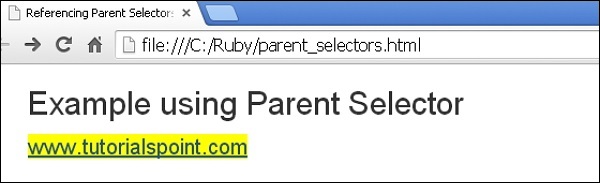
在此瀏覽器中開啟此 HTML 檔案,會顯示如下輸出..
這裡會用父選擇器 a 替換 &。當您將滑鼠懸停在連結上時,背景顏色將顯示為 黃色。
sass_css_extensions.htm
廣告