
RxJS – 使用排程程式
排程程式控制訂閱開始和傳送通知的時間。
要使用排程程式,我們需要以下內容:
import { Observable, asyncScheduler } from 'rxjs';
import { observeOn } from 'rxjs/operators';
這是一個工作示例,其中,我們將使用決定執行的排程程式。
示例
import { Observable, asyncScheduler } from 'rxjs';
import { observeOn } from 'rxjs/operators';

var observable = new Observable(function subscribe(subscriber) {
   subscriber.next("My First Observable");
   subscriber.next("Testing Observable");
   subscriber.complete();
}).pipe(
   observeOn(asyncScheduler)
);
console.log("Observable Created");
observable.subscribe(
   x => console.log(x),
   (e)=>console.log(e),
   ()=>console.log("Observable is complete")
);

console.log('Observable Subscribed');
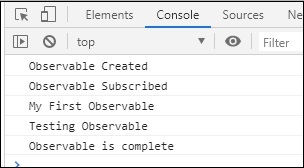
輸出
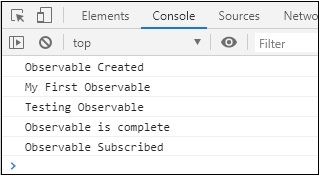
如果不使用排程程式,輸出將如下圖所示:
廣告