
 資料結構
資料結構 網路
網路 RDBMS
RDBMS 作業系統
作業系統 Java
Java MS Excel
 iOS
iOS HTML
HTML CSS
CSS Android
 Python
 C 程式設計
 C++
C++ C#
C# MongoDB
 MySQL
MySQL Javascript
 PHP
PHP 物理
物理 化學
化學 生物
生物 數學
數學 英語
英語 經濟學
經濟學 心理學
心理學 社會科學
社會科學 時尚學
時尚學 法學
法學Python - 如何合併資料夾中的所有 Excel 檔案
要合併資料夾中的所有 Excel 檔案,請使用 Glob 模組和 append() 方法。
假設桌面上的 Excel 檔案如下 −
Sales1.xlsx

Sales2.xlsx

注意 − 您可能需要安裝 openpyxl 和 xlrd 軟體包。
首先,設定要合併的所有 Excel 檔案所在的路徑。獲取 Excel 檔案並使用 glob 讀取它們 −
path = "C:\Users\amit_\Desktop\"

filenames = glob.glob(path + "\*.xlsx")
print('File names:', filenames)
接下來,建立一個空的 DataFrame,用於合併的輸出 Excel 檔案,它將從上述兩個 Excel 檔案中獲取資料 −
outputxlsx = pd.DataFrame()
現在,可以看到實際過程,即首先使用 for 迴圈迭代 Excel 檔案。讀取 Excel 檔案,將它們連線起來並追加資料 −
for file in filenames:
   df = pd.concat(pd.read_excel(file, sheet_name=None), ignore_index=True, sort=False)
   outputxlsx = outputxlsx.append(df, ignore_index=True)
示例
以下是程式碼 −
import pandas as pd
import glob

# getting excel files to be merged from the Desktop
path = "C:\Users\amit_\Desktop\"

# read all the files with extension .xlsx i.e. excel
filenames = glob.glob(path + "\*.xlsx")
print('File names:', filenames)

# empty data frame for the new output excel file with the merged excel files
outputxlsx = pd.DataFrame()

# for loop to iterate all excel files
for file in filenames:
   # using concat for excel files
   # after reading them with read_excel()
   df = pd.concat(pd.read_excel( file, sheet_name=None), ignore_index=True, sort=False)

   # appending data of excel files
   outputxlsx = outputxlsx.append( df, ignore_index=True)

print('Final Excel sheet now generated at the same location:')
outputxlsx.to_excel("C:/Users/amit_/Desktop/Output.xlsx", index=False)
輸出
這將生成以下輸出,即合併的 Excel 檔案將生成在相同的位置 −
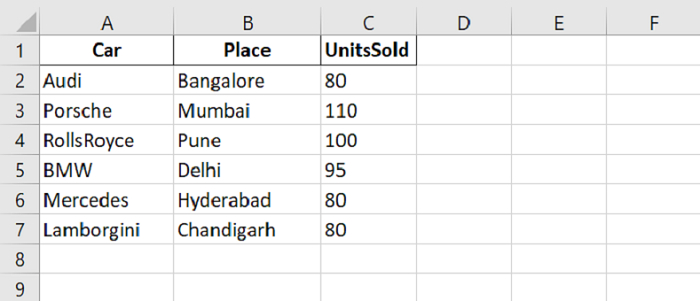

更新於:2021 年 9 月 27 日
11K+ 次瀏覽

廣告