
 資料結構
資料結構 網路
網路 關係資料庫管理系統 (RDBMS)
 作業系統
作業系統 Java
Java MS Excel
 iOS
iOS HTML
HTML CSS
CSS Android
 Python
 C語言程式設計
 C++
C++ C#
C# MongoDB
 MySQL
MySQL Javascript
 PHP
PHP 物理學
物理學 化學
化學 生物學
生物學 數學
數學 英語
英語 經濟學
經濟學 心理學
心理學 社會學
社會學 服裝學
服裝學 法學
法學如何使用Python將多個資料夾合併到一個資料夾中?
當今時代的資料量巨大,組織這些資料可能是一項具有挑戰性的任務。人們面臨的最常見問題之一是將多個資料夾合併到一個資料夾中。當您需要瀏覽多個資料夾才能搜尋特定檔案時,這可能會非常令人沮喪。幸運的是,Python 提供了一個簡單的解決方案來解決這個問題。
在本文中,我們將學習如何使用Python將多個資料夾合併到一個資料夾中。為了將多個資料夾合併到一個資料夾中,我們將使用os模組,它提供了一種可移植的方式來使用作業系統相關的功能,例如讀取或寫入檔案系統。
使用Python將多個資料夾合併到一個資料夾中的步驟
以下是使用Python將多個資料夾合併到一個資料夾中的完整步驟
步驟1:匯入OS和shutil模組
將多個資料夾合併到一個資料夾中的第一步是匯入所需的模組,例如Python中的os和shutil模組。這裡,os模組用於提供與作業系統互動的功能,而shutil模組提供用於操作檔案和目錄的功能。以下是我們如何匯入這些模組:
import os
import shutil
步驟2:定義資料夾路徑
此過程的下一步是定義原始檔夾和目標資料夾。原始檔夾是包含我們要合併的資料夾的資料夾,目標資料夾是我們想要將所有資料夾合併到的資料夾。以下是我們如何定義原始檔夾和目標資料夾的路徑:
mysource_folder = "yourpath/to/source/folder"
mydestination_folder = "yourpath/to/destination/folder"
步驟3:合併資料夾
定義路徑後,我們將使用os.walk()函式遞迴地迭代原始檔夾中的所有資料夾和檔案。然後,我們將使用shutil.copy2()函式將所有檔案複製到目標資料夾。以下是我們如何合併不同的資料夾:
for root, dirs, files in os.walk(mysource_folder):
    for file in files:
        mysrc_file = os.path.join(root, file)
        shutil.copy2(mysrc_file, mydestination_folder)
在上面的語法中,我們首先使用os.walk()迭代原始檔夾中的所有資料夾和檔案。os.walk()函式返回一個元組,包含根目錄、目錄列表和檔案列表。然後,我們使用for迴圈迭代files列表中的所有檔案。
在迴圈遍歷列表中的所有檔案之後,我們現在使用os.path.join()函式透過連線根目錄和檔名來建立原始檔路徑。最後,我們使用shutil.copy2()函式將檔案複製到目標資料夾。
就是這樣!現在我們已經看到了使用Python將資料夾合併到一個資料夾中的完整步驟。讓我們看一些將不同或多個資料夾合併到一個資料夾中的示例。
示例1:使用os.listdir()和shutil.copy2()
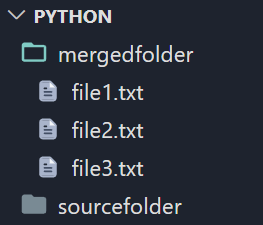
在下面的示例中,我們將多個資料夾合併到一個資料夾中的方法是使用os.listdir()迴圈遍歷原始檔夾中的所有檔案和子目錄。對於每個檔案或目錄,我們分別使用os.path.isfile()和os.path.isdir()檢查它是否是檔案或目錄。如果它是一個檔案,我們只需使用shutil.copy2()將其複製到目標資料夾。如果它是一個目錄,我們將迴圈遍歷目錄中的所有檔案和子目錄,並使用shutil.copy2()將每個子項複製到目標資料夾。
import os
import shutil

# Define your source and destination folders
mysource_folder = "path/to/source/folder"
mydestination_folder = "path/to/destination/folder"

# Loop through all files and subdirectories in source folder
for item in os.listdir(mysource_folder):

    # Create full path for the item
    myitem_path = os.path.join(mysource_folder, item)

    # Check if item is a file
    if os.path.isfile(myitem_path):

        # Copy the file to the destination folder
        shutil.copy2(myitem_path, mydestination_folder)

    # Check if item is a directory
    elif os.path.isdir(myitem_path):

        # Loop through all files and subdirectories in the directory
        for subitem in os.listdir(myitem_path):

            # Create full path for the subitem
            mysubitem_path = os.path.join(myitem_path, subitem)

            # Copy the subitem to the destination folder
            shutil.copy2(mysubitem_path, mydestination_folder)
輸出
之前

之後
示例2:使用os.walk()和os.path.join()
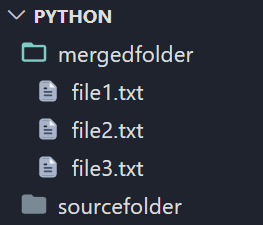
在上面的示例中,我們將多個資料夾合併到一個資料夾中的方法是使用os.walk()遞迴地迴圈遍歷原始檔夾中的所有檔案和子目錄。對於每個檔案,我們使用os.path.join()建立完整路徑,然後使用os.rename()將檔案重新命名到目標資料夾。對於每個子目錄,我們將使用os.walk()迴圈遍歷子目錄中的所有檔案和子目錄,然後使用os.rename()將每個子檔案重新命名到目標資料夾。
import os
import shutil

# Define your source and destination folders
mysource_folder = "path/to/source/folder"
mydestination_folder = "path/to/destination/folder"

# Loop through all files and subdirectories in source folder
for root, dirs, files in os.walk(mysource_folder):

    # Loop through all files in current directory
    for file in files:

        # Create full path for the file
        file_path = os.path.join(root, file)

        # Copy the file to the destination folder
        os.rename(file_path, os.path.join(mydestination_folder, file))

    # Loop through all subdirectories in current directory
    for dir in dirs:

        # Create full path for the subdirectory
        dir_path = os.path.join(root, dir)

        # Copy all files and subdirectories in the subdirectory to the destination folder
        for subroot, subdirs, subfiles in os.walk(dir_path):
            for subfile in subfiles:
                subfile_path = os.path.join(subroot, subfile)
os.rename(subfile_path, os.path.join(mydestination_folder, subfile))
輸出
之前

之後
示例3:使用distutils.dir_util.copy_tree()
在上面的示例中,我們使用適當的路徑定義source_folder和destination_folder變數。之後,我們使用copy_tree()函式,並將source_folder和destination_folder作為引數傳遞。此函式遞迴地將source_folder的內容複製到destination_folder,有效地將所有資料夾合併到一個資料夾中。
import os
from distutils.dir_util import copy_tree

# Define your source and destination folders
mysource_folder = "path/to/source/folder"
mydestination_folder = "path/to/destination/folder"

# Merge folders using copy_tree()
copy_tree(mysource_folder, mydestination_folder)

# Optional: Used in removing the source folders after merging
for root, dirs, files in os.walk(mysource_folder, topdown=False):
    for dir in dirs:
        dir_path = os.path.join(root, dir)
        os.rmdir(dir_path)
    os.rmdir(root)
輸出
之前

之後

結論
組織大量生成的資料可能是一項具有挑戰性的任務。將多個資料夾合併到一個資料夾中可能是一項艱鉅的任務,尤其是在您需要瀏覽多個資料夾時。Python 使用os和shutil等模組為這個問題提供了一個簡單的解決方案。將多個資料夾合併到一個資料夾中的步驟包括匯入所需的模組、定義原始檔夾和目標資料夾,以及使用os.walk()和shutil.copy2()函式合併資料夾。或者,也可以使用os.listdir()和os.path.join()合併資料夾。這些方法允許使用者快速有效地將多個資料夾合併到一個資料夾中。

2K+ 瀏覽量
