
 資料結構
資料結構 網路
網路 關係資料庫管理系統
 作業系統
作業系統 Java
Java MS Excel
 iOS
iOS HTML
HTML CSS
CSS Android
 Python
 C 程式設計
 C++
C++ C#
C# MongoDB
 MySQL
MySQL Javascript
 PHP
PHP 物理學
物理學 化學
化學 生物
生物 數學
數學 英語
英語 經濟
經濟 心理學
心理學 社會學
社會學 時尚設計
時尚設計 法律研究
法律研究使用 Python 中的 Seaborn 繪製圖形。
Plotly 的 Python 製圖庫可以線上製作互動式出版級圖表。此圖表主要用於繪製折線圖、散點圖、面積圖、條形圖、誤差棒圖、箱線圖、直方圖、熱力圖、子圖、多軸、極座標圖和氣泡圖。
Seaborn 是一個用於在 Python 中製作統計圖形的庫。它建立在 matplotlib 之上且整合到 Pandas 資料結構中。
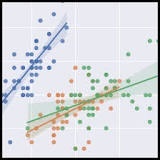
1. 我們匯入 Seaborn,這是此簡單示例所必需的唯一庫。
import seaborn as sns
2. 我們應用預設的 Seaborn 主題、縮放和調色盤。
sns.set()
3. 我們載入其中一個示例資料集。
tips = sns.load_dataset("tips")
4. 我們繪製一個分面散點圖,其中包含多個語義變數。
示例程式碼
# This Python program will illustrate scatter plot with Seaborn
# importing modules
import matplotlib.pyplot as plt
import seaborn as sns
# values for x-axis
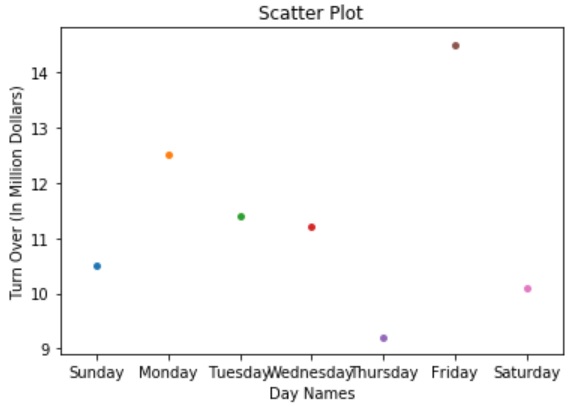
x=['Sunday', 'Monday', 'Tuesday', 'Wednesday', 'Thursday', 'Friday', 'Saturday']
# valueds for y-axis
y=[10.5, 12.5, 11.4, 11.2, 9.2, 14.5, 10.1]
# plotting with seaborn
my_plot = sns.stripplot(x, y);
# assigning x-axis and y-axis labels
my_plot.set(xlabel ='Day Names', ylabel ='Turn Over (In Million Dollars)')
# assigning plot title
plt.title('Scatter Plot');
# function to show plot
plt.show()
輸出

更新時間:30-7-2019
578 次瀏覽

廣告