
- Peewee 教程
- Peewee - 首頁
- Peewee - 概述
- Peewee - 資料庫類
- Peewee - 模型
- Peewee - 欄位類
- Peewee - 插入新記錄
- Peewee - 選擇記錄
- Peewee - 過濾器
- Peewee - 主鍵和複合鍵
- Peewee - 更新現有記錄
- Peewee - 刪除記錄
- Peewee - 建立索引
- Peewee - 約束
- Peewee - 使用 MySQL
- Peewee - 使用 PostgreSQL
- Peewee - 動態定義資料庫
- Peewee - 連線管理
- Peewee - 關係和連線
- Peewee - 子查詢
- Peewee - 排序
- Peewee - 計數和聚合
- Peewee - SQL 函式
- Peewee - 檢索行元組/字典
- Peewee - 使用者定義運算子
- Peewee - 原子事務
- Peewee - 資料庫錯誤
- Peewee - 查詢構建器
- Peewee - 與 Web 框架整合
- Peewee - SQLite 擴充套件
- Peewee - PostgreSQL 和 MySQL 擴充套件
- Peewee - 使用 CockroachDB
- Peewee 有用資源
- Peewee - 快速指南
- Peewee - 有用資源
- Peewee - 討論
Peewee - 關係和連線
Peewee 支援實現不同型別的 SQL JOIN 查詢。它的 Model 類有一個 join() 方法,該方法返回一個 Join 例項。
M1.joint(m2, join_type, on)
joins 表將 M1 模型對映到 m2 模型,並返回 Join 類例項。on 引數預設為 None,是作為連線謂詞使用的表示式。
連線型別
Peewee 支援以下連線型別(預設值為 INNER)。
JOIN.INNER
JOIN.LEFT_OUTER
JOIN.RIGHT_OUTER
JOIN.FULL
JOIN.FULL_OUTER
JOIN.CROSS
為了展示 join() 方法的使用,我們首先宣告以下模型:
db = SqliteDatabase('mydatabase.db')

class BaseModel(Model):
   class Meta:
      database = db

class Item(BaseModel):
   itemname = TextField()
      price = IntegerField()

class Brand(BaseModel):
   brandname = TextField()
      item = ForeignKeyField(Item, backref='brands')

class Bill(BaseModel):
   item = ForeignKeyField(Item, backref='bills')
   brand = ForeignKeyField(Brand, backref='bills')
   qty = DecimalField()

db.create_tables([Item, Brand, Bill])
表
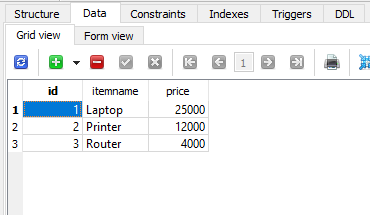
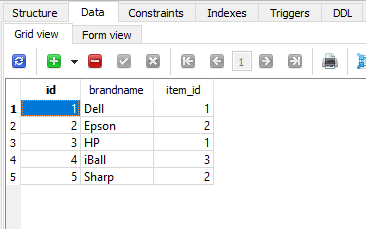
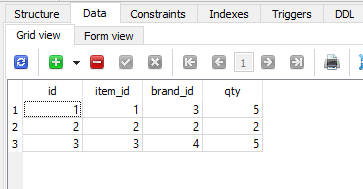
接下來,我們使用以下測試資料填充這些表:
專案表
專案表如下所示:
品牌表
以下是品牌表:
賬單表
賬單表如下所示:
要執行 Brand 和 Item 表之間的簡單連線操作,請執行以下程式碼:
qs=Brand.select().join(Item)
for q in qs:
print ("Brand ID:{} Item Name: {} Price: {}".format(q.id, q.brandname, q.item.price))
最終輸出將如下所示:
Brand ID:1 Item Name: Dell Price: 25000
Brand ID:2 Item Name: Epson Price: 12000
Brand ID:3 Item Name: HP Price: 25000
Brand ID:4 Item Name: iBall Price: 4000
Brand ID:5 Item Name: Sharp Price: 12000
連線多個表
我們有一個 Bill 模型,它與 item 和 brand 模型具有兩個外部索引鍵關係。要從所有三個表中提取資料,請使用以下程式碼:
qs=Bill.select().join(Brand).join(Item)
for q in qs:
print ("BillNo:{} Brand:{} Item:{} price:{} Quantity:{}".format(q.id, \
q.brand.brandname, q.item.itemname, q.item.price, q.qty))
根據我們的測試資料,將顯示以下輸出:
BillNo:1 Brand:HP Item:Laptop price:25000 Quantity:5
BillNo:2 Brand:Epson Item:Printer price:12000 Quantity:2
BillNo:3 Brand:iBall Item:Router price:4000 Quantity:5
廣告