
 資料結構
資料結構 網路
網路 關係資料庫管理系統
 作業系統
作業系統 Java
Java MS Excel
 iOS
iOS HTML
HTML CSS
CSS Android
 Python
 C語言程式設計
 C++
C++ C#
C# MongoDB
 MySQL
MySQL Javascript
 PHP
PHP 物理學
物理學 化學
化學 生物學
生物學 數學
數學 英語
英語 經濟學
經濟學 心理學
心理學 社會學
社會學 服裝設計
服裝設計 法律學
法律學MATLAB中的最近鄰插值演算法
最近鄰插值演算法是一種簡單的插值方法,用於在資料點之間插值未知值。我們可以在 MATLAB 程式設計中實現此演算法。閱讀本文以瞭解如何在 MATLAB 中實現最近鄰插值演算法。讓我們從最近鄰插值演算法的基礎知識開始討論。
什麼是最近鄰插值演算法?
最近鄰插值演算法是一種估計離散資料點之間未知值的簡單方法。此演算法在影像處理、訊號處理等各個工程領域非常有用。
此演算法背後的原理非常簡單,即它將一個值賦給與插值位置最近的資料點。
以下是最近鄰插值演算法中涉及的步驟:
步驟 1 - 輸入一組離散資料點。
步驟 2 - 指定要插值值的點。
步驟 3 - 對於每個插值點,確定最近的值。
步驟 4 - 將插值值分配給插值點最近的鄰近點。
這就是最近鄰插值演算法的工作原理。
在討論 MATLAB 中最近鄰插值演算法的實現之前。讓我們瞭解一下它的優點和缺點。
最近鄰插值演算法的優點
下面列出了最近鄰插值演算法的一些主要優點:
最近鄰插值演算法是一種易於理解和實現的技術。
此演算法不會影響資料集中原始值。
在影像處理中,最近鄰插值演算法不會造成任何模糊或平滑效果。
它可以有效地應用於插值離散資料點,例如數字訊號。
但是,最近鄰插值演算法也有一些侷限性,我們在使用它時需要考慮。
最近鄰插值演算法的侷限性
下面列出了最近鄰插值演算法的一些關鍵侷限性:
當用於提高影像解析度時,最近鄰插值演算法會導致塊狀外觀。
此演算法不能用於插值連續資料集或函式。
在複雜條件下使用時,其結果精度有限。
這就是關於最近鄰插值演算法基礎知識的所有內容。它是一種簡單有效的插值技術,適用於離散資料集。
在MATLAB中實現最近鄰插值演算法
在 MATLAB 中,我們可以使用“nearest”選項來實現最近鄰演算法。
以下是 MATLAB 中實現最近鄰插值的逐步說明:
步驟 1 - 定義輸入資料。它可以是矩陣、數字影像等。
步驟 2 - 定義插值資料所需的新大小或新網格。
步驟 3 - 對輸入資料執行最近鄰插值。
步驟 4 - 顯示結果。
這些是通用步驟。但是,根據輸入資料型別,可能會涉及更多步驟。
示例 (1) – 使用最近鄰插值調整影像大小
讓我們藉助示例瞭解 MATLAB 中的最近鄰插值演算法。
% Read the input image
img = imread('https://tutorialspoint.tw/assets/questions/media/14304-1687425236.jpg');

% Specify new dimensions to resize the image
new_size = [400, 250];

% Apply nearest-neighbor interpolation to resize the image
new_img = imresize(img, new_size, 'nearest');

% Display the original and resized images
figure;
subplot(1, 2, 1);
imshow(img);
title('Original Image');
axis([0, 600, 0, 600]);
axis on;

subplot(1, 2, 2);
imshow(new_img);
title('Resized Image');
axis([0, 600, 0, 600]);
axis on;
輸出
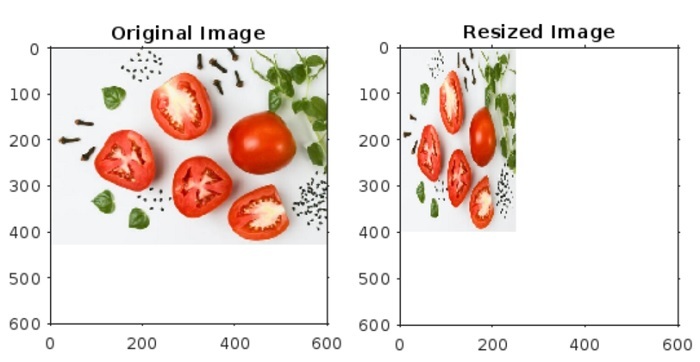
它將產生以下輸出
程式碼說明
在此示例中,我們首先使用“imread”函式讀取輸入影像。然後,指定要調整影像大小的新尺寸。之後,我們使用帶有“nearest”選項的“imresize”函式,使用最近鄰插值方法調整影像大小。
最後,我們使用“imshow”函式顯示輸入和調整大小的影像。
示例 (2) – 使用最近鄰插值方法執行矩陣插值
我們還可以使用最近鄰插值來插值矩陣。
下面給出了使用最近鄰插值演算法插值矩陣的 MATLAB 程式碼。
% Create a sample matrix to be interpolated
mat = [5, 3, 9, 4, 2, 1, 5, 6, 7, 3, 4];

% Create indices for the input matrix
mat_ind = 1:numel(mat);

% Define new indices to increase resolution of the matrix
new_ind  = linspace(1, numel(mat), 30);

% Perform nearest-neighbor interpolation of the matrix
new_mat = interp1(mat_ind, mat, new_ind, 'nearest');

% Display the input matrix and new matrix
disp('Input matrix:');
disp(mat);

disp('Interpolated matrix:');
disp(new_mat);

% Plot the matrices for visual comparison
figure;
subplot(2, 1, 1);
stem(mat_ind, mat, 'o-', 'LineWidth', 1);
title('Original Matrix');
xlabel('Index');
ylabel('Value');

subplot(2, 1, 2);
stem(new_ind, new_mat, 'r-', 'LineWidth', 1);
title('Nearest-Neighbor Interpolated Matrix');
xlabel('Index');
ylabel('Interpolated Value');
輸出
它將產生以下輸出:
Input matrix:
    5     3     9     4     2     1     5     6     7     3     4
Interpolated matrix:
Columns 1 through 7
5     5     3     3     3     9     9
Columns 8 through 14
9     4     4     4     2     2     2
Columns 15 through 21
1     1     5     5     5     6     6
Columns 22 through 28
6     7     7     7     3     3     3
Columns 29 through 30
4     4
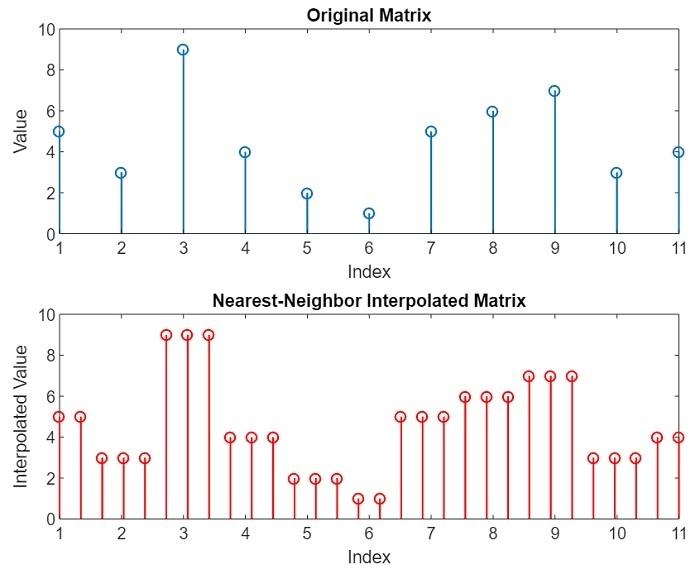
這兩個矩陣的視覺表示如下圖所示。
程式碼說明
在此 MATLAB 示例中,首先我們建立一個示例矩陣。然後,我們為此輸入矩陣建立索引。之後,我們定義新的索引以插值矩陣以提高其解析度。
接下來,我們使用“interp1”函式中的“nearest”選項應用最近鄰插值演算法,以將矩陣插值到新索引。
最後,我們顯示原始和插值矩陣及其視覺外觀。
結論
總之,最近鄰插值演算法是一種簡單有效的方法,用於插值一組離散資料點。此插值方法透過插值並將最近鄰的值分配給插值點來工作。
此方法廣泛應用於各種應用中,例如數字影像處理中提高影像解析度,訊號處理中進行訊號重建,地理資訊系統中估計位置之間的資料點,計算機圖形學等。但是,最近鄰插值也有一些侷限性,例如它不能應用於連續資料或函式。
在本文中,我解釋了最近鄰插值演算法及其在 MATLAB 程式設計中的實現。本文中包含的示例演示了最近鄰插值演算法在 MATLAB 中的實際實現。

547 次檢視
