
 資料結構
資料結構 網路
網路 關係資料庫管理系統
 作業系統
作業系統 Java
Java MS Excel
 iOS
iOS HTML
HTML CSS
CSS Android
 Python
 C 程式設計
 C++
C++ C#
C# MongoDB
 MySQL
MySQL Javascript
 PHP
PHP 物理
物理 化學
化學 生物
生物 數學
數學 英語
英語 經濟
經濟 心理學
心理學 社會學
社會學 時尚學
時尚學 法律研究
法律研究用 Python 的 pandas 建立 matplotlib 散點圖
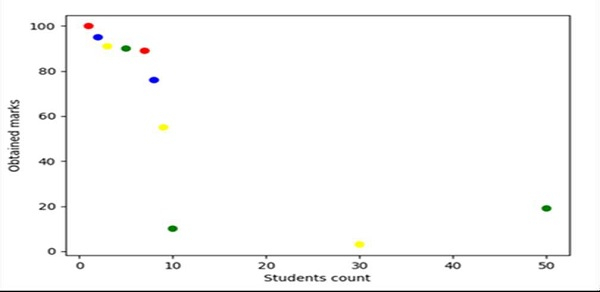
使用 Pandas,我們可以建立一個數據框,並使用 subplot() 方法建立一個圖表和軸變數。隨後,我們可以使用 ax.scatter() 方法獲取所需的圖表。
步驟
製作一份學生人數列表。
製作一份學生獲得的成績列表。
為了表示每個散點的顏色,我們可以製作一份顏色列表。
使用 Pandas,我們可以製作一份表示資料框軸的列表。
使用子區段方法建立圖表和軸變數,其中預設的 nrows 和 ncols 為 1。
使用 plt.xlabel() 方法設定“學生人數”標籤。
使用 plt.ylabel() 方法設定“獲得的成績”標籤。
要建立一個散點,使用第 4 步建立的資料框。點是學生人數、成績和顏色。
要顯示圖表,使用 plt.show() 方法。
示例
from matplotlib import pyplot as plt
import pandas as pd

no_of_students = [1, 2, 3, 5, 7, 8, 9, 10, 30, 50]
marks_obtained_by_student = [100, 95, 91, 90, 89, 76, 55, 10, 3, 19]
color_coding = ['red', 'blue', 'yellow', 'green', 'red', 'blue', 'yellow', 'green', 'yellow', 'green']

df = pd.DataFrame(dict(students_count=no_of_students,
marks=marks_obtained_by_student, color=color_coding))

fig, ax = plt.subplots()

plt.xlabel('Students count')
plt.ylabel('Obtained marks')

ax.scatter(df['students_count'], df['marks'], c=df['color'])

plt.show()
輸出

更新時間:2021 年 3 月 17 日
1 千次以上瀏覽量

廣告