- 語言特性
- LESS - 巢狀規則
- LESS - 巢狀指令和冒泡
- LESS - 運算
- LESS - 轉義
- LESS - 函式
- LESS - 名稱空間和訪問器
- LESS - 作用域
- LESS - 註釋
- LESS - 匯入
- LESS - 變數
- LESS - 擴充套件
- LESS - Mixin(混入)
- LESS - 引數化 Mixin
- LESS - Mixin 作為函式
- LESS - 向 Mixin 傳遞規則集
- LESS - 匯入指令
- LESS - 匯入選項
- LESS - Mixin 保護
- LESS - CSS 保護
- LESS - 迴圈
- LESS - 合併
- LESS - 父選擇器
- 函式
- LESS - 其他函式
- LESS - 字串函式
- LESS - 列表函式
- LESS - 數學函式
- LESS - 型別函式
- LESS - 顏色定義函式
- LESS - 顏色通道函式
- LESS - 顏色運算
- LESS - 顏色混合函式
- 使用
- LESS - 命令列使用
- 在瀏覽器中使用 LESS
- LESS - 瀏覽器支援
- LESS - 外掛
- LESS - 程式化使用
- LESS - 線上編譯器
- LESS - 圖形使用者介面
- LESS - 編輯器和外掛
- LESS - 第三方編譯器
- LESS - 框架
- LESS 有用資源
- LESS - 快速指南
- LESS - 有用資源
- LESS - 討論
LESS - 飽和度
描述
它改變元素中顏色的強度或飽和度。它具有以下引數:
顏色 (color) - 表示顏色物件。
數量 (amount) - 包含 0-100% 之間的百分比。
方法 (method) - 可選引數,透過將其設定為relative來進行相對於當前值的調整。
示例
以下示例演示了在 LESS 檔案中使用 saturate 顏色運算:
<html>
   <head>
      <title>Saturate</title>
      <link rel = "stylesheet" type = "text/css" href = "style.css"/>
   </head>

   <body>
      <h2>Example of Saturate Color Operation</h2>
      <div class = "myclass1">
         <p>color :<br> #426105</p>
      </div><br>

      <div class = "myclass2">
         <p>result :<br> #446600</p>
      </div>
   </body>
</html>
接下來,建立style.less檔案。
style.less
.myclass1 {
   height:100px;
   width:100px;
   padding: 30px 0px 0px 25px;
   background-color: hsl(80, 90%, 20%);
   color:white;
}

.myclass2 {
   height:100px;
   width:100px;
   padding: 30px 0px 0px 25px;
   background-color: saturate(hsl(80, 90%, 20%), 10%);
   color:white;
}
您可以使用以下命令將style.less編譯為style.css:
lessc style.less style.css
執行上述命令;它將自動建立包含以下程式碼的style.css檔案:
style.css
.myclass1 {
   height: 100px;
   width: 100px;
   padding: 30px 0px 0px 25px;
   background-color: #426105;
   color: white;
}

.myclass2 {
   height: 100px;
   width: 100px;
   padding: 30px 0px 0px 25px;
   background-color: #446600;
   color: white;
}
輸出
請按照以下步驟檢視以上程式碼的工作原理:
將以上 html 程式碼儲存到saturate.html檔案中。
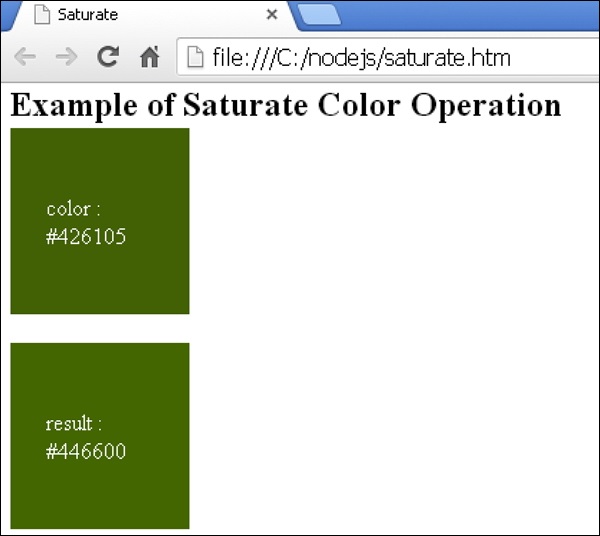
在瀏覽器中開啟此 HTML 檔案,將顯示以下輸出。
less_color_operation.htm
廣告