
- JPA 教程
- JPA - 首頁
- JPA - 簡介
- JPA - 架構
- JPA - ORM 元件
- JPA - 安裝
- JPA - 實體管理器
- JPA - JPQL
- JPA - 高階對映
- JPA - 實體關係
- JPA - Criteria API
- JPA 有用資源
- JPA - 快速指南
- JPA - 有用資源
JPA - 實體關係
本章將引導您瞭解實體之間的關係。通常,資料庫中表之間的關係更有效。這裡實體類被視為關係表(JPA 的概念),因此實體類之間的關係如下:
- @ManyToOne 關係
- @OneToMany 關係
- @OneToOne 關係
- @ManyToMany 關係
@ManyToOne 關係
實體之間的多對一關係:其中一個實體(列或列集)被引用到另一個實體(列或列集),該實體包含唯一值。在關係資料庫中,這些關係是透過使用表之間的外部索引鍵/主鍵來實現的。
讓我們考慮一下員工和部門實體之間關係的示例。以單向方式,即從員工到部門,適用多對一關係。這意味著每個員工記錄都包含一個部門 ID,該 ID 應該是部門表中的主鍵。此處,在員工表中,部門 ID 是外部索引鍵。
該圖解釋了多對一關係如下:
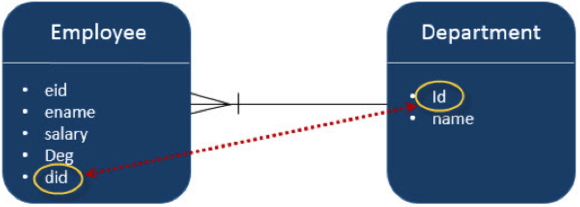
在 Eclipse IDE 中建立一個名為 **JPA_Eclipselink_MTO** 的 JPA 專案。該專案的所有模組如下所示:
建立實體
按照上面給出的圖建立實體。在 **src** 包下建立一個名為 **‘com.tutorialspoin.eclipselink.entity’** 的包。在給定的包下建立一個名為 **Department.java** 的類。Department 實體類如下所示:
package com.tutorialspoint.eclipselink.entity;

import javax.persistence.Entity;
import javax.persistence.GeneratedValue;
import javax.persistence.GenerationType;
import javax.persistence.Id;

@Entity
public class Department {

   @Id
   @GeneratedValue( strategy=GenerationType.AUTO )

   private int id;
   private String name;

   public int getId() {
      return id;
   }

   public void setId(int id) {
      this.id = id;
   }

   public String getName( ){
      return name;
   }

   public void setName( String deptName ){
      this.name = deptName;
   }
}
在此關係中建立第二個實體 - 在 **‘com.tutorialspoint.eclipselink.entity’** 包下建立一個名為 **Employee.java** 的 Employee 實體類。Employee 實體類如下所示:
package com.tutorialspoint.eclipselink.entity;

import javax.persistence.Entity;
import javax.persistence.GeneratedValue;
import javax.persistence.GenerationType;
import javax.persistence.Id;
import javax.persistence.ManyToOne;

@Entity
public class Employee{

   @Id
   @GeneratedValue( strategy= GenerationType.AUTO )

   private int eid;
   private String ename;
   private double salary;
   private String deg;

   @ManyToOne
   private Department department;

   public Employee(int eid, String ename, double salary, String deg) {
      super( );
      this.eid = eid;
      this.ename = ename;
      this.salary = salary;
      this.deg = deg;
   }

   public Employee( ) {
      super();
   }

   public int getEid( ) {
      return eid;
   }

   public void setEid(int eid)  {
      this.eid = eid;
   }

   public String getEname( ) {
      return ename;
   }

   public void setEname(String ename) {
      this.ename = ename;
   }

   public double getSalary( ) {
      return salary;
   }

   public void setSalary(double salary) {
      this.salary = salary;
   }

   public String getDeg( ) {
      return deg;
   }

   public void setDeg(String deg) {
      this.deg = deg;
   }

   public Department getDepartment() {
      return department;
   }

   public void setDepartment(Department department) {
      this.department = department;
   }
}
persistence.xml
persistence.xml 檔案是配置資料庫和註冊實體類所必需的。
在建立 JPA 專案時,persistence.xml 檔案將由 Eclipse IDE 建立。配置細節是使用者指定的。persistence.xml 檔案如下所示:
<?xml version="1.0" encoding = "UTF-8"?>

<persistence version = "2.0"
   xmlns = "http://java.sun.com/xml/ns/persistence"
   xmlns:xsi = "http://www.w3.org/2001/XMLSchema-instance"
   xsi:schemaLocation = "http://java.sun.com/xml/ns/persistence
   http://java.sun.com/xml/ns/persistence/persistence_2_0.xsd">

   <persistence-unit name = "Eclipselink_JPA" transaction-type = "RESOURCE_LOCAL">
      <class>com.tutorialspoint.eclipselink.entity.Employee</class>
      <class>com.tutorialspoint.eclipselink.entity.Department</class>

      <properties>
         <property name = "javax.persistence.jdbc.url" value = "jdbc:mysql://:3306/jpadb"/>
         <property name = "javax.persistence.jdbc.user" value = "root"/>
         <property name = "javax.persistence.jdbc.password" value="root"/>
         <property name = "javax.persistence.jdbc.driver" value="com.mysql.jdbc.Driver"/>
         <property name = "eclipselink.logging.level" value = "FINE"/>
         <property name = "eclipselink.ddl-generation" value = "create-tables"/>
      </properties>

   </persistence-unit>
</persistence>
服務類
此模組包含服務類,這些類使用屬性初始化實現關係部分。在 **src** 包下建立一個名為 **‘com.tutorialspoint.eclipselink.service’** 的包。在給定的包下建立一個名為 **ManyToOne.java** 的 DAO 類。DAO 類如下所示:
package com.tutorialspointeclipselink.service;

import javax.persistence.EntityManager;
import javax.persistence.EntityManagerFactory;
import javax.persistence.Persistence;

import com.tutorialspoint.eclipselink.entity.Department;
import com.tutorialspoint.eclipselink.entity.Employee;

public class ManyToOne {
   public static void main( String[ ] args ) {

   EntityManagerFactory emfactory = Persistence.createEntityManagerFactory( "Eclipselink_JPA" );
   EntityManager entitymanager = emfactory.createEntityManager( );
   entitymanager.getTransaction( ).begin( );

   //Create Department Entity
   Department department = new Department();
   department.setName("Development");

   //Store Department
   entitymanager.persist(department);

   //Create Employee1 Entity
   Employee employee1 = new Employee();
   employee1.setEname("Satish");
   employee1.setSalary(45000.0);
   employee1.setDeg("Technical Writer");
   employee1.setDepartment(department);

   //Create Employee2 Entity
   Employee employee2 = new Employee();
   employee2.setEname("Krishna");
   employee2.setSalary(45000.0);
   employee2.setDeg("Technical Writer");
   employee2.setDepartment(department);

   //Create Employee3 Entity
   Employee employee3 = new Employee();
   employee3.setEname("Masthanvali");
   employee3.setSalary(50000.0);
   employee3.setDeg("Technical Writer");
   employee3.setDepartment(department);

   //Store Employees
   entitymanager.persist(employee1);
   entitymanager.persist(employee2);
   entitymanager.persist(employee3);

   entitymanager.getTransaction().commit();
   entitymanager.close();
   emfactory.close();
   }
}
編譯並執行上述程式後,您將在 Eclipse IDE 的控制檯面板中收到通知。對於輸出,請檢查 MySQL Workbench。在此示例中,建立了兩個表。
在 MySQL 介面中傳遞以下查詢,部門表的表格格式結果如下所示:
Select * from department;

Id	Name
101	Development
在 MySQL 介面中傳遞以下查詢,員工表的表格格式結果如下所示:
Select * from employee;

Eid Deg                 Ename	        Salary	Department_Id
102 Technical Writer	Satish	        45000	101
103 Technical Writer	Krishna	        45000	101
104 Technical Writer	Masthan Wali	50000	101
在上表中,Deparment_Id 是來自部門表的外部索引鍵(引用欄位)。
@OneToMany 關係
在此關係中,一個實體的每一行都引用另一個實體中的許多子記錄。重要的是,子記錄不能有多個父記錄。在一個表 A 和表 B 之間的一對多關係中,表 A 中的每一行都連結到表 B 中的 0、1 或多行。
讓我們考慮上面的例子。如果 **Employee** 和 **Department** 以反向單向方式存在,則關係為多對一關係。在 Eclipse IDE 中建立一個名為 **JPA_Eclipselink_OTM** 的 JPA 專案。該專案的所有模組如下所示:
建立實體
按照上面給出的圖建立實體。在 **src** 包下建立一個名為 **‘com.tutorialspoin.eclipselink.entity’** 的包。在給定的包下建立一個名為 **Department.java** 的類。Department 實體類如下所示:
package com.tutorialspoint.eclipselink.entity;

import java.util.List;
import javax.persistence.Entity;
import javax.persistence.GeneratedValue;
import javax.persistence.GenerationType;
import javax.persistence.Id;
import javax.persistence.OneToMany;

@Entity
public class Department {

    @Id
    @GeneratedValue( strategy=GenerationType.AUTO )

    private int id;
    private String name;

    @OneToMany( targetEntity=Employee.class )
    private List employeelist;

    public int getId() {
    	return id;
    }

    public void setId(int id) {
    	this.id = id;
    }

    public String getName( ) {
    	return name;
    }

    public void setName( String deptName ) {
    	this.name = deptName;
    }

    public List getEmployeelist() {
      return employeelist;
    }

   public void setEmployeelist(List employeelist) {
      this.employeelist = employeelist;
   }
}
在此關係中建立第二個實體 - 在 **‘com.tutorialspoint.eclipselink.entity’** 包下建立一個名為 **Employee.java** 的 Employee 實體類。Employee 實體類如下所示:
package com.tutorialspoint.eclipselink.entity;

import javax.persistence.Entity;
import javax.persistence.GeneratedValue;
import javax.persistence.GenerationType;
import javax.persistence.Id;

@Entity
public class Employee {

   @Id
   @GeneratedValue( strategy= GenerationType.AUTO )

   private int eid;
   private String ename;
   private double salary;
   private String deg;

   public Employee(int eid, String ename, double salary, String deg) {
      super( );
      this.eid = eid;
      this.ename = ename;
      this.salary = salary;
      this.deg = deg;
   }

   public Employee( ) {
      super();
   }

   public int getEid( ) {
      return eid;
   }

   public void setEid(int eid) {
      this.eid = eid;
   }

   public String getEname( ) {
      return ename;
   }

   public void setEname(String ename) {
      this.ename = ename;
   }

   public double getSalary( ) {
      return salary;
   }

   public void setSalary(double salary) {
      this.salary = salary;
   }

   public String getDeg( ) {
      return deg;
   }

   public void setDeg(String deg) {
      this.deg = deg;
   }
}
persistence.xml
在建立 JPA 專案時,persistence.xml 檔案將由 Eclipse IDE 建立。配置細節是使用者指定的。persistence.xml 檔案如下所示:
<?xml version = "1.0" encoding = "UTF-8"?>

<persistence version = "2.0" xmlns = "http://java.sun.com/xml/ns/persistence"
   xmlns:xsi = "http://www.w3.org/2001/XMLSchema-instance"
   xsi:schemaLocation = "http://java.sun.com/xml/ns/persistence
   http://java.sun.com/xml/ns/persistence/persistence_2_0.xsd">

   <persistence-unit name = "Eclipselink_JPA" transaction-type = "RESOURCE_LOCAL">
      <class>com.tutorialspoint.eclipselink.entity.Employee</class>
      <class>com.tutorialspoint.eclipselink.entity.Department</class>

      <properties>
         <property name = "javax.persistence.jdbc.url" value = "jdbc:mysql://:3306/jpadb"/>
         <property name = "javax.persistence.jdbc.user" value = "root"/>
         <property name = "javax.persistence.jdbc.password" value = "root"/>
         <property name = "javax.persistence.jdbc.driver" value = "com.mysql.jdbc.Driver"/>
         <property name = "eclipselink.logging.level" value = "FINE"/>
         <property name = "eclipselink.ddl-generation" value = "create-tables"/>
      </properties>

   </persistence-unit>
</persistence>
服務類
此模組包含服務類,這些類使用屬性初始化實現關係部分。在 **src** 包下建立一個名為 **‘com.tutorialspoint.eclipselink.service’** 的包。在給定的包下建立一個名為 **OneToMany.java** 的 DAO 類。DAO 類如下所示:
package com.tutorialspointeclipselink.service;

import java.util.List;
import java.util.ArrayList;

import javax.persistence.EntityManager;
import javax.persistence.EntityManagerFactory;
import javax.persistence.Persistence;

import com.tutorialspoint.eclipselink.entity.Department;
import com.tutorialspoint.eclipselink.entity.Employee;

public class OneToMany {
   public static void main(String[] args) {

   EntityManagerFactory emfactory = Persistence.createEntityManagerFactory( "Eclipselink_JPA" );
   EntityManager entitymanager = emfactory.createEntityManager( );
   entitymanager.getTransaction( ).begin( );

   //Create Employee1 Entity
   Employee employee1 = new Employee();
   employee1.setEname("Satish");
   employee1.setSalary(45000.0);
   employee1.setDeg("Technical Writer");

   //Create Employee2 Entity
   Employee employee2 = new Employee();
   employee2.setEname("Krishna");
   employee2.setSalary(45000.0);
   employee2.setDeg("Technical Writer");

   //Create Employee3 Entity
   Employee employee3 = new Employee();
   employee3.setEname("Masthanvali");
   employee3.setSalary(50000.0);
   employee3.setDeg("Technical Writer");

   //Store Employee
   entitymanager.persist(employee1);
   entitymanager.persist(employee2);
   entitymanager.persist(employee3);

   //Create Employeelist
   List<Employee> emplist = new ArrayList();
   emplist.add(employee1);
   emplist.add(employee2);
   emplist.add(employee3);

   //Create Department Entity
   Department department = new Department();
   department.setName("Development");
   department.setEmployeelist(emplist);

   //Store Department
   entitymanager.persist(department);

   entitymanager.getTransaction().commit();
   entitymanager.close();
   emfactory.close();
   }
}
編譯並執行上述程式後,您將在 Eclipse IDE 的控制檯面板中收到通知。對於輸出,請檢查 MySQL Workbench,如下所示。在此專案中建立了三個表。
在 MySQL 介面中傳遞以下查詢,department_employee 表的表格格式結果如下所示:
Select * from department_Id;

Department_Id	Employee_Eid
254	        251
254	        252
254	        253
在上表中,deparment_id 和 employee_id 欄位是來自部門表和員工表的外部索引鍵(引用欄位)。
在 MySQL 介面中傳遞以下查詢,部門表的表格格式結果如下所示:
Select * from department;

Id	Name
254	Development
在 MySQL 介面中傳遞以下查詢,員工表的表格格式結果如下所示:
Select * from employee;

Eid	Deg	                Ename	       Salary
251	Technical Writer	Satish	       45000
252	Technical Writer	Krishna	       45000
253	Technical Writer	Masthanvali    50000
@OneToOne 關係
在一對一關係中,一個專案只能屬於另一個專案。這意味著一個實體的每一行都只引用另一個實體的一行。
讓我們考慮上面的例子。**Employee** 和 **Department** 以反向單向方式存在,則關係為一對一關係。這意味著每個員工只屬於一個部門。在 Eclipse IDE 中建立一個名為 **JPA_Eclipselink_OTO** 的 JPA 專案。該專案的所有模組如下所示:
建立實體
按照上面給出的圖建立實體。在 **src** 包下建立一個名為 **‘com.tutorialspoin.eclipselink.entity’** 的包。在給定的包下建立一個名為 **Department.java** 的類。Department 實體類如下所示:
package com.tutorialspoint.eclipselink.entity;

import javax.persistence.Entity;
import javax.persistence.GeneratedValue;
import javax.persistence.GenerationType;
import javax.persistence.Id;

@Entity
public class Department {

   @Id
   @GeneratedValue( strategy=GenerationType.AUTO )
   private int id;
   private String name;

   public int getId() {
      return id;
   }

   public void setId(int id) {
      this.id = id;
   }

   public String getName( ) {
      return name;
   }

   public void setName( String deptName ) {
      this.name = deptName;
   }
}
在此關係中建立第二個實體 - 在 **‘com.tutorialspoint.eclipselink.entity’** 包下建立一個名為 **Employee.java** 的 Employee 實體類。Employee 實體類如下所示:
package com.tutorialspoint.eclipselink.entity;

import javax.persistence.Entity;
import javax.persistence.GeneratedValue;
import javax.persistence.GenerationType;
import javax.persistence.Id;
import javax.persistence.OneToOne;

@Entity
public class Employee {

   @Id
   @GeneratedValue( strategy= GenerationType.AUTO )
   private int eid;
   private String ename;
   private double salary;
   private String deg;

   @OneToOne
   private Department department;

   public Employee(int eid, String ename, double salary, String deg) {
      super( );
      this.eid = eid;
      this.ename = ename;
      this.salary = salary;
      this.deg = deg;
   }

   public Employee( ) {
      super();
   }

   public int getEid( ) {
      return eid;
   }

   public void setEid(int eid) {
      this.eid = eid;
   }

   public String getEname( ) {
      return ename;
   }

   public void setEname(String ename) {
      this.ename = ename;
   }

   public double getSalary( ) {
      return salary;
   }

   public void setSalary(double salary) {
      this.salary = salary;
   }

   public String getDeg( ) {
      return deg;
   }

   public void setDeg(String deg) {
      this.deg = deg;
   }

   public Department getDepartment() {
      return department;
   }

   public void setDepartment(Department department) {
      this.department = department;
   }
}
persistence.xml
在建立 JPA 專案時,persistence.xml 檔案將由 Eclipse IDE 建立。配置細節是使用者指定的。persistence.xml 檔案如下所示:
<?xml version = "1.0" encoding = "UTF-8"?>
<persistence version = "2.0" xmlns = "http://java.sun.com/xml/ns/persistence"
   xmlns:xsi = "http://www.w3.org/2001/XMLSchema-instance"
   xsi:schemaLocation = "http://java.sun.com/xml/ns/persistence
   http://java.sun.com/xml/ns/persistence/persistence_2_0.xsd">

   <persistence-unit name = "Eclipselink_JPA" transaction-type = "RESOURCE_LOCAL">
      <class>com.tutorialspoint.eclipselink.entity.Employee</class>
      <class>com.tutorialspoint.eclipselink.entity.Department</class>

      <properties>
         <property name = "javax.persistence.jdbc.url" value = "jdbc:mysql://:3306/jpadb"/>
         <property name = "javax.persistence.jdbc.user" value = "root"/>
         <property name = "javax.persistence.jdbc.password" value = "root"/>
         <property name = "javax.persistence.jdbc.driver" value = "com.mysql.jdbc.Driver"/>
         <property name = "eclipselink.logging.level" value = "FINE"/>
         <property name = "eclipselink.ddl-generation" value = "create-tables"/>
      </properties>

   </persistence-unit>
</persistence>
服務類
此模組包含服務類,這些類使用屬性初始化實現關係部分。在 **src** 包下建立一個名為 **‘com.tutorialspoint.eclipselink.service’** 的包。在給定的包下建立一個名為 **OneToOne.java** 的 DAO 類。DAO 類如下所示:
package com.tutorialspointeclipselink.service;

import javax.persistence.EntityManager;
import javax.persistence.EntityManagerFactory;
import javax.persistence.Persistence;

import com.tutorialspoint.eclipselink.entity.Department;
import com.tutorialspoint.eclipselink.entity.Employee;

public class OneToOne {
   public static void main(String[] args) {

   EntityManagerFactory emfactory = Persistence.createEntityManagerFactory( "Eclipselink_JPA" );
   EntityManager entitymanager = emfactory.createEntityManager( );
   entitymanager.getTransaction( ).begin( );

   //Create Department Entity
   Department department = new Department();
   department.setName("Development");

   //Store Department
   entitymanager.persist(department);

   //Create Employee Entity
   Employee employee = new Employee();
   employee.setEname("Satish");
   employee.setSalary(45000.0);
   employee.setDeg("Technical Writer");
   employee.setDepartment(department);

   //Store Employee
   entitymanager.persist(employee);

   entitymanager.getTransaction().commit();
   entitymanager.close();
   emfactory.close();
   }
}
編譯並執行上述程式後,您將在 Eclipse IDE 的控制檯面板中收到通知。對於輸出,請檢查 MySQL Workbench,如下所示。在上面的示例中,建立了兩個表。
在 MySQL 介面中傳遞以下查詢,department 表的表格格式結果如下所示:
Select * from department

Id	Name
301	Development
在 MySQL 介面中傳遞以下查詢,employee 表的表格格式結果如下所示:
Select * from employee

Eid	Deg	                Ename	Salary	Department_id
302	Technical Writer	Satish	45000	301
@ManyToMany 關係
多對多關係是指一個實體的一行或多行與另一個實體的多行相關聯。
讓我們考慮一下班級和教師實體之間關係的示例。在雙向方式下,班級和教師都具有多對一關係。這意味著每個班級的記錄都被教師集(教師 ID)引用,這些 ID 應該是教師表中的主鍵,並存儲在 Teacher_Class 表中,反之亦然。此處,Teachers_Class 表包含兩個外部索引鍵欄位。在 Eclipse IDE 中建立一個名為 **JPA_Eclipselink_MTM** 的 JPA 專案。該專案的所有模組如下所示:
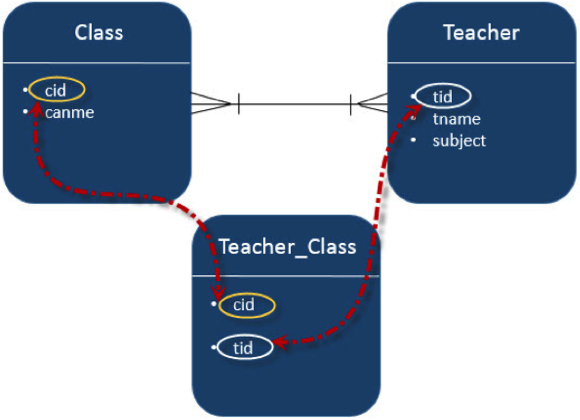
建立實體
按照上面給出的圖建立實體。在 **src** 包下建立一個名為 **‘com.tutorialspoin.eclipselink.entity’** 的包。在給定的包下建立一個名為 **Clas.java** 的類。Department 實體類如下所示:
package com.tutorialspoint.eclipselink.entity;

import java.util.Set;

import javax.persistence.Entity;
import javax.persistence.GeneratedValue;
import javax.persistence.GenerationType;
import javax.persistence.Id;
import javax.persistence.ManyToMany;

@Entity
public class Clas {

   @Id
   @GeneratedValue( strategy = GenerationType.AUTO )

   private int cid;
   private String cname;

   @ManyToMany(targetEntity=Teacher.class)
   private Set teacherSet;

   public Clas(){
      super();
   }

   public Clas(int cid, String cname, Set teacherSet) {
      super();
      this.cid = cid;
      this.cname = cname;
      this.teacherSet = teacherSet;
   }

   public int getCid(){
      return cid;
   }

   public void setCid(int cid) {
      this.cid = cid;
   }

   public String getCname() {
      return cname;
   }

   public void setCname(String cname) {
      this.cname = cname;
   }

   public Set getTeacherSet() {
      return teacherSet;
   }

   public void setTeacherSet(Set teacherSet) {
      this.teacherSet = teacherSet;
   }
}
在此關係中建立第二個實體 - 在 **‘com.tutorialspoint.eclipselink.entity’** 包下建立一個名為 **Teacher.java** 的 Employee 實體類。Employee 實體類如下所示:
package com.tutorialspoint.eclipselink.entity;

import java.util.Set;

import javax.persistence.Entity;
import javax.persistence.GeneratedValue;
import javax.persistence.GenerationType;
import javax.persistence.Id;
import javax.persistence.ManyToMany;

@Entity
public class Teacher {

   @Id
   @GeneratedValue( strategy = GenerationType.AUTO )
   private int tid;
   private String tname;
   private String subject;

   @ManyToMany(targetEntity = Clas.class)
   private Set clasSet;

   public Teacher(){
      super();
   }

   public Teacher(int tid, String tname, String subject, Set clasSet) {
      super();
      this.tid = tid;
      this.tname = tname;
      this.subject = subject;
      this.clasSet = clasSet;
   }

   public int getTid() {
      return tid;
   }

   public void setTid(int tid) {
      this.tid = tid;
   }

   public String getTname() {
      return tname;
   }

   public void setTname(String tname) {
      this.tname = tname;
   }

   public String getSubject() {
      return subject;
   }

   public void setSubject(String subject) {
      this.subject = subject;
   }

   public Set getClasSet() {
      return clasSet;
   }

   public void setClasSet(Set clasSet) {
      this.clasSet = clasSet;
   }
}
persistence.xml
在建立 JPA 專案時,persistence.xml 檔案將由 Eclipse IDE 建立。配置細節是使用者指定的。persistence.xml 檔案如下所示:
<?xml version = "1.0" encoding = "UTF-8"?>
<persistence version = "2.0" xmlns = "http://java.sun.com/xml/ns/persistence"
   xmlns:xsi = "http://www.w3.org/2001/XMLSchema-instance"
   xsi:schemaLocation = "http://java.sun.com/xml/ns/persistence
   http://java.sun.com/xml/ns/persistence/persistence_2_0.xsd">

   <persistence-unit name = "Eclipselink_JPA" transaction-type = "RESOURCE_LOCAL">
      <class>com.tutorialspoint.eclipselink.entity.Employee</class>
      <class>com.tutorialspoint.eclipselink.entity.Department</class>

      <properties>
      <property name = "javax.persistence.jdbc.url" value = "jdbc:mysql://:3306/jpadb"/>
      <property name = "javax.persistence.jdbc.user" value = "root"/>
      <property name = "javax.persistence.jdbc.password" value = "root"/>
      <property name = "javax.persistence.jdbc.driver" value = "com.mysql.jdbc.Driver"/>
      <property name = "eclipselink.logging.level" value = "FINE"/>
      <property name = "eclipselink.ddl-generation" value = "create-tables"/>
      </properties>

   </persistence-unit>
</persistence>
服務類
此模組包含服務類,這些類使用屬性初始化實現關係部分。在 **src** 包下建立一個名為 **‘com.tutorialspoint.eclipselink.service’** 的包。在給定的包下建立一個名為 **ManyToMany.java** 的 DAO 類。DAO 類如下所示:
package com.tutorialspoint.eclipselink.service;

import java.util.HashSet;
import java.util.Set;

import javax.persistence.EntityManager;
import javax.persistence.EntityManagerFactory;
import javax.persistence.Persistence;

import com.tutorialspoint.eclipselink.entity.Clas;
import com.tutorialspoint.eclipselink.entity.Teacher;

public class ManyToMany {
   public static void main(String[] args) {

   EntityManagerFactory emfactory = Persistence.createEntityManagerFactory( "Eclipselink_JPA" );
   EntityManager entitymanager = emfactory.createEntityManager( );
   entitymanager.getTransaction( ).begin( );

   //Create Clas Entity
   Clas clas1 = new Clas(0, "1st", null);
   Clas clas2 = new Clas(0, "2nd", null);
   Clas clas3 = new Clas(0, "3rd", null);

   //Store Clas
   entitymanager.persist(clas1);
   entitymanager.persist(clas2);
   entitymanager.persist(clas3);

   //Create Clas Set1
   Set<Clas> classSet1 = new HashSet();
   classSet1.add(clas1);
   classSet1.add(clas2);
   classSet1.add(clas3);

   //Create Clas Set2
   Set<Clas> classSet2 = new HashSet();
   classSet2.add(clas3);
   classSet2.add(clas1);
   classSet2.add(clas2);

   //Create Clas Set3
   Set<Clas> classSet3 = new HashSet();
   classSet3.add(clas2);
   classSet3.add(clas3);
   classSet3.add(clas1);

   //Create Teacher Entity
   Teacher teacher1 = new Teacher(0, "Satish","Java",classSet1);
   Teacher teacher2 = new Teacher(0, "Krishna","Adv Java",classSet2);
   Teacher teacher3 = new Teacher(0, "Masthanvali","DB2",classSet3);

   //Store Teacher
   entitymanager.persist(teacher1);
   entitymanager.persist(teacher2);
   entitymanager.persist(teacher3);


   entitymanager.getTransaction( ).commit( );
   entitymanager.close( );
   emfactory.close( );
   }
}
編譯並執行上述程式後,您將在 Eclipse IDE 的控制檯面板中收到通知。對於輸出,請檢查 MySQL Workbench,如下所示。在此示例專案中,建立了三個表。
在 MySQL 介面中傳遞以下查詢,teacher_clas 表的表格格式結果如下所示。
Select * form teacher_clas;

Teacher _tid	Classet_cid
354	        351
355	        351
356	        351
354	        352
355	        352
356	        352
354	        353
355	        353
356	        353
在上表中,teacher_tid 是來自教師表的外部索引鍵,classet_cid 是來自班級表的外部索引鍵。因此,不同的教師被分配到不同的班級。
在 MySQL 介面中傳遞以下查詢,教師表的表格格式結果如下所示:
Select * from teacher;

Tid	Subject	    Tname
354	Java	    Satish
355	Adv Java    Krishna
356	DB2         Masthanvali
在 MySQL 介面中傳遞以下查詢,clas 表的表格格式結果如下所示:
Select * from clas;

cid	Cname
351	1st
352	2nd
353	3rd