
 資料結構
資料結構 網路
網路 關係型資料庫管理系統
 作業系統
作業系統 Java
Java MS Excel
 iOS
iOS HTML
HTML CSS
CSS Android
 Python
 C 程式設計
 C++
C++ C#
C# MongoDB
 MySQL
MySQL JavaScript
 PHP
PHP 物理學
物理學 化學
化學 生物學
生物學 數學
數學 英語
英語 經濟學
經濟學 心理學
心理學 社會學
社會學 時尚研究
時尚研究 法律研究
法律研究JavaFX Label setLabelFor() 方法示例
在 JavaFX 中,你可以透過例項化javafx.scene.control.Label類來建立標籤。此類提供一個名為labelFor()的方法。使用此方法,你可以將當前標籤設定成另一個控制節點的標籤。
在設定助記符和解析加速器時,此方法會很方便。
示例
在以下 JavaFX 示例中,我們建立了一個標籤(文字)、一個文字欄位和一個按鈕。使用labelFor()方法,我們將標籤(文字)與文字欄位關聯起來,從而啟用助記符解析(T)。因此,在輸出視窗中,如果你按Alt + T,此文字欄位將獲得焦點。
import javafx.application.Application;
import javafx.geometry.Insets;
import javafx.scene.Scene;
import javafx.scene.control.Button;
import javafx.scene.control.Label;
import javafx.scene.control.TextField;
import javafx.scene.layout.HBox;
import javafx.scene.paint.Color;
import javafx.stage.Stage;
public class LabelFor_Example extends Application {
   public void start(Stage stage) {
      //Creating nodes
      TextField textField = new TextField();
      Button button = new Button("Click Me");
      //creating labels
      Label label1 = new Label("_Text");
      label1.setMnemonicParsing(true);
      label1.setLabelFor(textField);
      //Adding labels for nodes
      HBox box1 = new HBox(5);
      box1.setPadding(new Insets(25, 5 , 5, 50));
      box1.getChildren().addAll(label1, textField, button);
      //Setting the stage
      Scene scene = new Scene(box1, 595, 150, Color.BEIGE);
      stage.setTitle("JavaFX Example");
      stage.setScene(scene);
      stage.show();
   }
   public static void main(String args[]){
      launch(args);
   }
}
輸出
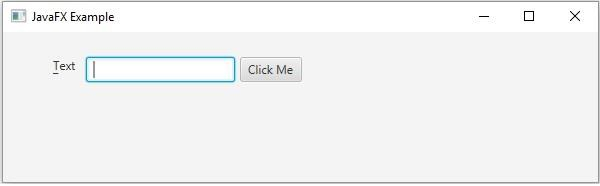

更新於: 16-5-2020
531 次檢視

廣告