
 資料結構
資料結構 網路
網路 關係資料庫管理系統
 作業系統
作業系統 Java
Java MS Excel
 iOS
iOS HTML
HTML CSS
CSS Android
 Python
 C 程式設計
 C++
C++ C#
C# MongoDB
 MySQL
MySQL Javascript
 PHP
PHP 物理學
物理學 化學
化學 生物學
生物學 數學
數學 英語
英語 經濟學
經濟學 心理學
心理學 社會學
社會學 服裝設計
服裝設計 法律研究
法律研究如何在 JavaFX 中的標籤中設定助記符?
您可以使用 Label 元件在使用者介面上顯示文字元素/影像。它是一個不可編輯的文字控制元件,主要用於指定應用程式中其他節點的用途。
在 JavaFX 中,您可以透過例項化 **javafx.scene.control.Label** 類來建立標籤。
設定助記符
助記符是在使用者介面元件(按鈕、文字欄位等)的選單標題中使用的數字或字元,通常帶下劃線。如果按下此字元並同時按下 **Alt** 鍵,則相應的選單項將獲得焦點。
要建立助記符 -
透過例項化其相應的類建立任何節點。
建立一個標籤來關聯節點,並在所需的助記符字元前使用下劃線字元 (“_”)。
預設情況下,標籤的助記符解析值將為 false,使用 **setMnemonicParsing()** 方法將其設定為 *true*。
將標籤設定為/關聯到所需的節點。
將標籤和欄位新增到場景中。
示例
import javafx.application.Application;
import javafx.geometry.Insets;
import javafx.scene.Scene;
import javafx.scene.control.Label;
import javafx.scene.control.PasswordField;
import javafx.scene.control.TextField;
import javafx.scene.layout.HBox;
import javafx.scene.paint.Color;
import javafx.stage.Stage;
public class LabelForExample extends Application {
   public void start(Stage stage) {
      //Creating nodes
      TextField textField = new TextField();
      PasswordField pwdField = new PasswordField();
      //creating labels
      Label label1 = new Label("_Email");
      label1.setMnemonicParsing(true);
      label1.setLabelFor(textField);
      Label label2 = new Label("_Password");
      label2.setMnemonicParsing(true);
      label2.setLabelFor(pwdField);
      //Adding labels for nodes
      HBox box1 = new HBox(5);
      box1.setPadding(new Insets(25, 5 , 5, 50));
      box1.getChildren().addAll(label1, textField, label2, pwdField);
      //Setting the stage
      Scene scene = new Scene(box1, 595, 150, Color.BEIGE);
      stage.setTitle("Check Box Example");
      stage.setScene(scene);
      stage.show();
   }
   public static void main(String args[]){
      launch(args);
   }
}
輸出
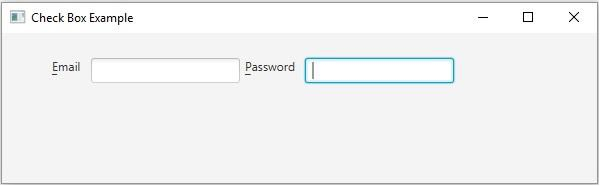
如果您在鍵盤上按下 **Alt+e**,焦點將轉移到第一個文字欄位,如果您在鍵盤上按下 **Alt+p**,焦點將轉移到第二個文字欄位。

更新於: 2020年5月16日
820 次瀏覽

廣告