
- Java 程式設計示例
- 示例 - 首頁
- 示例 - 環境
- 示例 - 字串
- 示例 - 陣列
- 示例 - 日期和時間
- 示例 - 方法
- 示例 - 檔案
- 示例 - 目錄
- 示例 - 異常
- 示例 - 資料結構
- 示例 - 集合
- 示例 - 網路
- 示例 - 執行緒
- 示例 - 小程式
- 示例 - 簡單圖形使用者介面
- 示例 - JDBC
- 示例 - 正則表示式
- 示例 - Apache PDF Box
- 示例 - Apache POI PPT
- 示例 - Apache POI Excel
- 示例 - Apache POI Word
- 示例 - OpenCV
- 示例 - Apache Tika
- 示例 - iText
- Java 教程
- Java - 教程
- Java 實用資源
- Java - 快速指南
- Java - 實用資源
如何使用 Java 在 PPT 中建立超連結
問題描述
如何使用 Java 在 PPT 中建立超連結。
解決方案
以下是使用 java 在 PPT 中建立超連結的程式。
import java.io.File;
import java.io.FileOutputStream;
import java.io.IOException;

import org.apache.poi.xslf.usermodel.SlideLayout;
import org.apache.poi.xslf.usermodel.XMLSlideShow;
import org.apache.poi.xslf.usermodel.XSLFHyperlink;
import org.apache.poi.xslf.usermodel.XSLFSlide;
import org.apache.poi.xslf.usermodel.XSLFSlideLayout;
import org.apache.poi.xslf.usermodel.XSLFSlideMaster;
import org.apache.poi.xslf.usermodel.XSLFTextRun;
import org.apache.poi.xslf.usermodel.XSLFTextShape;

public class HyperlinkToPPT {
   public static void main(String args[]) throws IOException {

      //create an empty presentation
      XMLSlideShow ppt = new XMLSlideShow();

      //getting the slide master object
      XSLFSlideMaster slideMaster = ppt.getSlideMasters()[0];

      //select a layout from specified list
      XSLFSlideLayout slidelayout = slideMaster.getLayout(SlideLayout.TITLE_AND_CONTENT);

      //creating a slide with title and content layout
      XSLFSlide slide = ppt.createSlide(slidelayout);

      //selection of title place holder
      XSLFTextShape body = slide.getPlaceholder(1);

      //clear the existing text in the slide
      body.clearText();

      //adding new paragraph
      XSLFTextRun textRun = body.addNewTextParagraph().addNewTextRun();

      //setting the text
      textRun.setText("Tutorials point");

      //creating the hyperlink
      XSLFHyperlink link = textRun.createHyperlink();

      //setting the link address
      link.setAddress("https://tutorialspoint.tw/");

      //create the file object
      File file = new File("C:/poippt/hyperlink.pptx");
      FileOutputStream out = new FileOutputStream(file);

      //save the changes in a file
      ppt.write(out);
      System.out.println("slide cretated successfully");
      out.close();
   }
}
結果
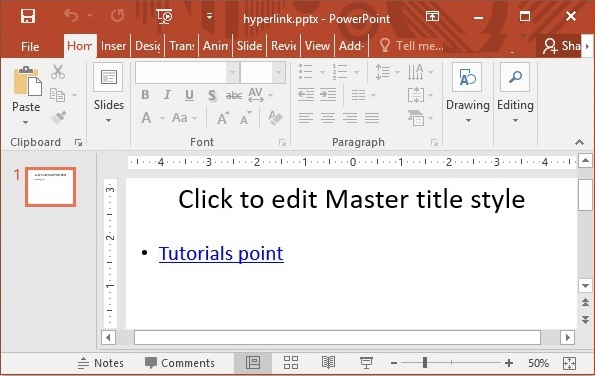
java_apache_poi_ppt
廣告