
 資料結構
資料結構 網路
網路 關係資料庫管理系統
 作業系統
作業系統 Java
Java MS Excel
 iOS
iOS HTML
HTML CSS
CSS Android
 Python
 C 程式設計
 C++
C++ C#
C# MongoDB
 MySQL
MySQL Javascript
 PHP
PHP 物理學
物理學 化學
化學 生物學
生物學 數學
數學 英語
英語 經濟學
經濟學 心理學
心理學 社會學
社會學 服裝設計
服裝設計 法律研究
法律研究如何在 MATLAB 中將資料寫入 Excel 電子表格?
MATLAB 提供各種內建函式,使我們能夠將表格、矩陣、元胞陣列等形式的資料寫入 Excel 檔案。閱讀本文以瞭解在 MATLAB 中將資料寫入 Excel 電子表格的過程。
以下是一些使用 MATLAB 將資料寫入 Excel 電子表格的常用方法:
使用“writetable”函式
使用“xlswrite”函式
使用“writematrix”函式
使用“writecell”函式
讓我們藉助示例詳細討論每種方法。
在 MATLAB 中使用“writetable”函式
在 MATLAB 中,“writetable”是一個內建函式,可用於將表格資料寫入 Excel 電子表格。此函式是建議在較新版本的 MATLAB 中將資料寫入 Excel 電子表格的方法。
以下是其**語法**:
writetable(data_table, excel_file_name);
這裡,“data_table”是一個包含表格形式的實際資料的變數。
示例
讓我們舉一個例子來了解如何使用“writetable”函式將資料寫入 Excel 電子表格。
% MATLAB code to write data to excel spreadsheet using writetable function
% Create some sample data
data = randn(4, 3);		% generating random matrix of data

% Create column headers
col_headers = {'Col1', 'Col2', 'Col3'};

% Convert the data to a data table format
data_table = array2table(data, 'VariableNames', col_headers);

% Specify a file name for excel spreadsheet
file_name = 'excel_file_1.xlsx';

% Write the data table to the Excel spreadsheet
writetable(data_table, file_name);

% Display a conformation message
disp('Data has been written to the excel spreadsheet successfully.');
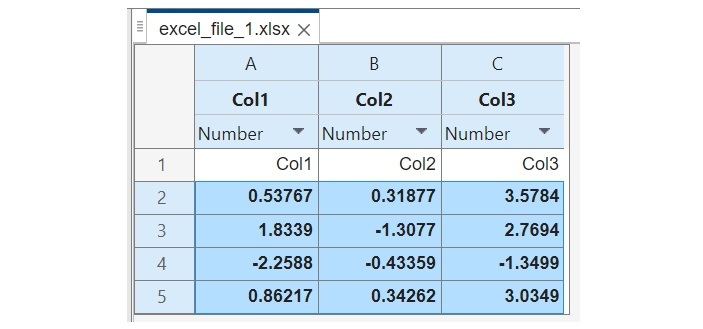
輸出
它將產生以下輸出:
Data has been written to the excel spreadsheet successfully.
在 MATLAB 中使用“xlswrite”函式
在 MATLAB 中,我們還有另一個名為“xlswrite”的內建函式可用於將資料寫入 Excel 電子表格。此函式是 MATLAB 中將資料寫入 Excel 電子表格的舊方法。
此函式在“writetable”函式上有一些限制。因此,如果您使用的是較新版本的 MATLAB,建議使用“writetable”函式而不是“xlswrite”函式。
以下是其**語法**:
xlswrite(file_name, data, sheet_name);
示例
讓我們看一個示例來了解如何使用“xlswrite”函式將資料寫入電子表格。
% MATLAB code to write data to excel spreadsheet using "xlswrite" function
% Create sample data
data = randn(5, 6);  	% generating random data

% Specify the name of the Excel file
file_name = 'excel_file_2.xlsx';

% Specify the name for spreadsheet
sheet_name = 'Sample_Sheet';

% Write the data to the Excel spreadsheet
xlswrite(file_name, data, sheet_name);

% Show a conformation message
disp('Data has been written to the excel spreadsheet successfully.');
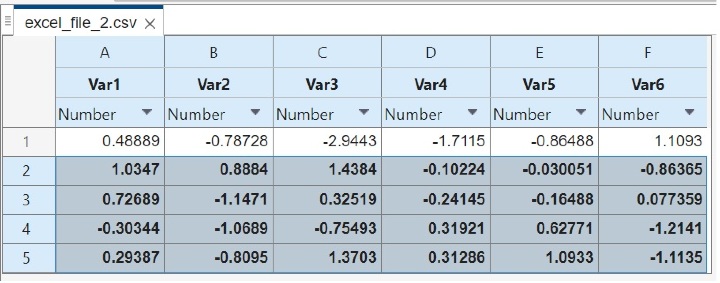
輸出
它將產生以下輸出:
Data has been written to the excel spreadsheet successfully.
在 MATLAB 中使用“writematrix”函式
在 MATLAB 中,“writematrix”函式用於將矩陣寫入 Excel 電子表格。此函式也建議在較新版本的 MATLAB 中使用。
其**語法**如下:
writematrix(mat, file_name);
示例
以下示例演示瞭如何使用“writematrix”函式將矩陣資料寫入 Excel 電子表格。
% MATLAB code to write data to excel spreadsheet using "writematrix" function
% Create a sample matrix of data
mat = randn(5, 4);	% generating a random matrix

% Specify the file name for excel spreadsheet
file_name = 'excel_file_3.xlsx';

% Write the matrix data to the Excel spreadsheet
writematrix(mat, file_name);

% Show a conformation message
disp('Data has been written to the excel spreadsheet successfully.');
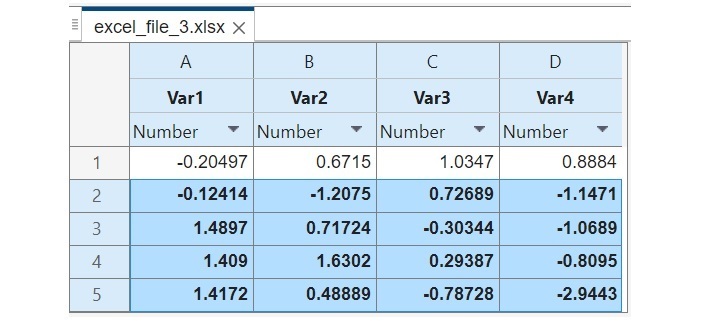
輸出
它將產生以下輸出:
Data has been written to the excel spreadsheet successfully.
在 MATLAB 中使用“writematrix”函式
在 MATLAB 中,“writecell”函式用於將元胞陣列資料寫入 Excel 電子表格。元胞陣列包含不同資料型別的元素。“writecell”函式提供了一種有效處理不同型別資料的方法。
“writecell”函式在 MATLAB R2019a 和更高版本的 MATLAB 中可用。在舊版本的 MATLAB 中,我們必須使用“xlswrite”函式將元胞陣列的資料寫入 Excel 電子表格。
以下是其**語法**:
writecell(cell_array, file_name);
示例
讓我們舉一個例子來了解如何使用“writecell”函式將元胞陣列寫入 Excel 電子表格。
% MATLAB code to write data to excel spreadsheet using writecell function
% Create an example cell array
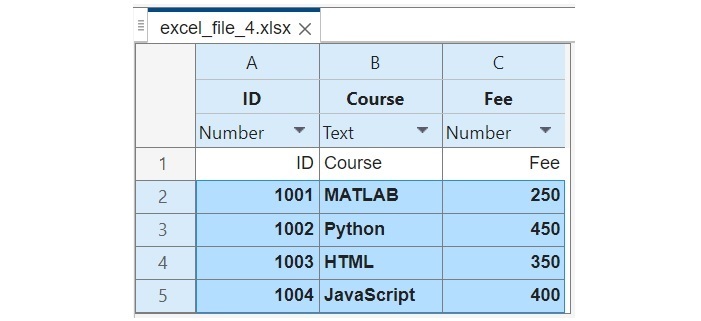
A = {'ID', 'Course', 'Fee'; 1001, 'MATLAB', 250; 1002, 'Python', 450; 1003, 'HTML', 350; 1004, 'JavaScript', 400;};

% Specify the file name for excel spreadsheet
file_name = 'excel_file_4.xlsx';

% Write the cell array to the Excel spreadsheet
writecell(A, file_name);

% Show a conformation message
disp('Data has been written to the excel spreadsheet successfully.');
輸出
它將產生以下輸出:
Data has been written to the excel spreadsheet successfully.
結論
總之,MATLAB 提供了多種將資料寫入 Excel 電子表格的方法。在本教程中,我解釋了所有常用方法,並使用 MATLAB 演示了將資料寫入示例的方法。這些示例演示瞭如何使用不同的函式將不同型別的資料寫入 MATLAB 中的 Excel 電子表格。

378 次檢視
