
 資料結構
資料結構 網路
網路 關係資料庫管理系統 (RDBMS)
 作業系統
作業系統 Java
Java MS Excel
 iOS
iOS HTML
HTML CSS
CSS Android
 Python
 C語言程式設計
 C++
C++ C#
C# MongoDB
 MySQL
MySQL Javascript
 PHP
PHP 物理學
物理學 化學
化學 生物學
生物學 數學
數學 英語
英語 經濟學
經濟學 心理學
心理學 社會學
社會學 服裝學
服裝學 法學
法學如何在PowerShell中使用ErrorActionPreference變數?
PowerShell中的**ErrorActionPreference**變數用於透過將非終止錯誤轉換為終止錯誤來控制非終止錯誤。錯誤處理取決於您為**$ErrorActionPreference**變數分配的值。
值如下所示。
**Continue** − 這是變數的預設值,當發生錯誤時,錯誤將顯示在PowerShell控制檯中,指令碼將繼續執行。
Get-WmiObject -Class Win32_Logicaldisk -ComputerName Nonexist
Write-Host "Hello World"
輸出
Get-WmiObject -Class Win32_Logicaldisk -ComputerName Nonexist
Write-Host "Hello World"
Get-WmiObject : The RPC server is unavailable.
At line:2 char:1
+ Get-WmiObject -Class Win32_Logicaldisk -ComputerName Nonexist
+ ~~~~~~~~~~~~~~~~~~~~~~~~~~~~~~~~~~~~~~~~~~~~~~~~~~~~~~~~~~~~~
+ CategoryInfo : InvalidOperation: (:) [Get-WmiObject],
COMException
+ FullyQualifiedErrorId :
GetWMICOMException,Microsoft.PowerShell.Commands.GetWmiObj
ectCommand
Hello World
**Stop** − 錯誤不會顯示在控制檯中,並且管道執行將停止。在下面的示例中,將沒有輸出。
$ErrorActionPreference = "Stop"
Get-WmiObject -Class Win32_Logicaldisk -ComputerName Nonexist
Write-Host "Hello World"
**SilentlyContinue** − 錯誤輸出不會顯示,指令碼將執行管道中的下一條命令。
$ErrorActionPreference = "SilentlyContinue"
Get-WmiObject -Class Win32_Logicaldisk -ComputerName Nonexist
Write-Host "`nHello World" -BackgroundColor DarkGreen
輸出 −
PS C:\WINDOWS\system32>> $ErrorActionPreference = "SilentlyContinue" Get-WmiObject -Class Win32_Logicaldisk -ComputerName Nonexist Write-Host "`nHello World" -BackgroundColor DarkGreen

Hello World
**Inquire** − 如果發生錯誤,它將等待使用者提示並詢問是否繼續。將顯示錯誤。
$ErrorActionPreference = "Inquire"
Get-WmiObject -Class Win32_Logicaldisk -ComputerName Nonexist
Write-Host "`nHello World" -BackgroundColor DarkGreen
輸出
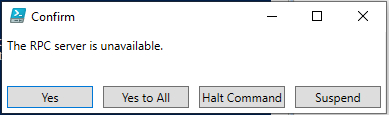
如果您按下**“是/全部是”**,則將顯示錯誤輸出,而**“停止命令/暫停”**不會顯示錯誤。
**Suspend** − 此值用於PowerShell工作流中,用於暫停工作流以進行調查,然後恢復。
關閉PowerShell會話時,**$ErrorActionPreference**的值將設定為預設值,即**Continue**。

更新於:2020年5月27日
5K+ 次瀏覽

廣告