
 資料結構
資料結構 網路
網路 RDBMS
RDBMS 作業系統
作業系統 Java
Java MS Excel
 iOS
iOS HTML
HTML CSS
CSS Android
 Python
 C 程式設計
 C++
C++ C#
C# MongoDB
 MySQL
MySQL JavaScript
 PHP
PHP 物理學
物理學 化學
化學 生物學
生物學 數學
數學 英語
英語 經濟學
經濟學 心理學
心理學 社會學
社會學 時尚研究
時尚研究 法學
法學如何使用 PowerShell 中的 tree 命令?
Tree 命令以圖形方式顯示所給驅動器或路徑的資料夾結構。它類似於 Get−ChildItem 或 dir 遞迴命令,只不過它顯示圖形結構。例如,以下命令將檢索 C:\VMs 的資料夾結構,包括
tree c:\VMs
輸出
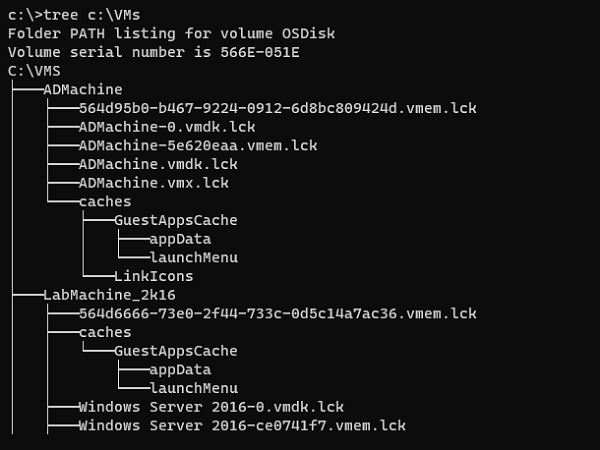
此命令還支援其他兩個開關。它們將出現在此命令的幫助部分。
c:\>tree /?
Graphically displays the folder structure of a drive or path.

TREE [drive:][path] [/F] [/A]
/F Display the names of the files in each folder.
/A Use ASCII instead of extended characters.
此命令是一個 cmd 實用程式,因此我們使用 ‘?’ 符號作為幫助命令。
帶有 /F 開關的命令,用於顯示每個資料夾中的檔名。
tree c:\VMs /F
輸出
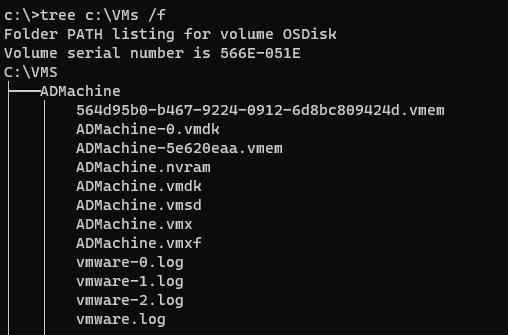
要一次顯示一個螢幕,請在管道中使用 more 關鍵字。例如,
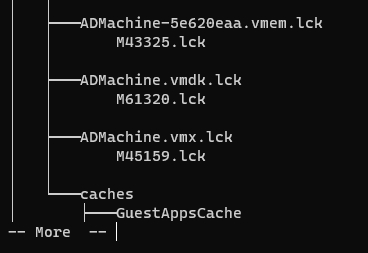
可以使用 /A 開關使用文字字元而不是圖形字元來顯示連結到子目錄的行。
例如,
tree c:\VMs /a
輸出
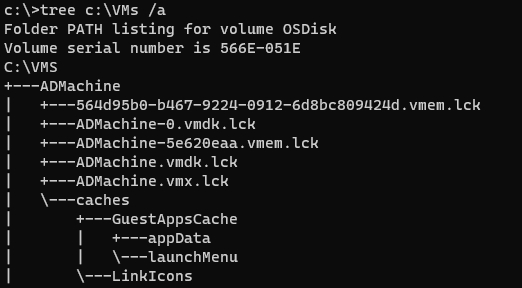

更新於: 2021-01-25
10000+ 次瀏覽

廣告