
 資料結構
資料結構 網路
網路 關係資料庫管理系統
 作業系統
作業系統 Java
Java MS Excel
 iOS
iOS HTML
HTML CSS
CSS Android
 Python
 C 程式設計
 C++
C++ C#
C# MongoDB
 MySQL
MySQL Javascript
 PHP
PHP 物理學
物理學 化學
化學 生物學
生物學 數學
數學 英語
英語 經濟學
經濟學 心理學
心理學 社會學
社會學 時尚研究
時尚研究 法律研究
法律研究如何在 React Native 中使用 Redux?
Redux 是一個用於 JavaScript 程式的狀態管理庫。它提供了一箇中心位置來儲存應用程式的所有狀態資訊,並提供了一種可預測的方式來使用 action 和 reducer 來更改狀態。
React Native 是一個使用 React 構建原生移動應用程式的框架。為了將 Redux 與 React Native 結合使用,使用者必須將其 Redux 儲存與 React Native 元件整合。要將 Redux 與 ReactNative 一起使用,我們將按照簡要描述的幾個步驟進行操作,稍後我們將更詳細地討論此過程。
首先,安裝 Redux 和 React-Redux 庫。
要構建儲存,請使用 Redux 庫的 createStore 方法。儲存包含應用程式的狀態。
使用 react-redux 包中的 Provider 元件來授予 React Native 元件訪問儲存的許可權。
要將元件連線到儲存,請使用 reactredux 包中的 connect 函式。來自儲存的狀態將可供這些元件訪問,然後這些元件可以發出 action 來更新狀態。
使用儲存的 dispatch 方法發出 action 來更新狀態。
要響應儲存更改來更新元件,請使用儲存的 subscribe 方法。
在 React Native 中使用 Redux 的步驟
首先安裝 React-Redux 和 Redux 庫 - 為了使 Redux 與 React Native 相容,必須安裝 React-Redux 和 Redux 庫。為此,我們可以使用 yarn 或 npm 包管理器。
以下是安裝 redux 和 react-redux 需要執行的命令。
npm install redux
npm install react-redux
建立儲存 - 儲存應用程式的狀態。使用 Redux 庫的 createStore 函式建立儲存。然後,createStore 方法根據 action 更新狀態,並接收 reducer 函式作為引數。
將使用者的 React Native 元件連線到儲存 - 使用 react-redux 包中的 Provider 元件向用戶的元件提供儲存。此元件為所有其他關聯元件提供了訪問儲存的許可權。
將使用者的元件連線到儲存 - 使用 reactredux 包中的 connect 方法將元件連線到儲存。透過將狀態從儲存對映到 props 並將 action 分派到 props,使用者可以使用 connect 函式分派 action 來更新狀態。
傳送 action 以修改狀態 - 我們可以透過儲存的 dispatch 函式來做到這一點。
註冊儲存更改 - 使用儲存的 subscribe 函式訂閱更改。然後對使用者的元件進行任何必要的更新。
示例
在此示例中,我們將建立一個 redux 儲存並在我們的 React-Native 應用程式中使用它。我們將建立一個儲存來儲存計數器的值。需要建立不同的檔案和資料夾來實現 redux。首先,我們需要建立一個名為 Redux 的資料夾,以下是我們需要在該資料夾中建立的檔案。
redux 的資料夾結構 -
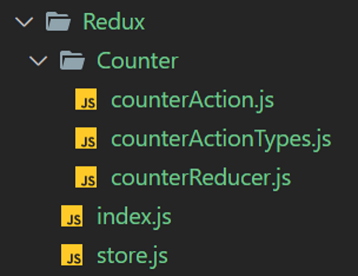
讓我們逐個瞭解每個檔案並理解程式碼
counterActionTypes.js - 儲存所有 action 型別
// All Action Types
export const INCREMENT_COUNTER = 'INCREMENT_COUNTER';
export const DECREMENT_COUNTER = 'DECREMENT_COUNTER';
counterAction.js − 儲存所有 action
import { INCREMENT_COUNTER, DECREMENT_COUNTER } from
'./counterActionTypes';
export const incrementCounterAction = (parameter) => {
   return {
      type: INCREMENT_COUNTER,
      payload: parameter
   }
}
export const decrementCounterAction = () => {
   return {
      type: DECREMENT_COUNTER
   }
}
counterReducer.js - 儲存初始狀態和 reducer。
import { INCREMENT_COUNTER, DECREMENT_COUNTER } from './counterActionTypes';

//initializing state
const initialState = {
   counter: 0
}
const counterReducer = (state = initialState, action) => {
   switch (action.type) {
      case INCREMENT_COUNTER: return {
         ...state,
         counter: state.counter + action.payload
      }
      case DECREMENT_COUNTER: return {
         ...state,
         counter: state.counter - 1
      }
      default: return state
   }
}
export default counterReducer;
index.js − 儲存所有 action
// All Actions
import { incrementCounterAction } from './Counter/counterAction';
import { decrementCounterAction } from './Counter/counterAction';
store.js − redux 的儲存
import { createStore } from 'redux';
import counterReducer from './Counter/counterReducer';

// Passing counterReducer to createStore
const store = createStore(counterReducer);
export default store;
App.js − 應用程式的主要元件
import React from 'react';
import { Provider } from 'react-redux';
import store from './Redux/store';
import MyComponent from './MyComponent';
const App = () => {
   return (
      <Provider store={store}>
         <MyComponent />
      </Provider>
   );
};
export default App;
MyComponent.js − 我們使用 redux 狀態的元件
import React, { Component } from 'react'
import { Text, View, Button } from 'react-native'
import { connect } from 'react-redux'
import { incrementCounterAction, decrementCounterAction } from
'./Redux/Counter/counterAction';
class MyComponent extends Component {
   render() {
      return (
         <View style={{ justifyContent: 'center', alignItems: 'center' }}>
            <View style={{ marginVertical: 50 }}>
               <Text style = {{ fontSize: 25, fontWeight: 'bold' }}> Counter Value = {this.props.counter} </Text>
            </View>
            <View style = {{ marginVertical: 5 }}>
               <Button title = "Increment +1" style = {{ marginVertical: 50 }} onPress={() => { this.props.increaseCounter(1) }} />
            </View>
            <View style = {{ marginVertical: 5 }}>
               <Button title = "Increment +5" style = {{ marginVertical: 50 }} onPress={() => { this.props.increaseCounter(5) }} />
            </View>
            <View style = {{ marginVertical: 50 }}>
               <Button title = "Decrement -1" onPress={() => { this.props.decreaseCounter() }} />
            </View>
         </View>
      )
   }
}
const mapStateToProps = (state) => {
   return {
      counter: state.counter
   }
}
const mapDispatchToProps = (dispatch) => {
   return {
      increaseCounter: (parameter) => {
         dispatch(incrementCounterAction(parameter))
      },
      decreaseCounter: () => {
         dispatch(decrementCounterAction())
      }
   }
}
export default connect(mapStateToProps, mapDispatchToProps)(MyComponent);
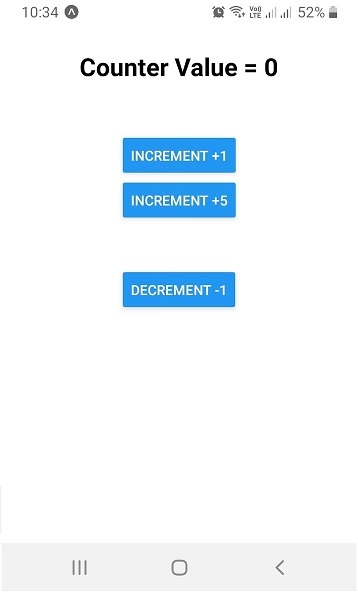
輸出
初始狀態
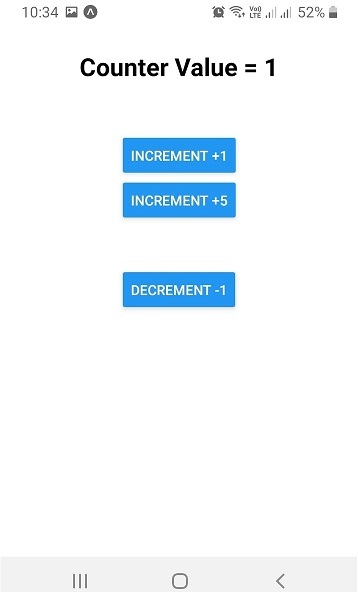
單擊“INCREMENT +1”按鈕後。
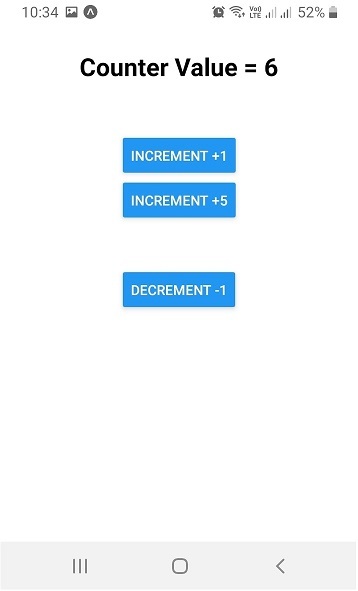
單擊“INCREMENT +5”按鈕後。
單擊“DECREMENT -1”按鈕後。
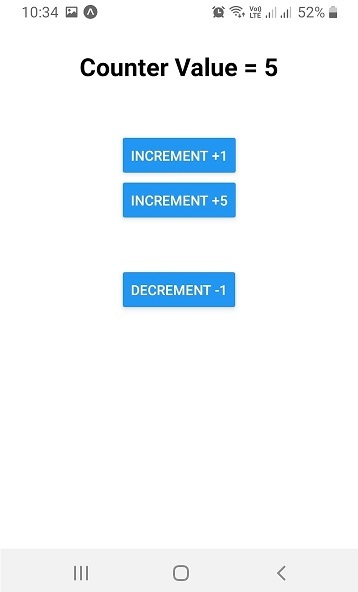
這演示瞭如何在 React Native 中使用 Redux。雖然在實際應用程式中,與儲存相關的 action、reducer 和元件會更多,但基本概念仍然適用。

7K+ 瀏覽量
