
 資料結構
資料結構 網路
網路 關係型資料庫
 作業系統
作業系統 Java
Java MS Excel
 iOS
iOS HTML
HTML CSS
CSS Android
 Python
 C 程式設計
 C++
C++ C#
C# MongoDB
 MySQL
MySQL Javascript
 PHP
PHP 物理
物理 化學
化學 生物
生物 數學
數學 英語
英語 經濟
經濟 心理學
心理學 社會學
社會學 時裝設計
時裝設計 法律研究
法律研究如何更新 Tkinter 選單欄項的標籤?
選單欄中包含一組選單項,其中每個選單項都針對不同的功能或操作進行定義。假設我們要更新選單欄項的標籤,則可以在回撥函式中使用entryconfigure(item_number, options..) 方法。要在選單欄中更新選單項,我們可以在上述方法中新增label 。
示例
讓我們建立一個應用程式,其中包含選單欄中的選單項列表。當我們點選某個特定項時,它將更改其中的文字。
#Import the required Library
from tkinter import *
#Create an Instance of tkinter frame
win= Tk()

#Set the geometry of the window
win.geometry("750x250")

#Create a Menu Bar
menu_bar = Menu(win)

#Define a function to change the Menu Label
def clicked(menu):
   menu.entryconfigure(1, label="You have Clicked!")
   Label(win, text= "You have Selected a Menu", font= (None,14)).pack(pady=20)

#Create a Menu Items
file_menu = Menu(menu_bar, tearoff=False)
file_menu.add_command(label="Click Me", command=lambda:
clicked(file_menu))

#Create a Menu Bar
menu_bar.add_cascade(label="File", menu=file_menu)
win.config(menu=menu_bar)
win.mainloop()
輸出
執行以上程式碼將顯示一個視窗,其中包含一個選單欄。當我們點選選單項時,它會快速更改其標籤。
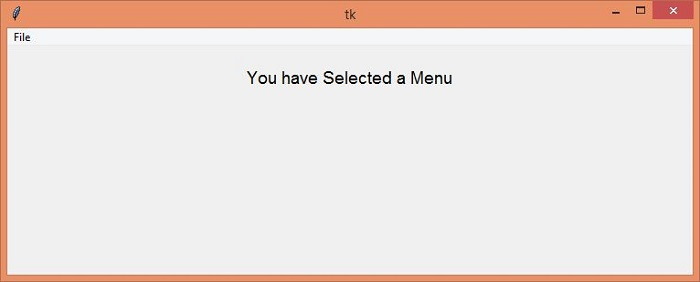
當我們點選檔案 → 單擊我時,它會更改其標籤文字並在螢幕上顯示一條訊息。

上次更新:2021-05-04
945 次瀏覽

廣告