
 資料結構
資料結構 網路
網路 關係型資料庫管理系統(RDBMS)
 作業系統
作業系統 Java
Java MS Excel
 iOS
iOS HTML
HTML CSS
CSS Android
 Python
 C語言程式設計
 C++
C++ C#
C# MongoDB
 MySQL
MySQL Javascript
 PHP
PHP 物理學
物理學 化學
化學 生物學
生物學 數學
數學 英語
英語 經濟學
經濟學 心理學
心理學 社會研究
社會研究 時尚研究
時尚研究 法律研究
法律研究如何在ReactJS中顯示線性進度條?
線性進度條通常用於顯示應用程式中的下載和上傳百分比。我們可以使用線性進度條來顯示上傳或下載完成的百分比。此外,它還可以透過動畫顯示進度,從而改善應用程式的使用者體驗。
在本教程中,我們將學習如何使用Material UI進度條和自定義進度條來顯示線性進度。
使用Material UI在ReactJS中顯示LinearProgress進度條
使用者可以在React應用程式中使用以下命令安裝Material UI庫。
npm install @mui/material @emotion/react @emotion/styled
安裝Material UI庫後,使用者需要從中匯入LinearProgress元件並在應用程式中使用它。
語法
使用者可以按照以下語法使用Material UI庫的LinearProgress元件來顯示線性進度條。
<LinearProgress />
示例
在下面的示例中,我們從material UI庫匯入了LinearProgress元件。之後,我們在App()元件中使用了它。
使用者可以觀察到,輸出顯示一個持續動畫的進度條。
import * as React from "react";
import Box from "@mui/material/Box";
import LinearProgress from "@mui/material/LinearProgress";
export default function App() {
   return (
      <div style = {{width:"700px"}}>
         <h2>
            {" "}
            Using the <i> Material UI </i> to show a linear progress bar in ReactJS
         </h2>
         <Box sx = {{ width: "100%" }}>
            <LinearProgress />
         </Box>
      </div>
   );
}
輸出

示例
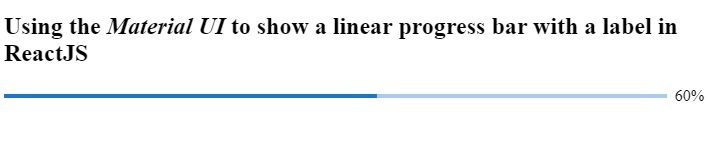
在下面的示例中,我們顯示帶有線性進度的標籤。我們在標籤上顯示完成百分比。我們使用了`determinate`作為`variant`屬性的值,它根據百分比顯示進度。
為了更新進度條的百分比,我們使用了`useEffect()`鉤子。在鉤子中,我們使用`setInterval()`方法設定計時器。它每500毫秒將進度增加10。我們使用了`setPercantage()`函式,該函式將帶有先前進度的回撥函式作為引數來更新進度。
import * as React from "react";
import LinearProgress from "@mui/material/LinearProgress";
import Box from "@mui/material/Box";
export default function App() {
   const [currentPercentage, setPercentage] = React.useState(10);
   React.useEffect(() => {
      const timer = setInterval(() => {
         setPercentage((prevProgress) =>
            prevProgress >= 100 ? 10 : prevProgress + 10
         );
      }, 500);
      return () => {
         clearInterval(timer);
      };
   }, []);
   return (
      <div style = {{ width: "700px" }}>
         <h2>
            {" "}
            Using the <i> Material UI </i> to show a linear progress bar with a label in ReactJS
         </h2>
         <Box sx = {{ display: "flex", alignItems: "center" }}>
            <Box sx = {{ width: "100%", mr: 1 }}>
               <LinearProgress variant="determinate" value={currentPercentage}/>
            </Box>
            {`${Math.round(currentPercentage)}%`}
         </Box>
      </div>
   );
}
輸出
在ReactJS中建立自定義線性進度條
我們可以使用HTML和CSS建立線性進度條。之後,我們可以使用React鉤子使其在進度百分比更新時進行動畫。
語法
使用者可以按照以下語法建立自定義進度條並更新其進度。
<div className = "mainDiv">
   <div className = "childDiv" style = {{ width: `${progress}%` }}>
      <span> </span>
   </div>
</div>
在上面的語法中,我們在樣式中添加了一個`width`屬性來更改進度。
示例
在下面的示例中,我們實現了自定義線性進度條。
檔名 – App.js
在下面的檔案中,我們添加了HTML來建立進度條,並根據進度狀態的值更改了進度條的寬度。我們在`setProgress`函式的回撥函式的引數中獲取當前進度值,然後向當前進度值新增1到10之間的任意值。
此外,如果進度超過1,我們將進度設定為1。
import * as React from "react";
import "./App.css";
export default function App() {
   const [progress, setProgress] = React.useState(10);
   React.useEffect(() => {
      const timer = setInterval(() => {
         setProgress((currentProgress) =>
            currentProgress >= 100 ? 1 : currentProgress + Math.random() * 10
         );
      }, 800);
      return () => {
         clearInterval(timer);
      };
   }, []);
   return (
      <div style = {{ width: "700px" }}>
         <h2>
            {" "}
            Creating the <i> custom linear progress bar </i> in ReactJS
         </h2>
         <div className = "mainDiv">
            <div className = "childDiv" style = {{ width: `${progress}%` }}>
               <span> </span>
            </div>
         </div>
      </div>
   );
}
檔名 – App.css
在下面的檔案中,我們實現了一些CSS來建立線性進度條。
.mainDiv {
   height: 1rem;
   width: 500px;
   background-color: whitesmoke;
   border-radius: 12px;
   margin: 1rem;
}
.childDiv {
   height: 100%;
   background-color: red;
   border-radius: 12px;
   text-align: left;
}
輸出

在本教程中,我們學習瞭如何在ReactJS中建立線性進度。我們學習瞭如何使用Material UI庫來建立線性進度條。此外,在使用線性進度條時,我們還可以更改進度條的變體。
此外,我們還使用HTML和CSS建立了自定義進度條。使用者應根據需要使用自定義線性進度條。

2K+ 次瀏覽
