
 資料結構
資料結構 網路
網路 關係資料庫管理系統
 作業系統
作業系統 Java
Java MS Excel
 iOS
iOS HTML
HTML CSS
CSS Android
 Python
 C 語言程式設計
 C++
C++ C#
C# MongoDB
 MySQL
MySQL Javascript
 PHP
PHP 物理學
物理學 化學
化學 生物學
生物學 數學
數學 英語
英語 經濟學
經濟學 心理學
心理學 社會學
社會學 服裝設計
服裝設計 法律研究
法律研究如何在 ReactJS 中顯示分頁?
分頁允許使用者在不同的頁面上顯示內容。例如,我們有成千上萬的資料,並希望在單個網頁上向用戶顯示這些資料。如果我們在單個頁面上顯示數千條資料,則看起來會很糟糕,因為使用者必須滾動瀏覽所有資料才能到達最後一條資料。
因此,為了解決這個問題,分頁就出現了。我們可以在單個頁面上顯示特定數量的資料,並根據可用資料的總數建立總頁數。Gmail 是分頁的最佳示例,它每頁顯示 50 封電子郵件,使用者可以更改頁面以檢視其他電子郵件。
使用 react-paginate NPM 包
react-paginate 是一個 NPM 包,允許在 React 應用程式中新增分頁功能。我們需要從包中匯入 ReactPaginate 元件並在應用程式中使用它。此外,我們需要將一些值作為 prop 傳遞。例如,pageCount 顯示螢幕上的總頁數。
使用者可以在專案目錄中執行以下命令,以在 React 應用程式中安裝 react-paginate NPM 包。
npm i react-paginate
語法
使用者可以按照以下語法使用 ReactPaginate 元件在 React 應用程式中顯示分頁。
<ReactPaginate
   pageCount = {Math.ceil(
      total data / ItemsPerPage
   )}
   onPageChange = {Invoke_func}
/>
在上面的語法中,使用者可以觀察到我們根據總資料和每頁專案數計算總頁數。此外,當用戶更改頁面時,我們可以執行任何函式。
示例
在下面的示例中,我們在類元件中定義了 state 物件。在 state 物件中,我們定義並初始化了所需的變數。我們已將 28 個專案新增到 Data 變數中。
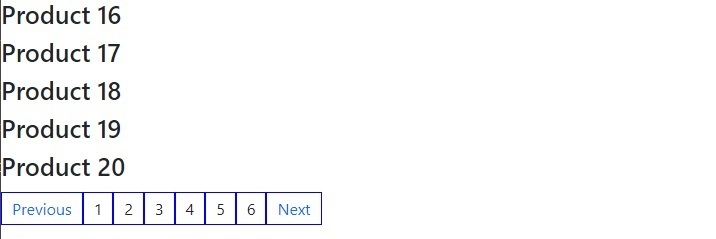
之後,我們向 ReactPaginate 元件添加了一些 props。每當使用者點選任何頁面時,我們都會呼叫 handlePageclick() 函式。在函式中,我們獲取選定的頁面,相應地從“allData” state 變數中切片資料,並將相應的資料儲存在“currentData” state 變數中。此外,我們在網頁上顯示當前資料。
此外,我們使用 Bootstrap 在 App.css 檔案中添加了一些 CSS。在輸出中,使用者可以觀察到,每當他們更改頁面時,它都會相應地更改資料。
檔名 – App.js
import React, { Component } from "react";
import ReactPaginate from "react-paginate";
import "./App.css";

export default class App extends Component {
   constructor(props) {
      super(props);

      // defining the state for the component
      this.state = {
         offset: 0,

         // defining the data that will be displayed
         allData: [
            1, 2, 3, 4, 5, 6, 7, 8, 9, 10, 11, 12, 13, 14, 15, 16, 17, 18, 19, 20,
            21, 22, 23, 24, 25, 26, 27, 28,
         ],

         // data for selected page
         currentData: [1, 2, 3, 4, 5],

         // total pages
         ItemsPerPage: 5,
         currentPage: 0,
      };
      this.handlePageClick = this.handlePageClick.bind(this);
   }
   getData = () => {
      // slice the data according to requirements
      const data = this.state.allData;
      const slice = data.slice(
         this.state.offset,
         this.state.offset + this.state.ItemsPerPage
      );
      // update the data
      this.setState({
         currentData: slice,
      });
   };

   handlePageClick = (e) => {
      // on page change, update the state
      const currentPage = e.selected;
      const offset = currentPage * this.state.ItemsPerPage;

      this.setState(
         {
            currentPage: currentPage,
            offset: offset,
         },
         () => {
            // update the current data
            this.getData();
         }
      );
   };

   render() {
      return (
         <div>
            {/* show data in the products form */}
            {this.state.currentData.map((item, index) => {
               return <h3 key = {index}> Product {item} </h3>;
            })}
            <ReactPaginate
               containerClassName = {"pagination"}
               pageCount = {Math.ceil(
                  this.state.allData.length / this.state.ItemsPerPage
               )}
               marginPagesDisplayed = {2}
               pageRangeDisplayed = {5}
               onPageChange = {this.handlePageClick}
               activeClassName = {"active"}
            />
         </div>
      );
   }
}
檔名 – App.css
@import "https://cdn.jsdelivr.net/npm/bootstrap@5.1.3/dist/css/bootstrap.min.css";

#container {
   margin:10px;
}

.items {
   margin-bottom:10px;
}

.pagination {
   list-style: none;
   outline: none;
   margin: 15px auto;
   display: flex;
}

.pagination > li > a {
   border: 1px solid blue;
   padding: 5px 10px;
   outline: none;
   text-decoration: none;
   cursor: pointer;
}
輸出
使用 Material Ui 的 Paginate 元件
Material UI 庫包含 Pagination 元件,我們可以直接將其匯入到 React 應用程式中以使用它。
在終端中執行以下命令以安裝 Material UI。
npm install @mui/material @emotion/react @emotion/styled
語法
使用者應遵循以下語法以使用 Material UI 的 Pagination 元件。
<Pagination count = {5} shape = "rounded" />
在上面的語法中,我們傳遞了表示總頁數的 count 和頁面項的形狀作為 prop。
示例
在下面的示例中,我們從 Material UI 匯入 Pagination 元件,並透過傳遞多個 props 添加了它的不同變體。
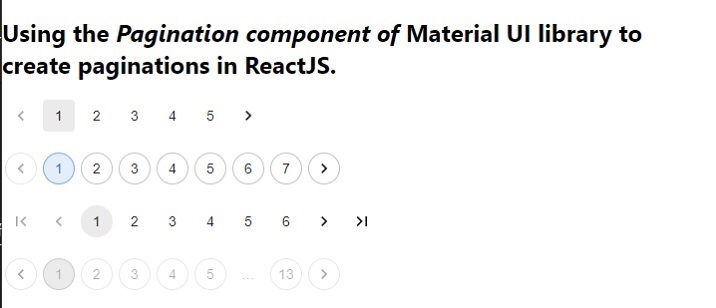
在輸出中,使用者可以觀察到我們已為頁面元件提供了圓角形狀。我們在第二個 Pagination 元件中添加了顏色和輪廓。此外,我們在第三個 Pagination 元件中顯示了箭頭按鈕,並在最後一個 Pagination 元件中停用了頁面。
import React from "react.js";
import Pagination from "@mui/material/Pagination";

const App = () => {
   return (
      <div>
         <h2>
            Using the <i> Pagination component of </i> Material UI library to create
            paginations in ReactJS.{" "}
         </h2>

         <Pagination count = {5} shape = "rounded" />
         <br></br>
         <Pagination count = {7} variant = "outlined" color = "primary" />
         <br></br>
         <Pagination count = {6} showFirstButton showLastButton />
         <br></br>
         <Pagination count = {13} variant = "outlined" disabled />
      </div>
   );
};
輸出
我們學習了兩種在 ReactJS 中建立分頁的方法。第一種方法使用 react-paginate NPM 包,第二種方法使用 Material UI 庫。此外,如果使用者擁有豐富的處理分頁功能的知識,他們可以從頭開始在 ReactJS 中建立自定義 Pagination 元件。

520 次檢視
