
 資料結構
資料結構 網路
網路 關係資料庫管理系統 (RDBMS)
 作業系統
作業系統 Java
Java MS Excel
 iOS
iOS HTML
HTML CSS
CSS Android
 Python
 C 程式設計
 C++
C++ C#
C# MongoDB
 MySQL
MySQL Javascript
 PHP
PHP 物理學
物理學 化學
化學 生物學
生物學 數學
數學 英語
英語 經濟學
經濟學 心理學
心理學 社會學
社會學 服裝設計
服裝設計 法學
法學如何使用 Selenium WebDriver 傳送電子郵件報告?
我們可以使用 Selenium WebDriver 傳送電子郵件報告。電子郵件報告在自動化框架中是一個重要的功能。在迴歸測試套件組合執行完成後,必須傳送一封電子郵件,以便全面瞭解測試結果。
透過電子郵件傳送報告的方法如下:
使用 Java 庫 - Apache Commons,可在以下連結找到:https://commons.apache.org/proper/commons-email/。
使用 Java mail JAR。詳細資訊可在以下連結找到:https://javaee.github.io/javamail/
配置 Java mail JAR 的步驟如下:
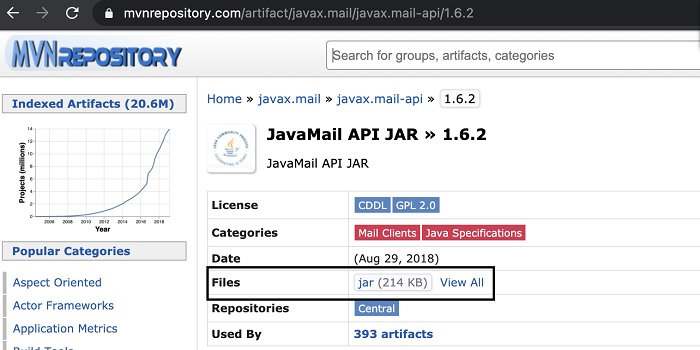
步驟 1:訪問以下連結:https://mvnrepository.com/artifact/javax.mail/javax.mail-api/1.6.2,並透過點選突出顯示的連結將 JAR 新增到專案中。
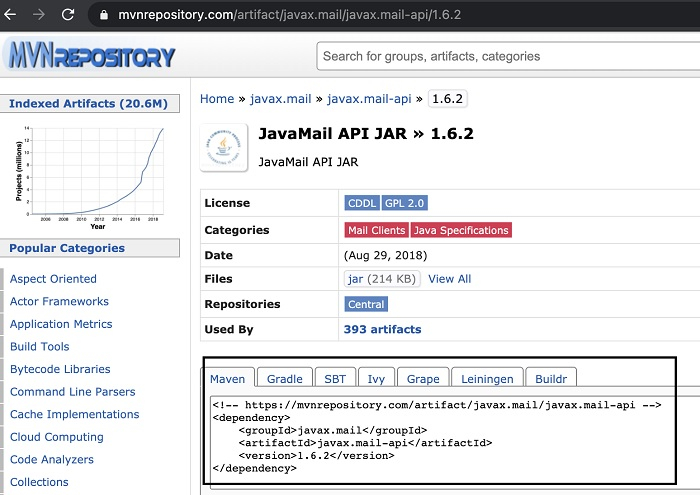
如果我們有一個 Maven 專案,請在 pom.xml 檔案中新增依賴項,如下面的圖片中突出顯示的那樣。
步驟 2:我們應該在單獨的檔案中生成報告。
示例
程式碼實現
import javax.mail.BodyPart;
import javax.mail.Session; import javax.mail.Transport; import java.util.Properties; import javax.activation.DataHandler; import javax.mail.Message; import javax.mail.MessagingException; import javax.mail.Multipart; import javax.mail.PasswordAuthentication; import javax.activation.DataSource; import javax.activation.FileDataSource;
import javax.mail.internet.InternetAddress;
import javax.mail.internet.MimeBodyPart;
import javax.mail.internet.MimeMessage;
import javax.mail.internet.MimeMultipart;
public class EmailReport {
   public static void main(String[] args) {
      // instance of Properties class
      Properties p = new Properties();
      // configure host server
      p.put("mail.smtp.host", "smtp.yahoo.com");
      // configure socket port p.put("mail.smtp.socketFactory.port", "529");
      // configure socket factory
      p.put ("mail.smtp.socketFactory.class","javax.net.ssl.SSLSocketFactory");
      // configure true authentication p.put("mail.smtp.auth", "true");
      // configure smtp port
      p.put("mail.smtp.port", "465");
      // authentication with Session class
      Session s= Session.getDefaultInstance(p, new javax.mail.Authenticator() {
         protected PasswordAuthentication getPasswordAuthentication() {
            return new PasswordAuthentication("mail id", "password");
         }
      });
      try {
         // instance of MimeMessage
         Message m = new MimeMessage(s);
         // address of Form
         m.setFrom(new ("test12@yahoo.com"));
         //address of recipient m.setRecipients(Message.RecipientType.TO,InternetAddress.
         parse("test13@yahoo.com"));
         // email subject text
         m.setSubject("Email Report");
         // configure multi-media email
         BodyPart b = new MimeBodyPart();
         // email body text
         b.setText("Overall Selenium Test Report");
         // configure multi-media email for another text BodyPart b1 = new MimeBodyPart();
         // name of file to be attached to email
         String s = "C:\TestResults.xlsx";
         // pass filename
         DataSource sr= new FileDataSource(s);
         // set the handler
         b2.setDataHandler(new DataHandler(sr));
         // configure file
         b2.setFileName(s);
         // instance of class MimeMultipart
         Multipart mm = new MimeMultipart();
         // adding body texts
         mm.addBodyPart(b1);
         mm.addBodyPart(b);
         // add email content
         m.setContent(mm);
         // email sending
         Transport.send(m);
         System.out.println("MAIL TRIGGERED");
      } catch (MessagingException ex) {
         throw new RuntimeException(ex);
      }
   }
}

更新於:2021年6月29日
3K+ 次瀏覽

廣告