
 資料結構
資料結構 網路
網路 關係資料庫管理系統 (RDBMS)
 作業系統
作業系統 Java
Java MS Excel
 iOS
iOS HTML
HTML CSS
CSS Android
 Python
 C語言程式設計
 C++
C++ C#
C# MongoDB
 MySQL
MySQL Javascript
 PHP
PHP 物理學
物理學 化學
化學 生物學
生物學 數學
數學 英語
英語 經濟學
經濟學 心理學
心理學 社會學
社會學 服裝設計
服裝設計 法律研究
法律研究使用Selenium (Python)選擇下拉選單選項值的方法
我們可以使用Selenium webdriver選擇下拉選單選項值。Selenium中的Select類用於處理下拉選單。在HTML文件中,下拉選單用<select>標籤標識。
讓我們看看下拉選單的HTML結構。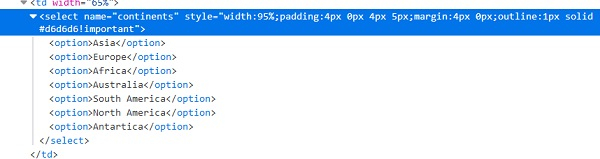
要使用Select類的 方法,我們必須在程式碼中匯入**selenium.webdriver.support.select.Select**。讓我們討論一下從下拉選單中選擇選項的可用方法:
select_by_visible_text (arg) – 如果傳遞給方法的引數與下拉選單中可見的文字匹配,則選擇該引數。
語法:
sel = Select (driver.find_element_by_id ("name"))
sel.select_by_visible_text ('可見文字')
select_by_value (arg) – 如果傳遞給方法的引數與下拉選單中的選項值匹配,則選擇該引數。
語法:
sel = Select (driver.find_element_by_id ("name"))
sel.select_by_value ('值')
select_by_index (arg) – 如果傳遞給方法的引數與下拉選單中的選項索引匹配,則選擇該引數。
索引從零開始。
語法:
sel = Select (driver.find_element_by_id ("name"))
sel.select_by_index (1)
示例
from selenium import webdriver
from selenium.webdriver.support.select import Select
import timedriver = webdriver.Chrome(executable_path="C:\chromedriver.exe")
driver.implicitly_wait(0.5)
driver.get("https://tutorialspoint.tw/selenium/selenium_automation_practice.htm")
# identify dropdown with Select class
sel = Select(driver.find_element_by_xpath("//select[@name='continents']"))
#select by select_by_visible_text() method
sel.select_by_visible_text("Europe")
time.sleep(0.8)
#select by select_by_index() method
sel.select_by_index(0)
driver.close()

更新於:2020年9月18日
16K+ 次瀏覽

廣告