
 資料結構
資料結構 網路
網路 關係型資料庫管理系統
 作業系統
作業系統 Java
Java MS Excel
 iOS
iOS HTML
HTML CSS
CSS Android
 Python
 C 程式設計
 C++
C++ C#
C# MongoDB
 MySQL
MySQL Javascript
 PHP
PHP 物理學
物理學 化學
化學 生物
生物 數學
數學 英語
英語 經濟
經濟 心理學
心理學 社會學
社會學 時尚
時尚 法律
法律如何使用 Selenium 按下鍵盤按鍵?
我們可以使用 Selenium webdriver 按住一個鍵。我們大多利用 CONTROL/SHIFT/ALT 鍵按住,然後點選其他按鍵。因此,僅引用諸如 keys.CONTROL/ keys.SHIFT 或 Keys.ALT 之類的修飾符鍵是不夠的。
為了在按下另一個鍵的同時按住一個鍵,我們使用 keyDown() 和 keyUp() 方法。這兩個方法都接受修飾符鍵作為引數。
這兩個方法對鍵的操作會產生鍵的特殊功能。所有這些方法都是 Selenium 中 Actions 類的部分。我們必須將匯入 org.openqa.selenium.interactions.Actions 包新增到我們的程式碼中,以便使用 Actions 類下的方法。
示例
import org.openqa.selenium.By;
import org.openqa.selenium.Keys;
import org.openqa.selenium.WebDriver;
import org.openqa.selenium.WebElement;
import org.openqa.selenium.chrome.ChromeDriver;
import java.util.concurrent.TimeUnit;
import org.openqa.selenium.interactions.Action;
import org.openqa.selenium.interactions.Actions;

public class MetdKeyDown{
   public static void main(String[] args) {
System.setProperty("webdriver.chrome.driver","C:\Users\ghs6kor\Desktop\Java\chromedriver.exe");
      WebDriver driver = new ChromeDriver();
      String url = "https://tutorialspoint.tw/index.htm";
      driver.get(url);
      driver.manage().timeouts().implicitlyWait(4, TimeUnit.SECONDS);
      // identify element
      WebElement l = driver.findElement(By.id("gsc-i-id1"));
      // Actions class
      Actions a = new Actions(driver);
      // moveToElement() and then click()
      a.moveToElement(l).click();
      //enter text with keyDown() SHIFT key ,keyUp() then build() ,perform()
      a.keyDown(Keys.SHIFT);
      a.sendKeys("hello").keyUp(Keys.SHIFT).build().perform();
      driver.quit()
   }
}
輸出
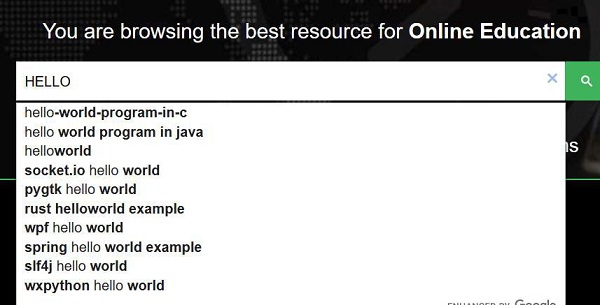

更新於:18-Sep-2020
7K+ 次瀏覽

廣告